3-17
Chapter 3
OPERATION
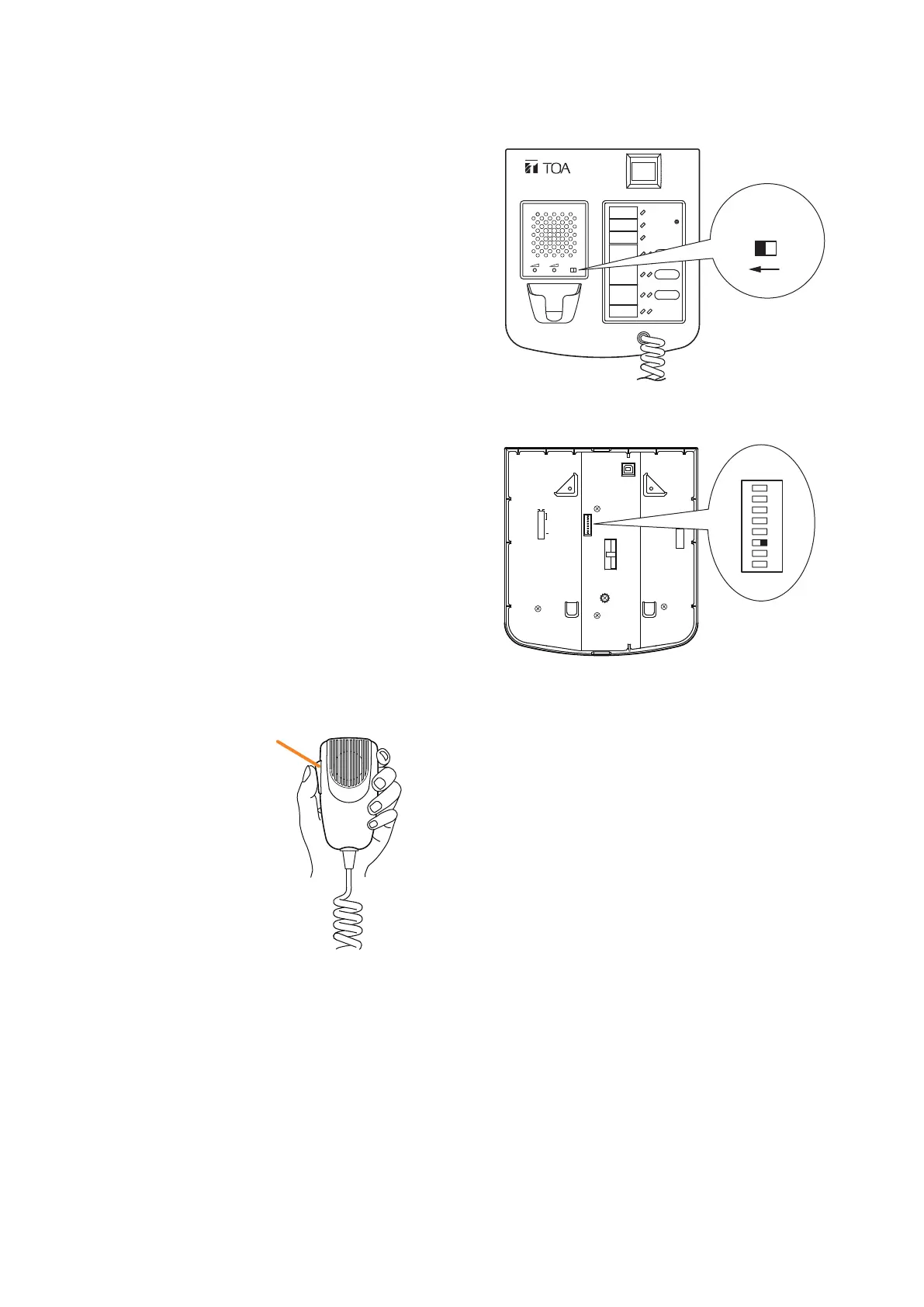
4.3.MakingAll-zoneEmergencyBroadcastfromtheRM-200SF
Step 1. Set the CPU switch on the top surface to OFF.
Tip: The CPU switch is factory-preset to ON.
8
7
6
5
4
3
2
1
TERMINATION
CPU OFF
LEVEL METER
COMMUNICATION
UNIT ID
OnOff
DIP SWITCH
RM-200SF rear
1
2
ON
3
4
5
6
7
8
FIREMAN'S MICROPHONE
RM-200SF
MIC SP CPU
OFF ON
RM-200SF front
CPU
OFF ON
Talk key
Step 2. Make the microphone announcement while holding down the Talk key.
Step 3. When the microphone announcement is complete, return the CPU switch to ON.
Notes
• TheRM-200SF'sDIPswitch6(factorydefault:
ON) must be preset to ON to enable the CPU
OFF function (all-zone emergency broadcast).
• The event being activated from the remote
microphone will be cleared when the system is
placed in the CPU OFF state, and not restarted
when its state is released.



 To Next Page