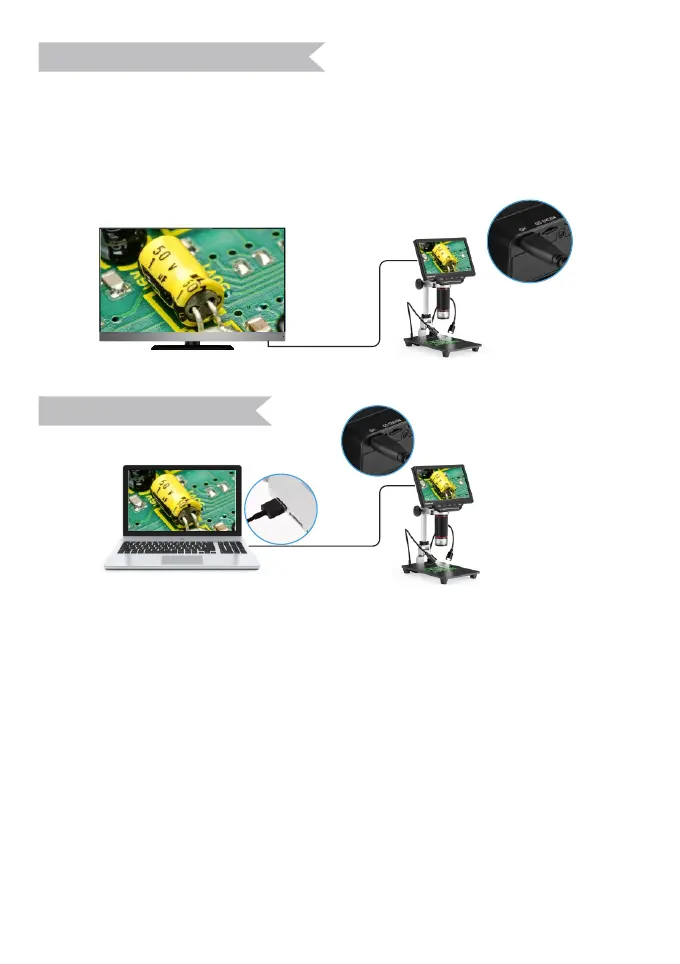
The microscope comes with one HD Cable that allows to connect a
regular HDMI device .
Operation buttons and remote control can work when the microscope
connected with HDMI device. Pictures/Photos can be saved in the
memory Card.
After connecting USB cable with computer, microscope can be
recognized as a mass storage device or PC camera(UVC).
Press Power button firstly. It can be switched between storage
device(MSDC mode) and PC camera(UVC mode) by pressing OK
button.
7.Connect TV with HDMI
8.PC Connection
E-mail: support_eu@tomlov.com -16-
Mass Storage Device(MSDC): Can download the pictures or video
files to the computer.
PC Camera (UVC): Can show the real time video in the computer.
Please note, operation buttons (except Power button and OK button)
on the monitor and remote control don’t work during connecting with
computer.


 To Next Page