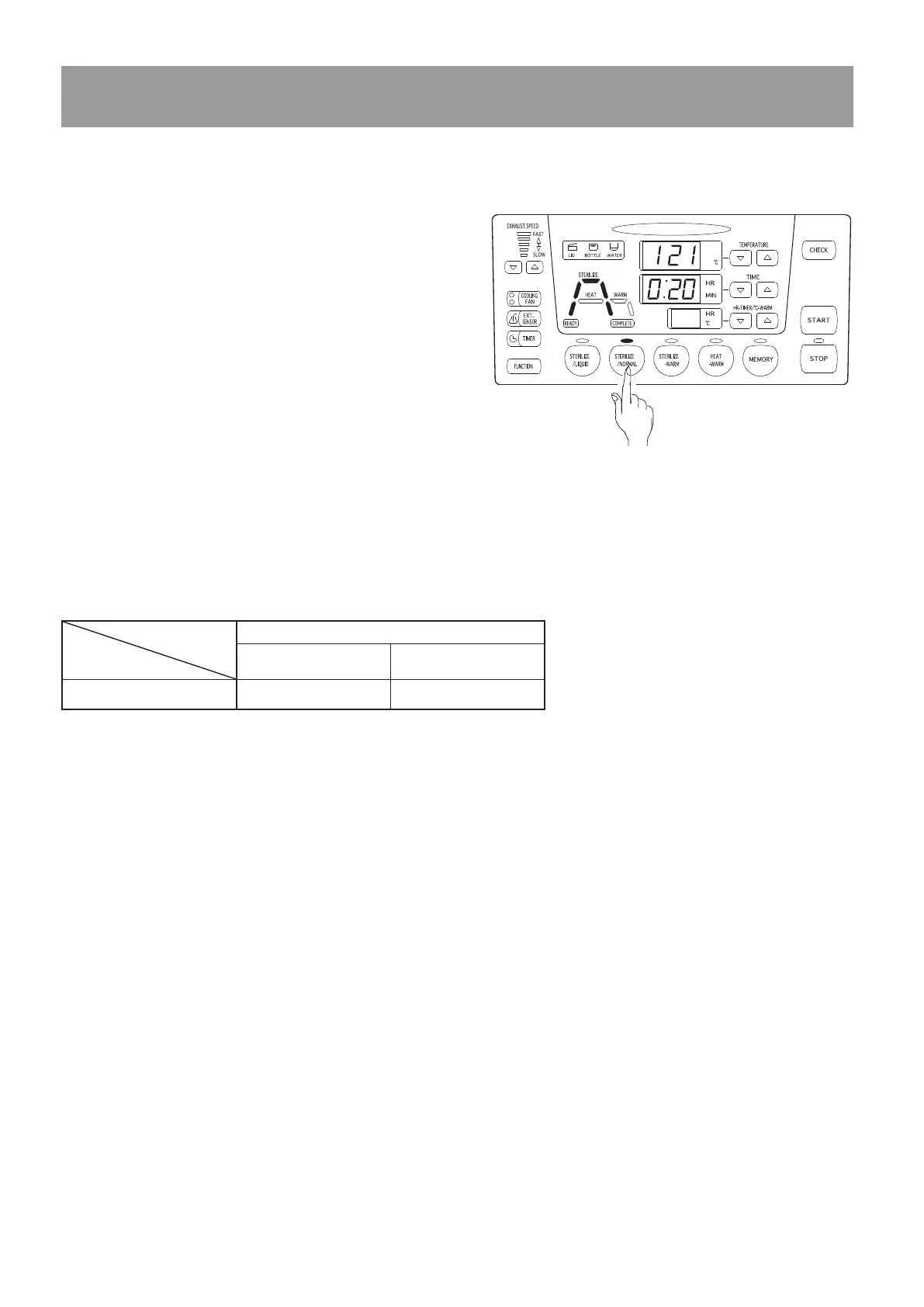
Press the [Sterilize] key once. The sterilizing
indication lamp lights and sterilizing operation
is selected. Concurrently, the temperature
raising process indication lamp, temperature
and pressure raising process indication lamp,
sterilizing process indication lamp, temperature
and pressure reduction process indication lamp,
and temperature reduction process indication
lamp on the work monitor light in yellow.
Press the [Temperature setting] keys to set the
temperature for the sterilizing process.
Press the [Time setting] keys to set the time for the sterilizing process.
Press the [Exhaust speed setting] keys to set the exhaust speed for the temperature and
pressure reduction process.
Press the [Cooling fan setting] key to select the number of fans activated during the
temperature and pressure reduction process and temperature reduction process.
<
Setting sterilizing operation
>
①
②
③
④
⑤
5-7. Setting operating conditions
※
To change the time display form, refer to “6-9. Setting the time display form”.
When a large volume of liquid is sterilized, raising the temperature requires a longer
time. Therefore, it is recommended that the operation time be extended by referring to the
description given below as a guide.
Extended sterilizing time for liquid sterilization Reference example: in case of 121 °C and 20
minutes
When 2 L of water is put in metal container (20 minutes) + 4 minutes
When 5 L of water is put in metal container (20 minutes) + 8 minutes
When 10 L of water is put in metal container (20 minutes) + 15 minutes
<
For effective sterilization
>
○
The autoclave controls the temperature using the temperature detected by the temperature
sensor in the chamber as an index. When reliable sterilization is required, set appropriate
sterilizing conditions employing the temperature sensor of articles to be sterilized, sterilizing
indicator, etc.
○
Sterilizing process
Settable temperature
range
Settable time range
SX-300E/500E/700E 105
〜
135℃ 0 : 01
〜
9 : 59



 To Next Page