17
muted.) This is also used to turn
the effects on/off and to play-
back/pause the Phrase Trainer.
C RHYTHM/AUX EFFECT
button
This button enters Rhythm &
Bass mode or AUX Effect mode.
D EXIT button
This button returns you from
any mode back to Play mode.
This button is also used to as-
sign a function to the Value dial.
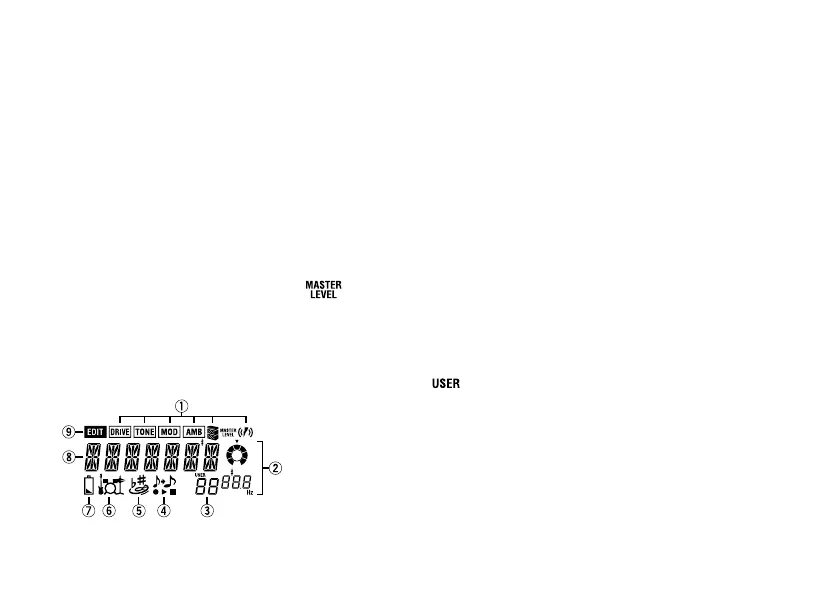
LCD screen
1 Effect chain
This indicates the on/off status
of Drive, Modulation, Ambience,
Cabinet Resonator, and HBB.
2 Value display
This area indicates the master
level or parameter values both
numerically and graphically.
(When the master level is shown,
the MASTER LEVEL indicator
will light.)
3 Program number display
This indicates the program
number. (When a user program
is selected, the
indicator
will light.)
4 Phrase Trainer mode icon
This icon will blink when you en-
ter Phrase Trainer mode.
5 AUX Effect mode icon
This icon will blink when you en-
ter AUX Effect mode.
6 Rhythm & Bass mode icon
This icon will blink when you en-
ter Rhythm & Bass mode.
7 Low Battery icon
This icon will light when the bat-
teries run down.
8 Program name/Effect type
display
This area shows the program
name or effect type. When the
PANDORA is bypassed or mut-
ed, this area will function as the
tuning meter.
9 Edit mode icon
This icon will light when you
enter Edit mode.



 To Next Page