27
5. BASIC OPERATION
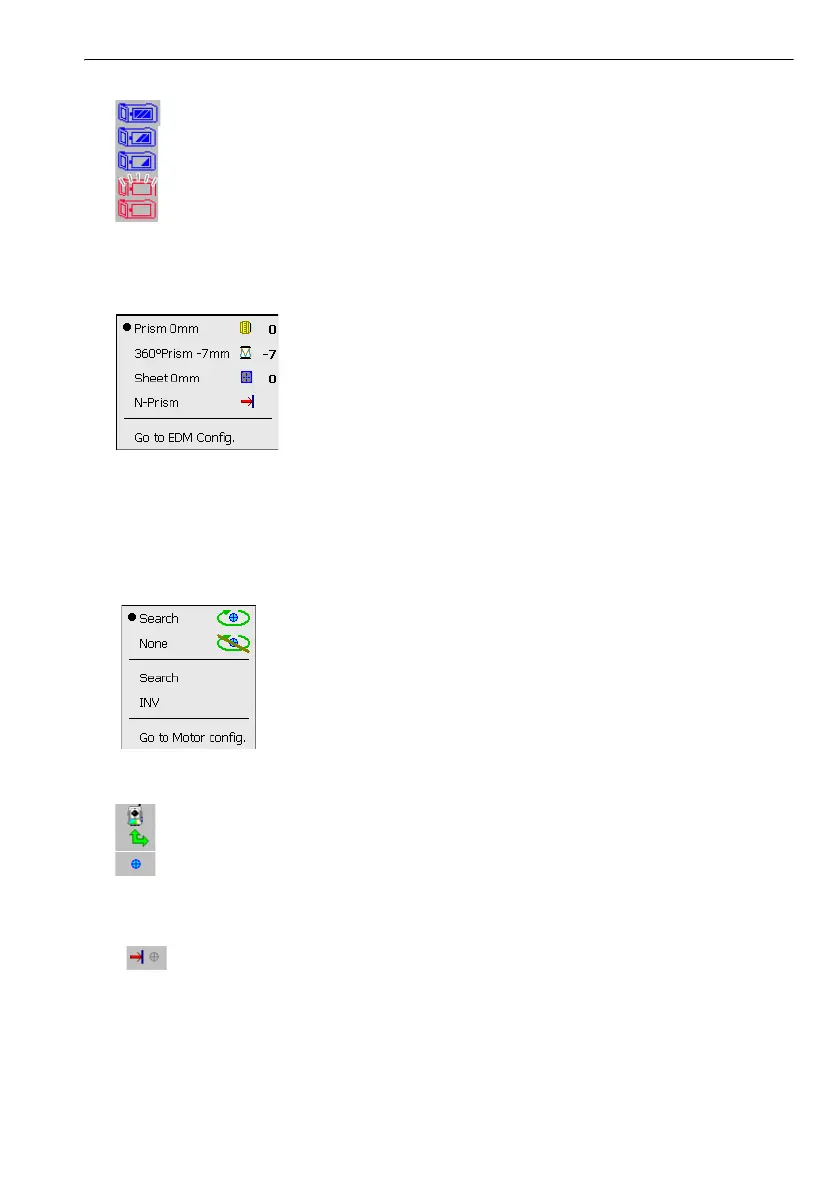
When using external battery
: Level 3 Full power
: Level 2 Plenty of power remains
: Level 1 Half or less power remains
: Level 0 Little power remains. Prepare a replacement battery.
: No power Stop operation and charge the battery.
C"6.1 Battery Charging"
(2) Target type icon
Selection of target type and configuration of prism constant correction value.
: Prism (0mm)
: 360° prism (-7mm)
: Sheet (0mm)
: N-Prism
Target information can be edited/recorded in <Reflector setting>.
C"19.3 EDM Settings PROCEDURE Recording and editing target information"
(3) Motor icon
Configuration of Auto Pointing status. The display may change slightly depending on the target
type selected.
: Auto Pointing ON
: Auto Pointing OFF
: Begin searching
: Rotates the instrument 180°
One of the following icons will be displayed while the motor is in operation to indicate the current
status of the instrument.
: Rotating
: Rotating at fixed velocity
: Searching
$
• Auto Pointing cannot be performed when "Reflectorless" has been selected as the target type.
will be displayed.
• An arrow indicating turn direction will be displayed when the instrument is rotating at a fixed
velocity.
C "11.3 Turning the Instrument from the Reference Angle to a Specified Angle"



 To Next Page