10. TARGET SIGHTING
54
& TURN
This option allows the user to set a tolerance range for setting accuracy (after rotation to a
specified angle). For example, when this option is set to 30" and [INV], [H.ANG], or [ROTATE]
is pressed, the instrument will stop rotation within 30" of the specified rotation angle.
& Search operation during Auto Pointing
When the target enters the field-of-view within the set limit (setting of "Auto AIM" and "Measure
Acc.") for Auto Pointing completion, the instrument stops moving, calculates the offset between
the target and telescope reticle by image processing, then compensates the angle measurement
value obtained from the encoder. This compensation enables accurate sighting in a short time.
Even though the target and telescope reticle may appear to be misaligned, actual angle value
of center of the target is displayed. Compensated values are displayed in blue.
If the instrument is rotated (manually or using the Jogs) more than 10", compensation will be
canceled, the angle reverts to that obtained from the encoder, and the angle values are once
again displayed in black. Powering OFF the instrument will cancel the compensation function.
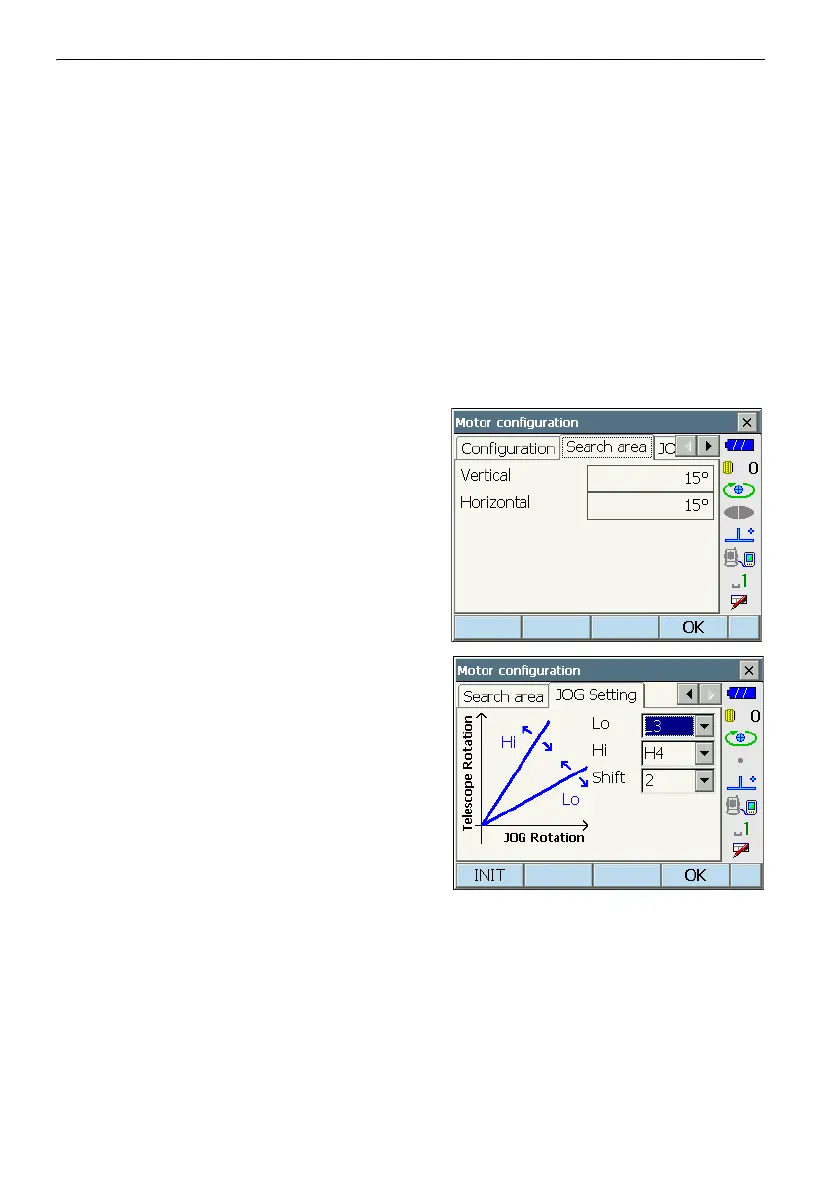
2. Set the area in which to perform target sighting in
the Search area tab.
Angle values can only be specified in 1°steps.
Input values not conforming to this format will be
automatically rounded up.
Items set and options (*: Factory setting)
(1) Vertical : 0 to 90° (15*)
(2) Horizontal : 0 to 180° (15*)
3. Set the Jog turning speed for vertical and
horizontal rotation of the telescope. The "Shift"
point signifies the Jog turning speed at which
telescope rotation switches from the Lo speed
setting to the Hi speed setting.The higher the
"Shift" point setting, the faster the Jog turning
speed needed to activate the Hi speed setting.
Items set and options (*: Factory setting)
(1) Lo : 1 to 4 (3*) (steps. 4 is fastest)
(2) Hi : 1 to 7 (4*) (steps. 7 is fastest)
(3) Shift : 1 to 6 (2*) (steps)
Press [INIT] to return JOG Setting tab settings
only to their factory settings.
4. Press [OK].



 To Next Page