Radio Configuration
P/N 7010-0626 www.topconpositioning.com
2-37
Unlike the UHF radio modems and PDLCONF, TopSURV
automatically connects the receiver and modem boards for
configuration purposes. When you configure radios, you
configure the Base and Rover radios separately.
1. Using the RS232 cable, connect your external controller
(FC-1000) to the receiver’s serial port A.
2. Press the power buttons on the receiver and external
controller to turn them on, and start TopSURV.
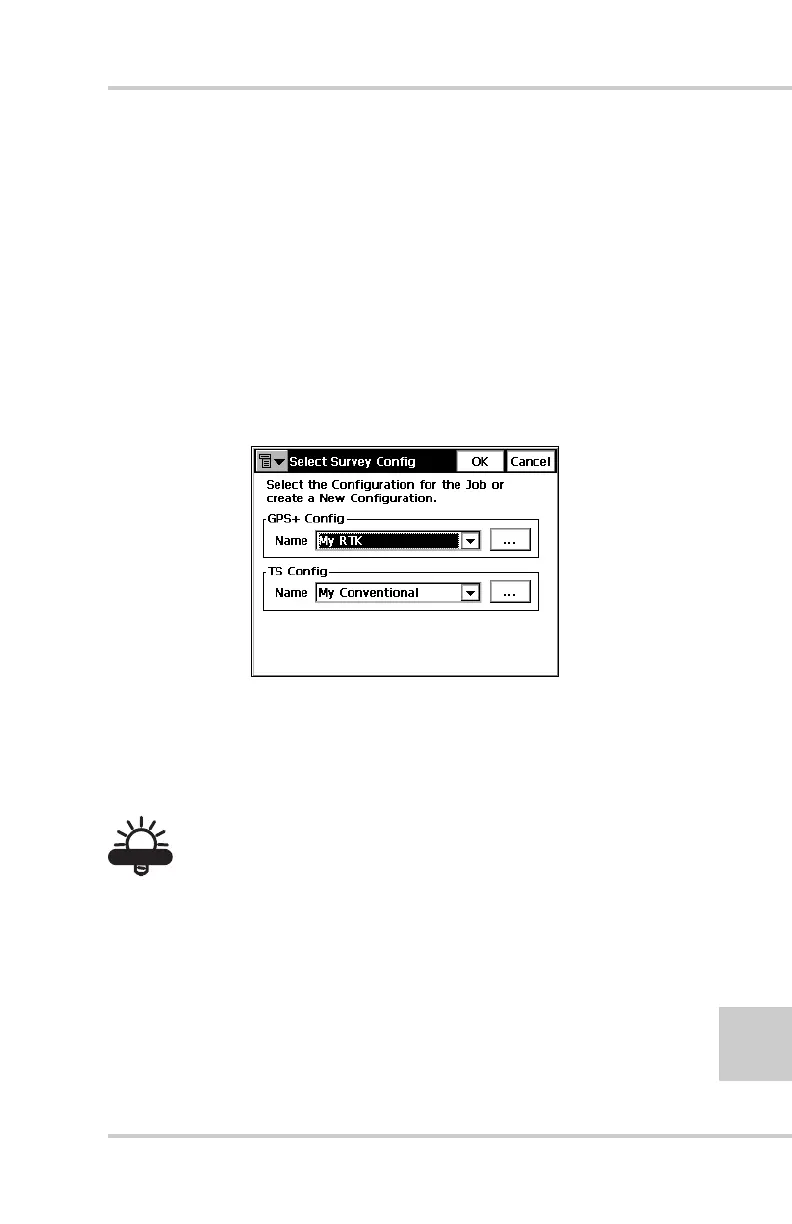
3. Click JobConfigSurvey to open the Select Survey
Config dialog box (Figure 2-36).
Figure 2-36. Select a Survey Configuration
4. From the GPS+ Config drop-down list, select My RTK, or
the name of your GPS+ survey configuration, and click the
“...” (continue) button (Figure 2-36).
TIP
TIP
If this is a new configuration, refer to the TopSURV User’s
Manual for the procedure to configure a new survey.
Otherwise, continue below to configure your radio.
5. Press Next to navigate to the Base Radio or Rover Radio
configuration screen, usually a couple dialog boxes beyond
the Select Survey Config dialog box.



 To Next Page