Powering the Receiver
P/N 7010-0626 www.topconpositioning.com
2-9
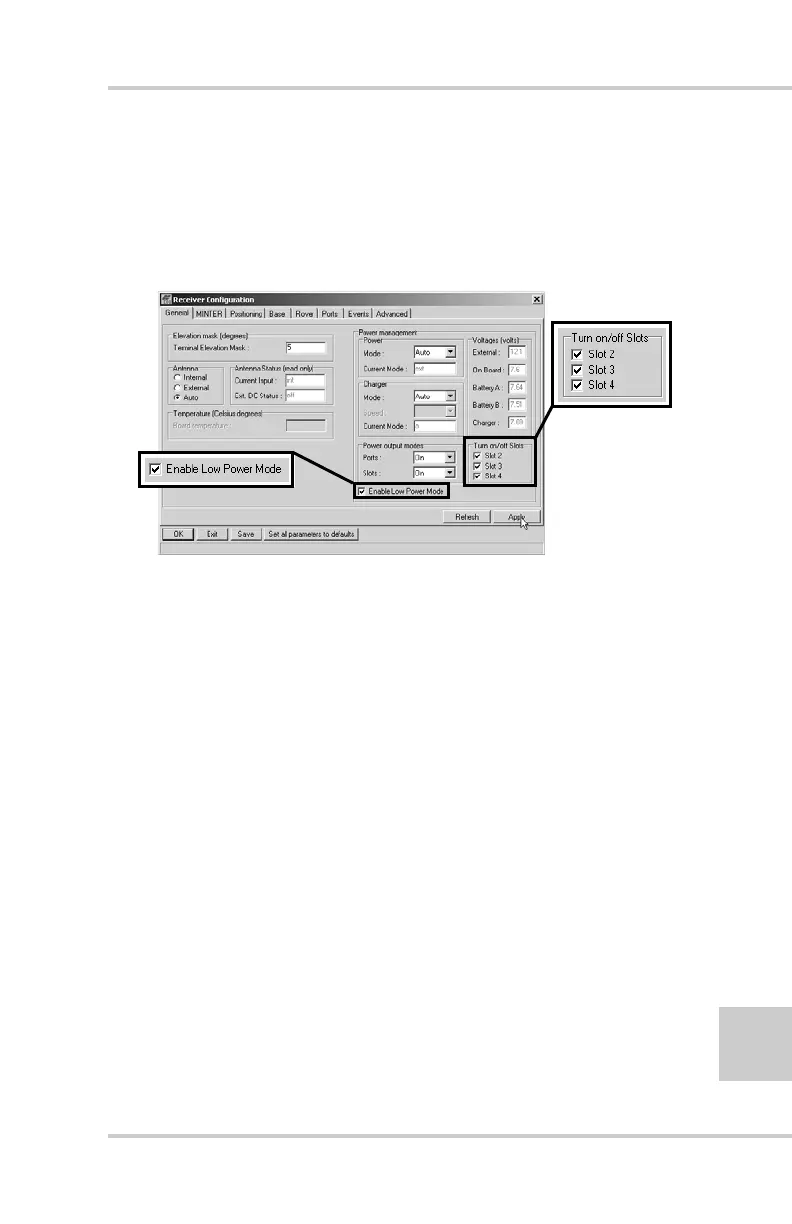
8. Select and check each of the Turn on/off Slots check boxes
to enable the corresponding internal slots (Figure 2-7).
9. Select and check the Enable Low Power Mode check box to
put the receiver’s processor into low power consumption
mode (Figure 2-7).
Figure 2-7. Enable and Apply Power Settings
10. Click Apply.
Charge Internal Batteries
Use one of the following conditions for maximum battery
charge speed.
• The receiver is turned off. Power Mode and Charger
Mode are set to Auto. See “Power Management” on
page 2-5 for setting these parameters.
• The receiver is turned on. Power Mode is set to
External and Charger Mode is set to Auto.
1. To charge the internal batteries:
• Plug the receiver-to-SAE power cable into the
receiver’s power input port.
• Connect the receiver-to-SAE power cable and the
power supply-to-outlet cable to the AC adapter.



 To Next Page