EasyManua.ls Logo

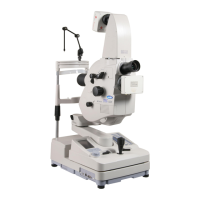
Topcon TRC-50DX - User Manual

Topcon TRC-50DX
82 pages
Print Icon
To Next Page IconTo Next Page
Loading...
INSTRUCTION MANUAL
RETINAL CAMERA
TRC-50DX
TRC
-
50DX

Table of Contents

Questions and Answers

  • J
    Jason YoungSep 6, 2025
    Why operator cannot see the patient's eye through Topcon TRC-50DX Camcorder?
    • W
      wendy07Sep 7, 2025
      If the operator cannot see the patient's eye through the Topcon Camcorder, first adjust the illumination level to ensure the illumination light is on. Check that the objective lens cap is removed. Ensure that the BARRIER filter and EXCITER filter are set to "OFF". Verify that the angle changing lever and the diopter compensation lens selector are turned to the "click" position.
  • N
    Nancy ClaytonAug 22, 2025
    Why is my Topcon TRC-50DX photographic image dark all over?
    • D
      David MurphyAug 22, 2025
      If your Topcon Camcorder's photographic image is dark all over, it could be due to a few reasons. First, the flash level might be insufficient; try adjusting it using the flash correction switch or flash selector switch. Another possibility is that the xenon lamp set screw is loose, so ensure it's securely fastened. Finally, the xenon lamp may have reached the end of its lifespan and needs replacement.
  • T
    Thomas RussellSep 3, 2025
    How to center patient's pupil with Topcon TRC-50DX?
    • W
      William JonesSep 4, 2025
      If you're having trouble centering the patient's pupil with your Topcon Camcorder, make sure the patient's face position is correct, with their chin and forehead properly placed on the rests and their face directed straight ahead. Also, ensure the patient's face height is properly adjusted using the chinrest adjusting knob.
  • B
    Bonnie HendersonSep 2, 2025
    Why photograph is influenced by overall flare in Topcon TRC-50DX?
    • B
      Brooke MillerSep 2, 2025
      If your Topcon Camcorder photograph is influenced by overall flare, it could be because the distance between the patient's eye and the instrument is shorter than the proper working distance; set the patient's eye farther away. Another reason could be that the SMALL PUPIL switch is pressed in angle of coverage 50°; press it again to cancel the microcoria mode. Also, the flash level might be higher than necessary; set it to a low value.
  • C
    christopherharperSep 1, 2025
    How to eliminate flare at angle of coverage 50° on Topcon Camcorder?
    • S
      Susan DominguezSep 1, 2025
      If you can't eliminate flare at a 50° angle of coverage on your Topcon Camcorder, check that the angle changing lever is set to the "click" position. Also, ensure the microcoria mode is not active by pressing the SMALL PUPIL switch. Verify that the patient's eye and the instrument are correctly positioned, and that the patient's eye is fully dilated.
  • A
    Amy JimenezAug 30, 2025
    What to do if photographed image is flared all over with Topcon Camcorder?
    • V
      Victoria CastroAug 31, 2025
      If your Topcon Camcorder's photographed image is flared all over, it might be due to incorrect operation distance (alignment); adjust it accordingly. Incorrect focusing could also be the cause, so adjust the focus. If the flare is due to opacity in the patient's eye, it cannot be removed.
  • L
    Larry GarciaAug 29, 2025
    How to fix dark periphery in Topcon TRC-50DX Camcorder photographed image?
    • B
      Benjamin RodriguezAug 29, 2025
      If the periphery of your Topcon Camcorder's photographed image is dark, it could be due to incorrect operation distance (alignment), so adjust it accordingly. Another cause might be incorrect focusing, so adjust the focus. Also, if the patient's pupil isn't large enough, darken the room and thoroughly dilate the patient's pupil.
  • J
    Joseph CampbellAug 27, 2025
    Why split lines cannot be seen on Topcon Camcorder?
    • C
      cgarrettAug 27, 2025
      If you can't see the split lines on your Topcon Camcorder, check the following: Ensure the SPLIT switch is turned ON. Verify the diopter compensation lens selector is set to "0". Make sure the patient's pupil is sufficiently dilated by darkening the room. Also, confirm that the internal fixation target is set to "OFF".
  • B
    Brandi BrooksAug 27, 2025
    How to get correct focus with Topcon TRC-50DX?
    • S
      Shannon KingAug 27, 2025
      If you cannot get the correct focus with your Topcon Camcorder, consider these points. First, ensure that the optical finder dioptric power is correctly adjusted. Also, check that the diopter compensation lens selector is properly set to match the dioptric power of the patient's eye. Finally, make sure that the patient's eye and the instrument are positioned correctly.
  • H
    Heather CoffeyAug 25, 2025
    How to fix illumination lamp if it does not turn on in Topcon Camcorder?
    • R
      Rebekah HarmonAug 26, 2025
      If the illumination lamp on your Topcon Camcorder isn't turning on, here are a few things to check: * Ensure the power save function is off. If "SLEEP" is on the control panel, press the photography switch. * Make sure the lamp terminal is securely fastened. * Inspect the fuse and replace it if it's burnt out. * The lamp itself might be burnt out and need replacement. * Confirm the lamp house cover is properly set.

Summary

Topcon TRC-50 DX Retinal Camera Instruction Manual

Introduction

Cautions for Use

Covers basic safety advice, disposal, and handling precautions for the instrument.

Environmental Conditions and Maintenance Checks

Storage, Usage Period and Others

Specifies instrument storage, usage period, and other related conditions.

Checkpoints for Maintenance

Outlines essential checks to perform for instrument upkeep.

Display for Safe Use

Understanding Safety Displays and Icons

Explains the meaning of warning, caution, and prohibition icons and text.

Safety Cautions

Electrical and Fire Hazard Prevention

Critical precautions to prevent electric shock, grounding issues, and fire hazards.

Operational Safety and Injury Prevention

Guidelines to prevent physical injury to the patient and operator during use.

Usage and Maintenance

User Maintenance Tasks

Information on proper use and maintenance tasks the user can perform.

Escape Clauses

States Topcon's responsibilities regarding instrument use and outcomes.

Warning Displays and Positions

Instrument Warning Label Locations

Illustrates the positions of warning labels on the instrument for safe operation.

Nomenclature

Components of Main Unit

Identifies and describes the parts of the main instrument unit.

Components of Base Unit

Details the various controls and parts of the instrument's base unit.

Components on Control Panel Screen

Explains the indicators and controls displayed on the instrument's control panel.

Names in Optical Finder

Illustrates and names the components visible within the optical finder.

Standard Accessories

Lists and shows the standard accessories provided with the TRC-50DX.

Setup

Connecting the Power Cord

Guides on connecting the power cord to the instrument.

Connecting the External Device

Guides on connecting external devices like PCs or video timers.

Reset from Power Save State

Instructions for waking the instrument from power save mode.

Setting on the Set Menu Display

Details how to adjust settings like flash level, fixation color, and filter.

Basic Operations

Preparation for Photography

Covers initial checks, instrument positioning, and optical finder adjustment.

Preparation of the Patient

Guides on preparing the patient, including pupil dilation and positioning.

Color Photography

Color Photography Adjustments

Setting filters, camera selection, and initial flash level adjustments.

Aligning Illumination and Focusing

Procedures for aligning illumination light and focusing the retina.

Focusing and Angle of Coverage

Methods for focusing the retina and setting the angle of coverage.

Specialized Photography Modes

FAG Photography

Steps for performing FAG photography, including filter insertion and timing.

ICG Fluorescein Photography

Procedure for ICG fluorescein angiography, using the monitor and specific settings.

Red Free Photography with Green Filter

Instructions for red-free photography.

Objective Operations

Photography by Inclination and Swinging

How to adjust the instrument's angle and swing for optimal imaging.

Blue Filter Photography

Using blue filters for specific imaging needs.

Stereo Photography

Techniques for capturing stereo images.

Before Requesting Service

Troubleshooting Check List

A checklist to diagnose and resolve common issues with image quality and illumination.

Error Code List

Lists error codes, their causes, and recommended correction methods.

Specifications and Performance

Specifications

Details on resolving power, angle of coverage, magnification, and dioptric range.

System Classification

Information on electrical shock protection, water ingress, and physical dimensions.

Purpose of Use

Defines the intended application of the TRC-50DX retinal camera.

Maintenance

Daily Checkups

Routine checks for instrument upkeep and lens cleaning.

Ordering Consumables

Information on how to order replacement lamps, fuses, and tissue paper.

Maintenance by the Dealer

Details periodic inspections and services performed by authorized dealers.

Replacing the Illumination Lamp

Step-by-step guide for replacing the illumination lamp unit.

Replacing the Xenon Lamp

Step-by-step guide for replacing the xenon lamp.

Replacing the Fuse

Instructions for replacing blown fuses safely.

Cleaning

Cleaning the External Cover, Control Panel and Others

Methods for cleaning the instrument's exterior and control surfaces.

Cleaning the Objective Lens

Detailed instructions on how to safely clean the objective lens.

Cleaning the Lens Which is Seen in Upper Mount

Procedure for cleaning lenses located in the upper mount.

Optional Accessories

Optional Accessory Mounting;Detaching Methods

Instructions for installing and removing accessories like relay lens adapters.

Installing;removing the AUTO FLUO filter attachment

Procedures for installing and removing the AUTO FLUO filter attachment.

Reference Material

Shape of Plug

Information on power plug types for different countries.

Electromagnetic Compatibility

Guidance on EMC standards and electromagnetic emissions/immunity for the device.

Information About the Optical Radiation Hazard for the User

Details on potential optical hazards and safe usage recommendations for users.

Topcon TRC-50DX Specifications

General IconGeneral
TypeRetinal Camera
Fundus photographyYes
Fundus photography angle45°
Non-mydriaticYes
SLR CameraNo
MydriasisMydriatic