43
BASIC OPERATIONS
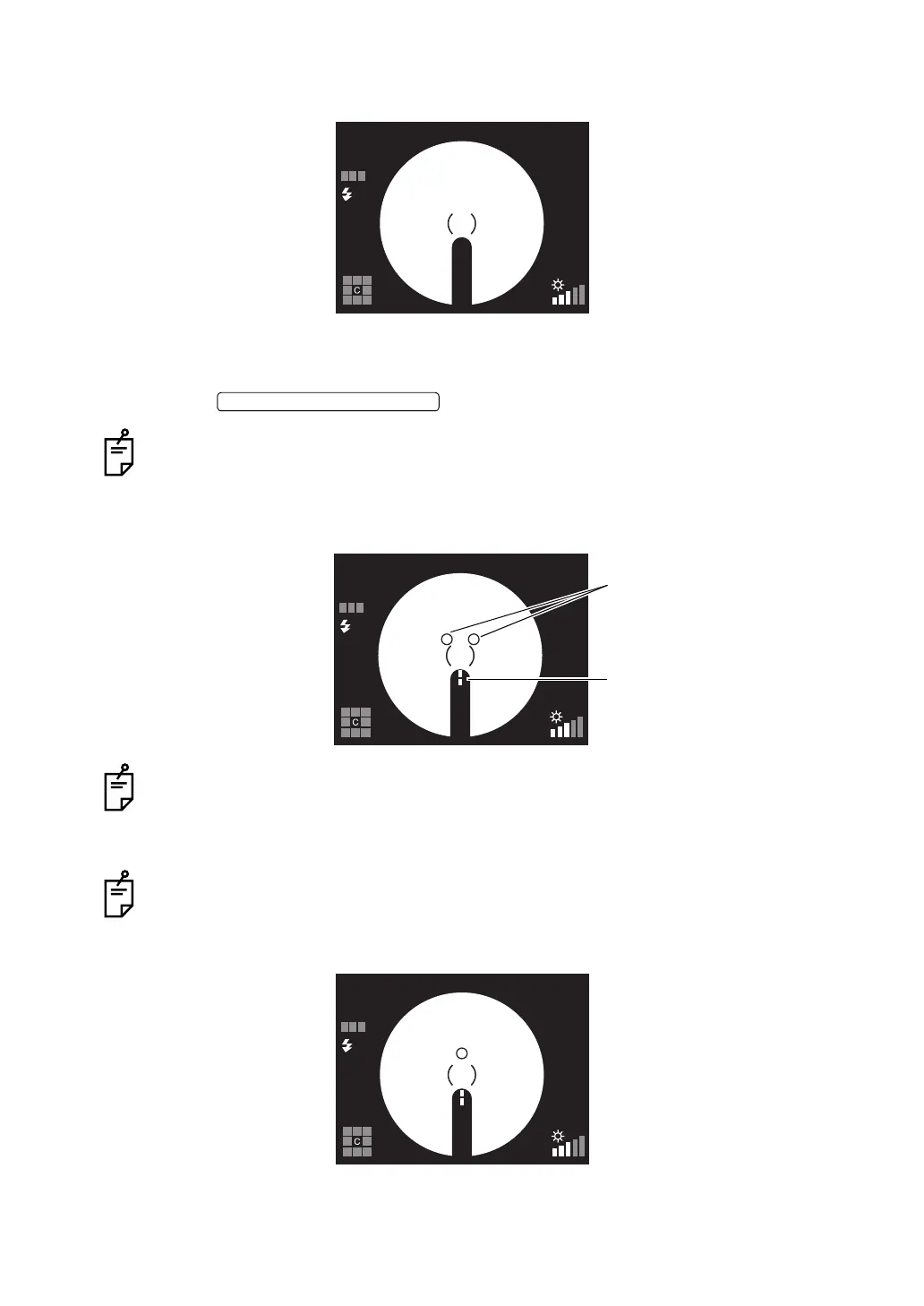
4 Slowly bring the instrument closer to the patient; the retina image will appear on the color
LCD monitor.
5 Instruct the patient to look at the green light (internal fixation target).
6 While watching the image on the color LCD monitor, adjust the brightness of the image
using the .
For details about the illumination level setting, see page 38.
7 Bring the instrument even closer to the patient; and two bright spots for the working dis-
tance alignment become visible.
When the auto focus function is ON, the instrument changes the split lines into one line.
At this time, the fundus is almost in focus.
The auto focus mechanism does not work for ocular pathology (e.g. strong cataract),
myopia and hyperopia (beyond -13 to +12D), etc. from time to time.
When the auto focus function is OFF, operate the focusing knob to change the split lines
into one line on the color LCD monitor.
8 Operate the control lever until the two alignment bright spots are changed to one spot.
AUTO
FSP
ILLUMINATION LEVEL SWITCH
AUTO
FSP
Alignment bright spots
Split lines
AUTO
FSP


 To Next Page