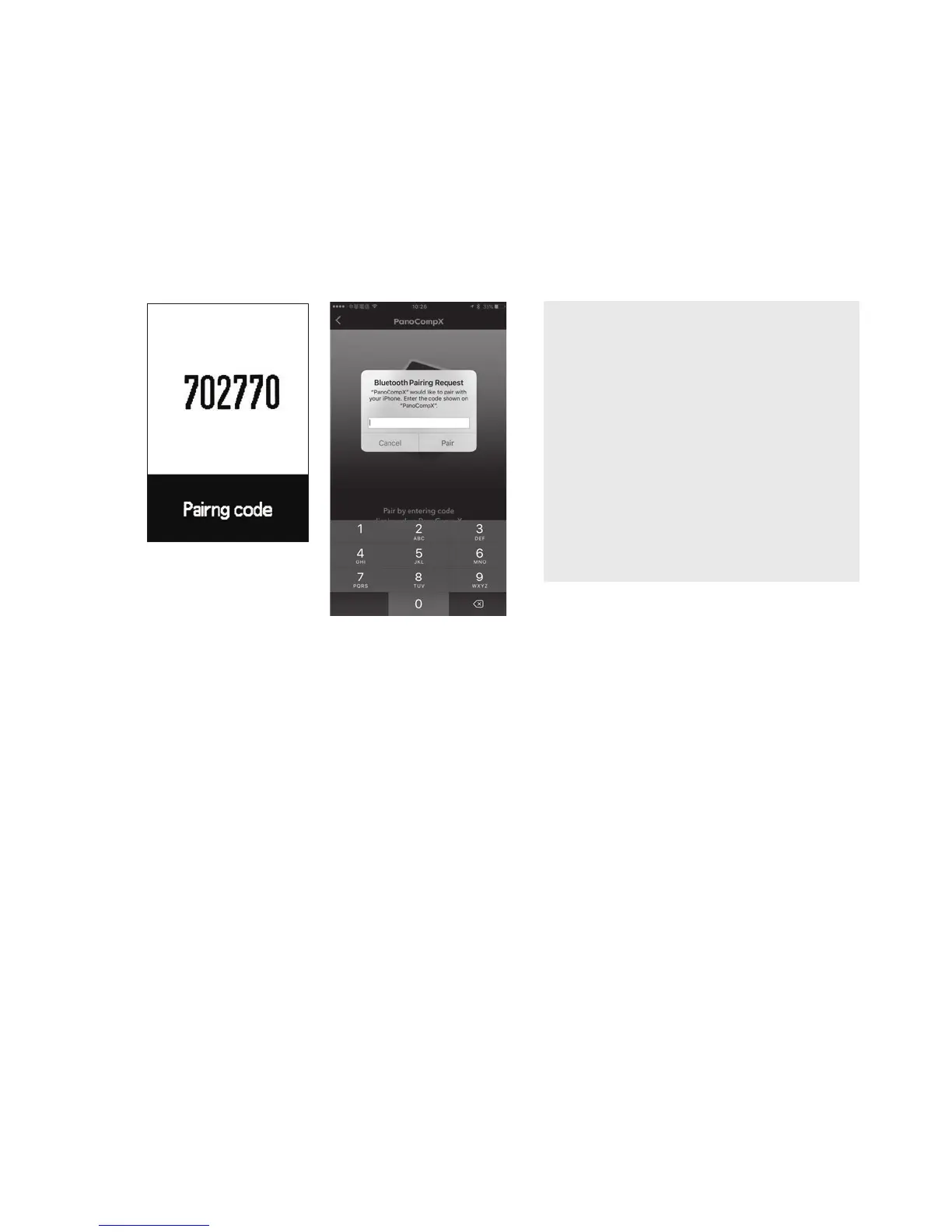
• Smartphone:
(iOS device) Enter pairing code displayed on PanoComp X
into smartphone.
(Android device) Enable location function before pairing
PanoComp X with PanoBike+ app.
• After pairing is complete, PanoComp X will return to the
Let's Ride screen.
NOTE
If PanoBike+ app pairing
is skipped at PanoComp X
start screen, after profile
setup, proceed to:
Settings > Bluetooth >
Select system : iOS or
Android
1.2 Settings in PanoComp X :
For additional information, see section 3.6 "System Settings”
for more information.
• Debut screen > Select language > profile setup.
• Click Profile Setup:
Key sequence for operations below
NEXT to cycle selection. ENTER to confirm selection.
1. Set Year:
Repeat sequence to set and confirm remaining year information.
2. Set Month/Day:
Repeat sequence to set and confirm correct date.
3. Set Clock Mode:
Cycle between 12hr and 24hr mode, then confirm clock mode.
4. Set Time:
Repeat sequence to set and confirm correct time.
5. Set Gender
(iOS device)





 To Next Page