Home
Topshine
GPS
MT01
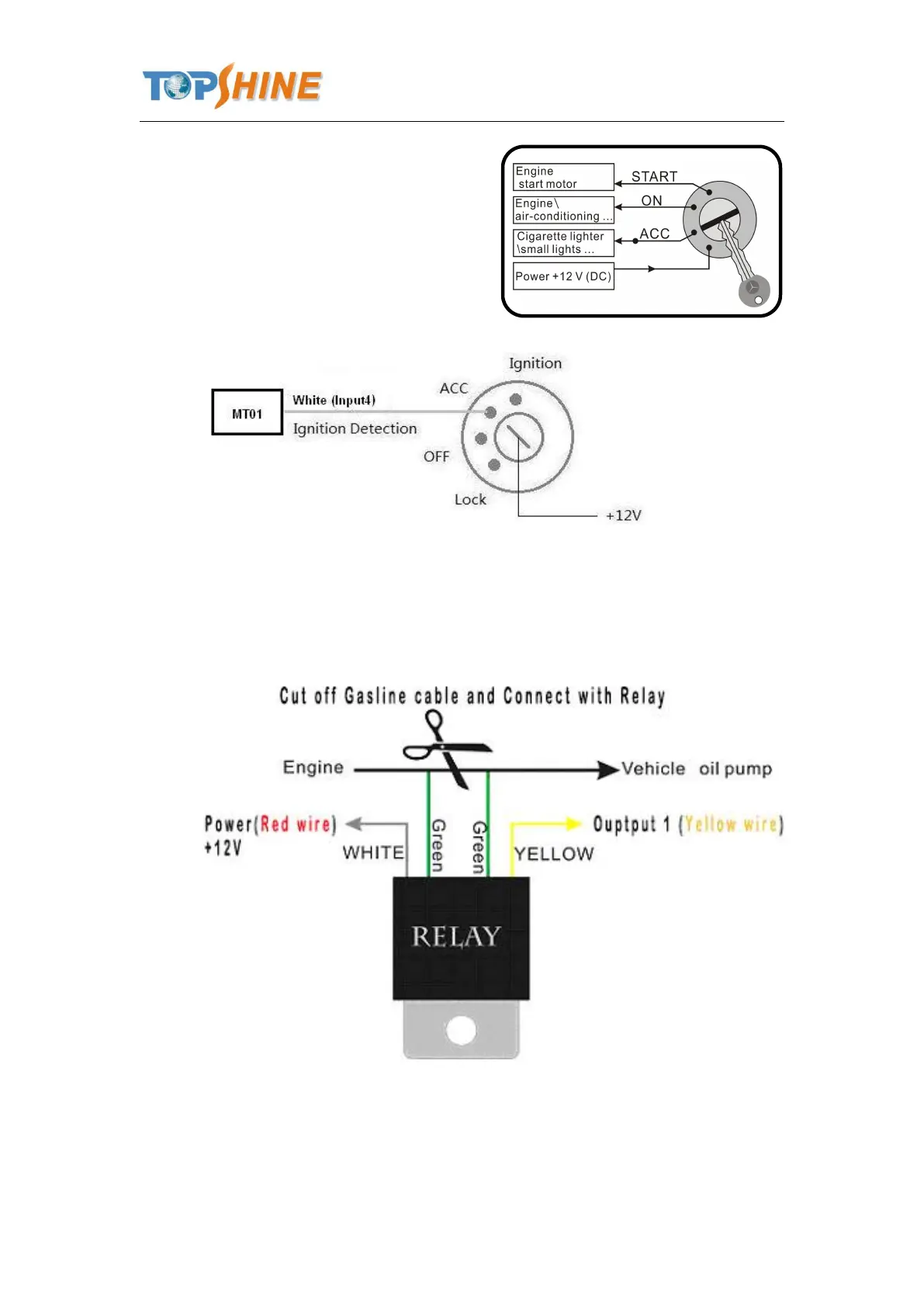
Page 16 (Digital Input 4)
Topshine MT01 - Digital Input 4; Output 1
26 pages
Manual
Save Page as PDF
To Next Page
To Next Page
To Previous Page
To Previous Page
Loading...
Guangzhou
T
opshine
In
formation
T
echnic
Co.,
L
TD
Address:
RM
605,
#52
SHUI
YIN
RD,
YUE
XIU
DIST
,
GUANGZHOU,
CHINA
User
manual
of
tracker
MT01
-
16
-
7.3
Digital
Input
4
Example:
Detec
ting
vehicle
engine
on/off
status
7.4
Output
1
Example:
Contro
l
fuel-cut
15
17
Table of Contents
Main Page
Default Chapter
3
Table of Contents
3
Contents
3
1 Product Overview
4
2 Applications
4
3 Features & Functions
4
4 Specifications
5
5 First Use
6
Install SIM Card
6
Charging
6
LED Indications
6
6 Connect the Tracker MT01 to GPRS01 Web Server Platform
7
Optional 1: Configure by Computer to Set GPS Tracker Online
7
Optional 2: SMS Commands to Set GPS Tracker Online
12
7 Installation
13
Install I/O Cable
14
Power/Gnd
15
Digital Input 4
16
Output 1
16
Install GPS/GSM Antenna
17
8 Basic SMS Commands
17
Position Report
17
Set Receiving Physical Address Name Via SMS
18
Get Google Map's Link Via SMS
18
To Cut off Engine, Immobilize the Vehicle
18
Set over Speed Alarm
19
9 Simplified SMS Commands
19
Engine Stop/Vehicle Immobilize: 000000STP
19
Engine Restore: 000000RES
19
Check Location Address Name: 000000ADD
19
Location Coordinate Check: 000000CHK
19
Get Location Google Map's URL with Mobile Phone: 000000MAP
19
Voice Monitoring: 000000Mon<Telephone Number
19
10 MT01 Packing and Accessories
19
11 Troubleshooting
20
Appendix 1 Configure by Computer
21
Appendix 2: Command List
22
Related product manuals
Topshine MT06
23 pages
Topshine MT100
31 pages



 To Next Page