Removing the Cutting Unit (continued)
G404931
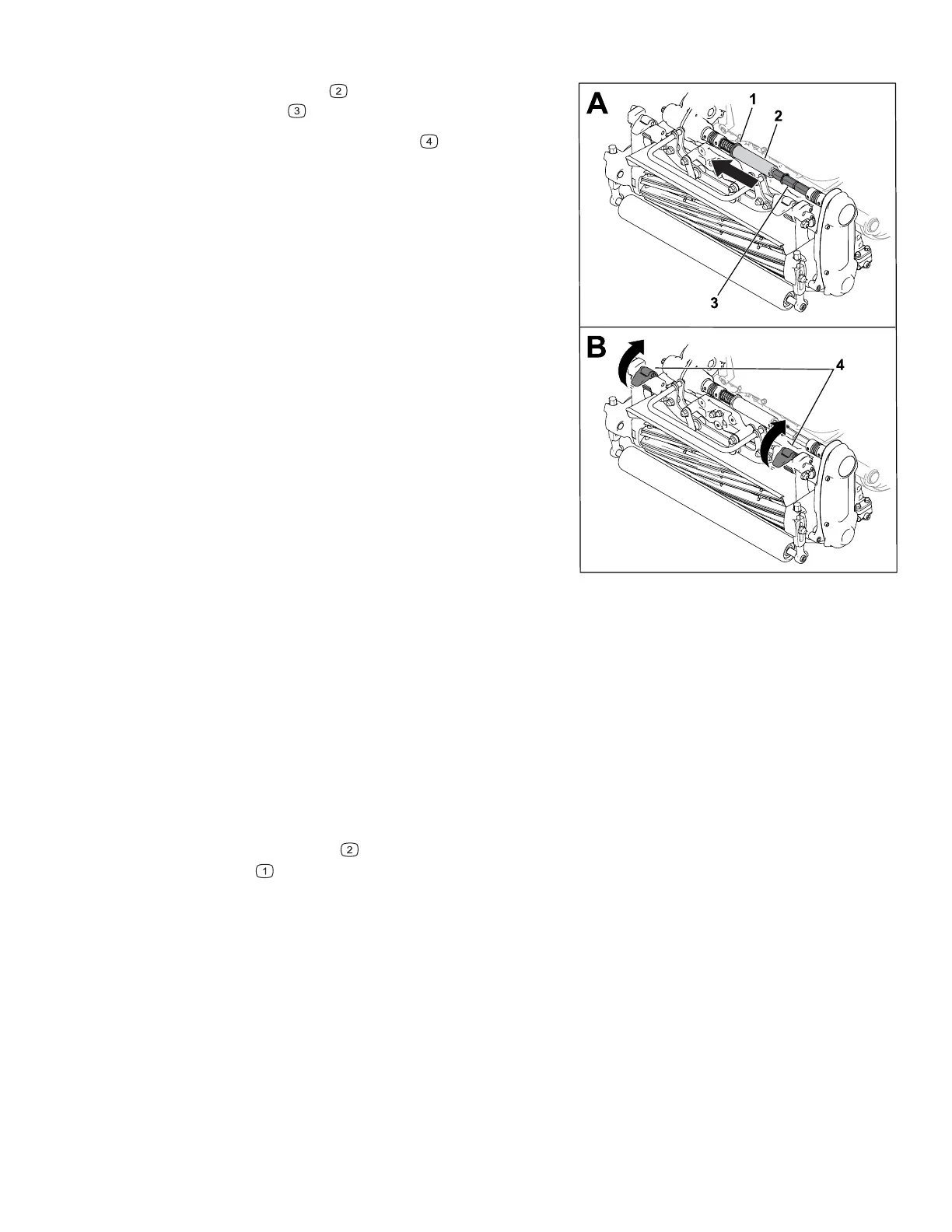
4. Slide the hex tube off of the cutting-unit
coupler shaft
.
5. Move the suspension latches
up to release
the cutting unit from the machine.
6. Remove the cutting unit from the frame.
Backlapping Information
To backlap the cutting unit, perform 1 of the following options:
• Install the Access Backlap Kit (Model 139-4342) and use a backlapping machine.
Contact your authorized distributor to acquire this kit.
• Use the InfoCenter to enter Backlap Mode.
To enter Backlap Mode, select B
ACKLAP from the SERVICE menu. Follow the InfoCenter
prompts to backlap the cutting unit.
Note: Once the bail is released, Backlap Mode is disengaged. You can use the bail-
catch fork
(shipped in the loose-parts bag) to secure the bail in the engaged position.
Remove the bail-catch fork after your backlapping is completed.
10




 To Next Page