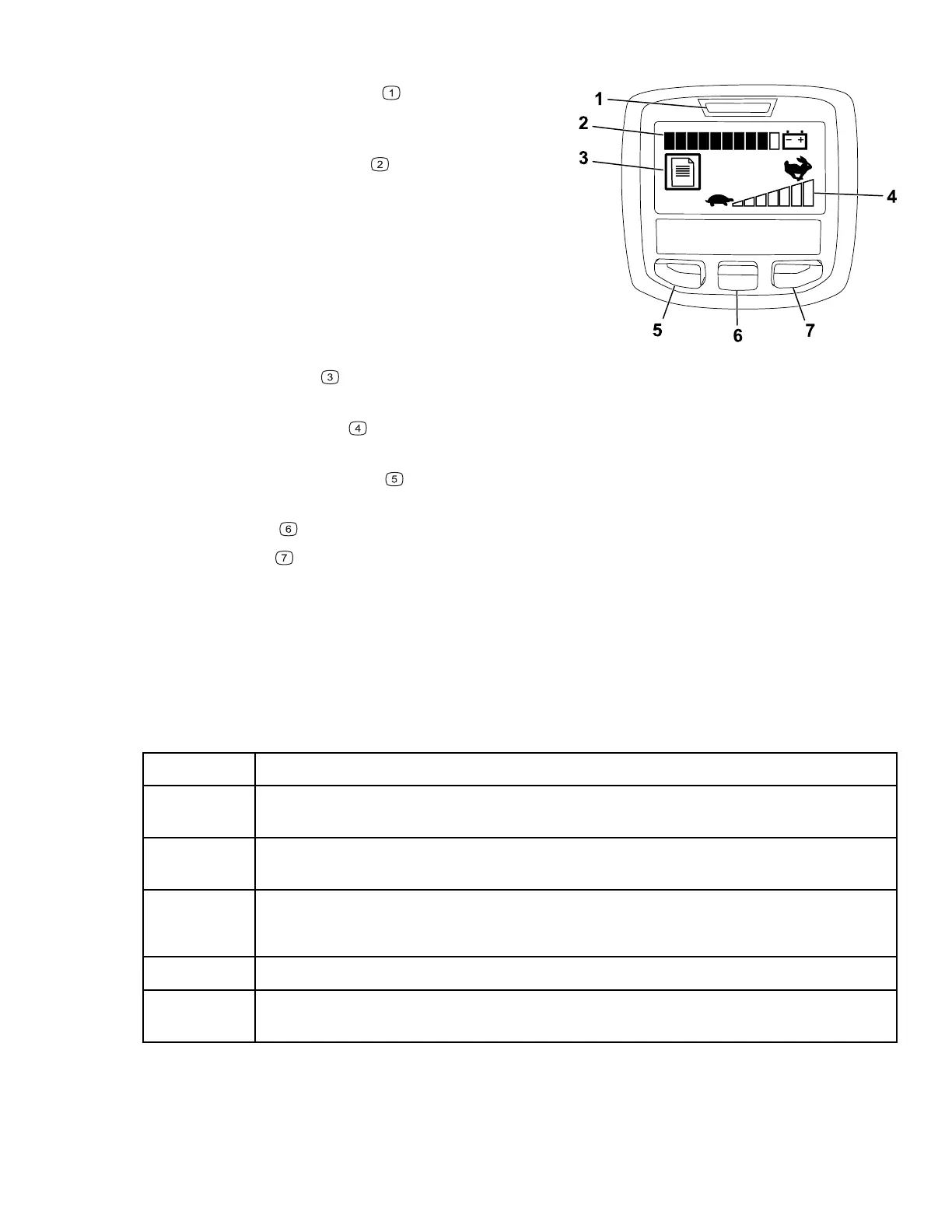
InfoCenter LCD Display (continued)
G404709
• Power light/fault indicator —illuminates when
you turn the machine on. This light also blinks
when there is a machine fault.
• Battery charge indicator
—when the battery
has a full charge, all of the boxes in the
indicator will be filled in with black. As power is
used, boxes will be filled with white starting
from the right and proceeding to the left as the
battery drains. When only 1 box is still black the
battery pack is almost out of power; the
machine enters a power reduction mode which
limits the throttle speed by 25%. You should
immediately proceed to charge the battery.
• Fault log indicator
—this icon indicates that
there is a current fault log to review.
• Speed control setting
—the bars turn black from left to right the faster you set the
speed control. When all bars are filled with white, the machine is at zero speed.
• Menu access/back button
—press this button to access the InfoCenter menus. You
can also use it to back out of any menu you are currently using.
• Down button
—use this button to scroll down menus.
• Right button
—use this button to open a menu where a right arrow indicated additional
content.
Note: The purpose of each button may change depending on what is required at the time.
Each button has a label with an icon displaying its current function.
InfoCenter Menu Items
Main Menu
Menu Item Description
Faults The Faults menu contains a list of the recent machine faults. Refer to the Service
Manual or your authorized Toro distributor for more information on the Faults menu.
Service The Service menu contains information on the machine such as hours of use and
battery usage and status.
Diagnos-
tics
The Diagnostics menu lists various states that the machine currently has. You can
use this to troubleshoot certain issues as it will quickly tell you which machine
controls are on and which are off.
Settings The Settings menu allows you to customize the InfoCenter display.
About The About menu lists the model number, serial number, and software version of
your machine.
3460-892A Page 4–6 Product Overview: Controls




 To Next Page