PRINTING FROM WINDOWS
- 34 -
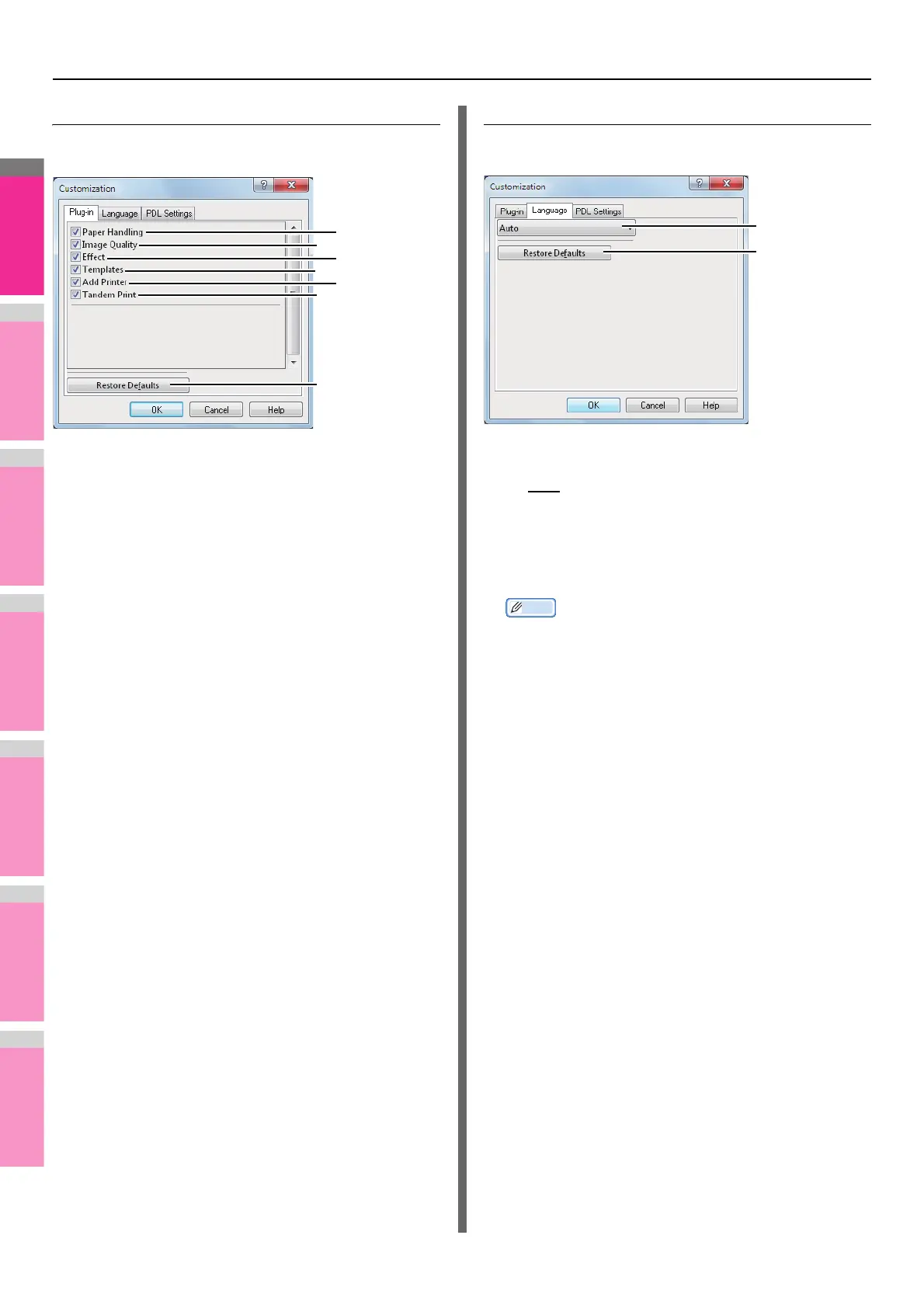
Customization: [Plug-in] tab
You can enable or disable the Plug-in setting.
1) Paper Handling
Select this check box to enable the [Paper Handling] tab.
P.18 "[Paper Handling] tab"
2) Image Quality
Select this check box to enable the [Image Quality] tab.
P.20 "[Image Quality] tab"
3) Effect
Select this check box to enable the [Effect] tab.
P.24 "[Effect] tab"
4) Templates
Select this check box to enable the [Templates] tab.
P.35 "[Templates] tab"
5) Add Printer
Select this check box to enable [Add Printer] on the
[Others] tab.
P.27 "[Others] tab"
P.30 "Add Printer"
6) Tandem Print
Select this check box to enable [Output Devices] on the
[Others] tab.
P.27 "[Others] tab"
P.53 "Switching equipment to print jobs"
P.55 "Splitting a print job across two pieces of
equipment (Tandem Printing)"
7) [Restore Defaults]
Click this to restore the factory defaults on the [Plug-in] tab.
Customization: [Language] tab
You can switch printer driver language.
1) Language
This selects the language to be used.
- Auto / Chinese (Simplified) / Chinese (Traditional) /
Danish / Dutch / English (UK) / English (US) / Finnish /
French / German / Italian / Japanese / Norwegian,
Nynorsk / Polish / Russian / Spanish / Swedish/ Turkish/
Czech / Greek / Hungarian / Portuguese (Brazil) /
Portuguese (Portugal)
Memo
• [Auto] is selected by default. When [Auto] is selected,
the most appropriate printer driver language is
automatically set according to the regional and language
settings in Windows OS.
2) [Restore Defaults]
Click this to restore the factory defaults on the [Language]
tab.




 To Next Page