ATTACHMENTS
LEG PULL ACCESSORY
REMOVE ALL
ATTACHMENTS
WHEN YOU ARE NOT
EXERCISING WITH
THEM.
NOTE: Be sure to have plenty of free space
—at least 2-3 feet of clearance around
the exerciser—so that performing on the
Total Gym
®
, as well as getting on and
off, is convenient and safe. The rails and
glideboard can be raised to any desired
level on the height adjustment assembly/
vertical column depending upon your
degree of tness. Please note, however,
that the rails cannot be raised to the highest
position on the column when the leg
pulley bracket is attached to the top of
the column.
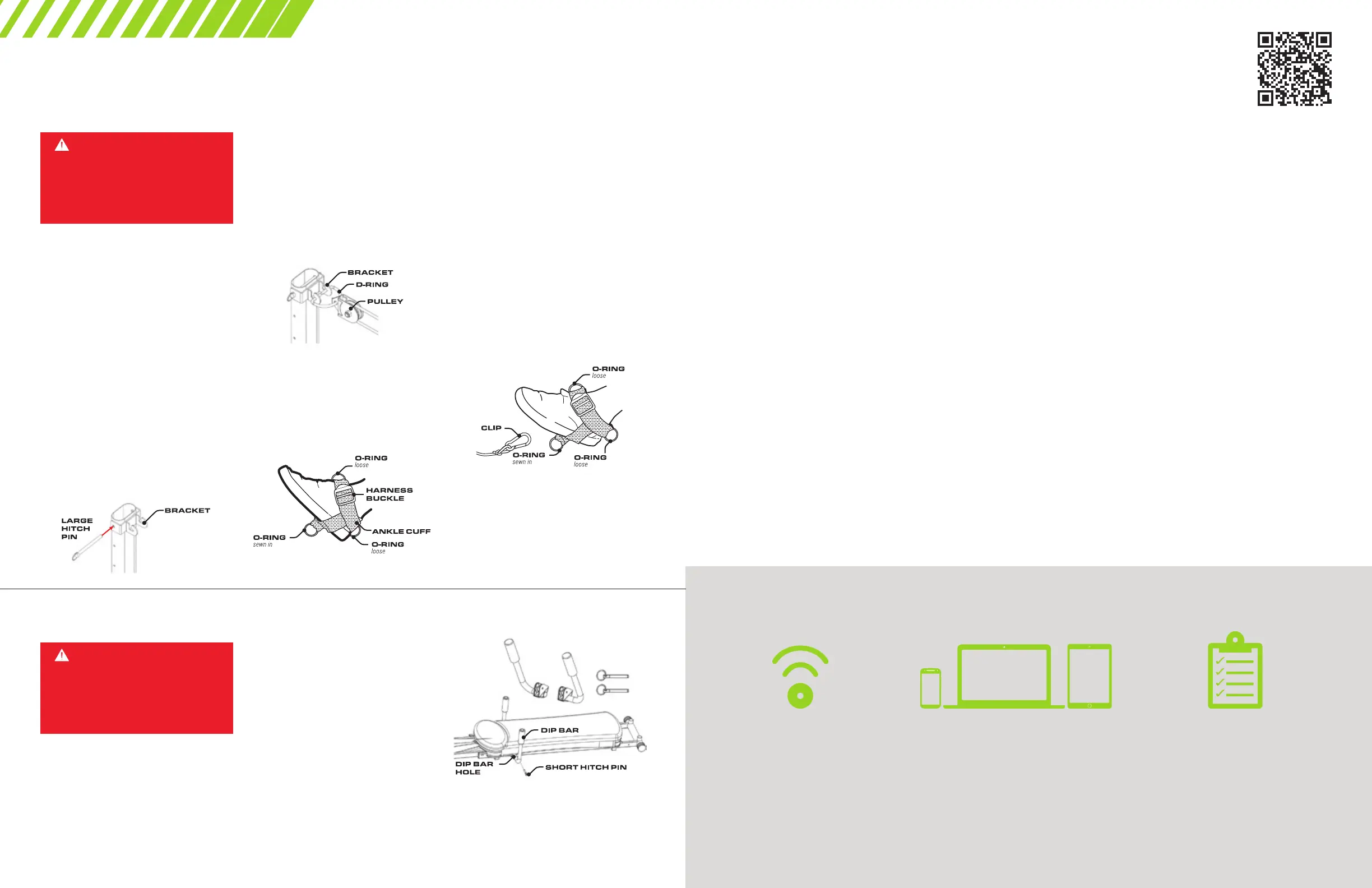
1. Connect the leg pulley bracket to the top
of the vertical column by aligning bracket
with the hole at the top of the column; be
sure bracket is right side up. Insert Large
Hitch Pin through the hole to secure bracket
onto the vertical column.
5. Position yourself on the glideboard
correctly for the specic exercise you want
to perform.
While sitting down on the glideboard, bring
1 knee up, connect the clip on the end of
the rope to an O-Ring on the Ankle Cuff
attached to your foot. Depending on the
exercise you are performing, connect the
clip to the proper O-Ring. Be sure to always
stabilize the glideboard when clipping on or
off the Ankle Cuff. Also, use caution when
getting on or off the glideboard. You are
now ready to exercise using the Leg Pull
Accessory. See your Exercise Guide
for specic exercises that utilize the
Leg Pull Accessory.
NOTE: Remove leg pulley bracket when
you are not exercising with it.
To disconnect the Ankle Cuff, unclip the
rope from the O-Ring on the Ankle Cuff.
Be sure to stabilize glideboard when
disconnecting Ankle Cuff.
2. Detach the arm pulley/cable assembly
from the hook on the underside of the
glideboard and attach the O-Ring from the
leg pulley/rope assembly instead.
3. Place D-Ring on pulley rst. Then connect
the D-Ring to the bracket as shown.
NOTE: If rope appears to be twisted,
take D-Ring off and turn pulley around.
4. Attach the Ankle Cuff to one of your feet
by placing your foot in the harness so the
O-Ring (sewn in) is on the bottom of your
foot. With the strap threaded through the
harness buckle, pull tightly on strap securing
Ankle Cuff onto foot.
1. Attach each Dip Bar to the frame with the
Short Hitch Pins included with your Total
Gym
®
. NOTE: Hitch Pins are included in
Miscellaneous Parts. Simply line up each
bar with the holes in the upper portion of
the bottom frame.
2. Slide one Short Hitch Pin through the
hole of one of the Dip Bars and through the
frame. Repeat Steps 1 and 2 for attaching
the other Dip Bar. Make sure to securely
attach each Dip Bar to each side of the
frame before using. See your Exercise Guide
for specic exercise.
DIP BARS
REMOVE ALL
ATTACHMENTS
WHEN YOU ARE NOT
EXERCISING WITH
THEM.
TOTAL GYM
®
TV
TV.TOTALGYMDIRECT.COM
Stream the classic Total Gym
®
DVD
workouts from any device or watch a newly
released workout created specically for
Total Gym
®
TV users! Additionally, you get
access to our growing library of new cardio,
strength training, and Pilates videos so
you can keep your workouts fresh and
stay motivated!
Learn new exercises and workout alongside
trainers including our elite Total Gym
Trainers:
• Todd Durkin • Maria Sollon
• Rosalie Brown • Devin Gage
• Cathe Friedrich • Rob Glick
• Carrie Wightman • Dane Robinson
STEP 1: SIGN UP!
There are two levels of access to Total
Gym TV: Basic and Premium. Sign up at
tv.totalgymdirect.com.
Total Gym TV Basic is completely free,
and gives you access to 7 of our top-rated
workout videos. We’re offering this free
option as a thank-you to all of our loyal
Total Gym customers over the years.
HOW IT WORKS
NO DVDS REQUIRED
Total Gym
®
TV only requires an internet
connection and browser for access to
all of your Total Gym TV content.
ANY DEVICE
Because Total Gym TV is internet-based,
you can access your Total Gym TV
content from any Internet-enabled
device with a browser!
PROVEN WORKOUTS
Get access to energy-boosting,
fat-blasting workouts from your
favorite Total Gym
®
Trainers!
Total Gym TV Premium is our monthly
paid subscription service. Every month,
we release new Total Gym workouts
available exclusively to Total Gym Premium
members, in addition to the benets of
Total Gym TV Basic!
Total Gym TV is accessible via Internet
browser or app. We are proud to offer
streaming workouts on iOS, Android, Roku
®
,
tvOS (Apple
®
TV) and Amazon
®
FireTV.
STEP 2: SIGN IN
Signing in to Total Gym TV is easy!
On a computer, go to the top right of your
screen, and click the yellow Sign In button.
On a mobile device, go to the top left of
your screen, open the menu, and select the
Sign In menu item.
Once on the Sign In page, enter your email
and password details.
If you have forgotten your password, open
the Forgot Password link under the Sign In
form, and complete the process to retrieve
or reset your password.
STEP 3: CHOOSE
A WORKOUT
Once logged in, you can easily select and
browse a workout from your library. To open
your workout library, open the My Account
menu located in the main menu area, and
select My Library.
If you are a Total Gym TV Premium
subscriber, new workouts are added to your
library each month.
STEP 4: WORKOUT!
Before you start your workout, make sure
you have everything you need to complete
your workout safely:
• Fill up your water bottle.
• Grab your sweat towel.
• Make sure your safety hitch pins are
in place.
• Make sure any attachments are securely
fastened or out of the way if you aren’t
using them.
• Enjoy your workout!
Scan this
QR Code
for Quick
Access!


 To Next Page
 Loading...