EasyManua.ls Logo

Toto SN970M - Configuring Energy Saver Modes

Toto SN970M
32 pages
Print Icon
To Next Page IconTo Next Page
To Previous Page IconTo Previous Page
Loading...
26
27
Operation
1
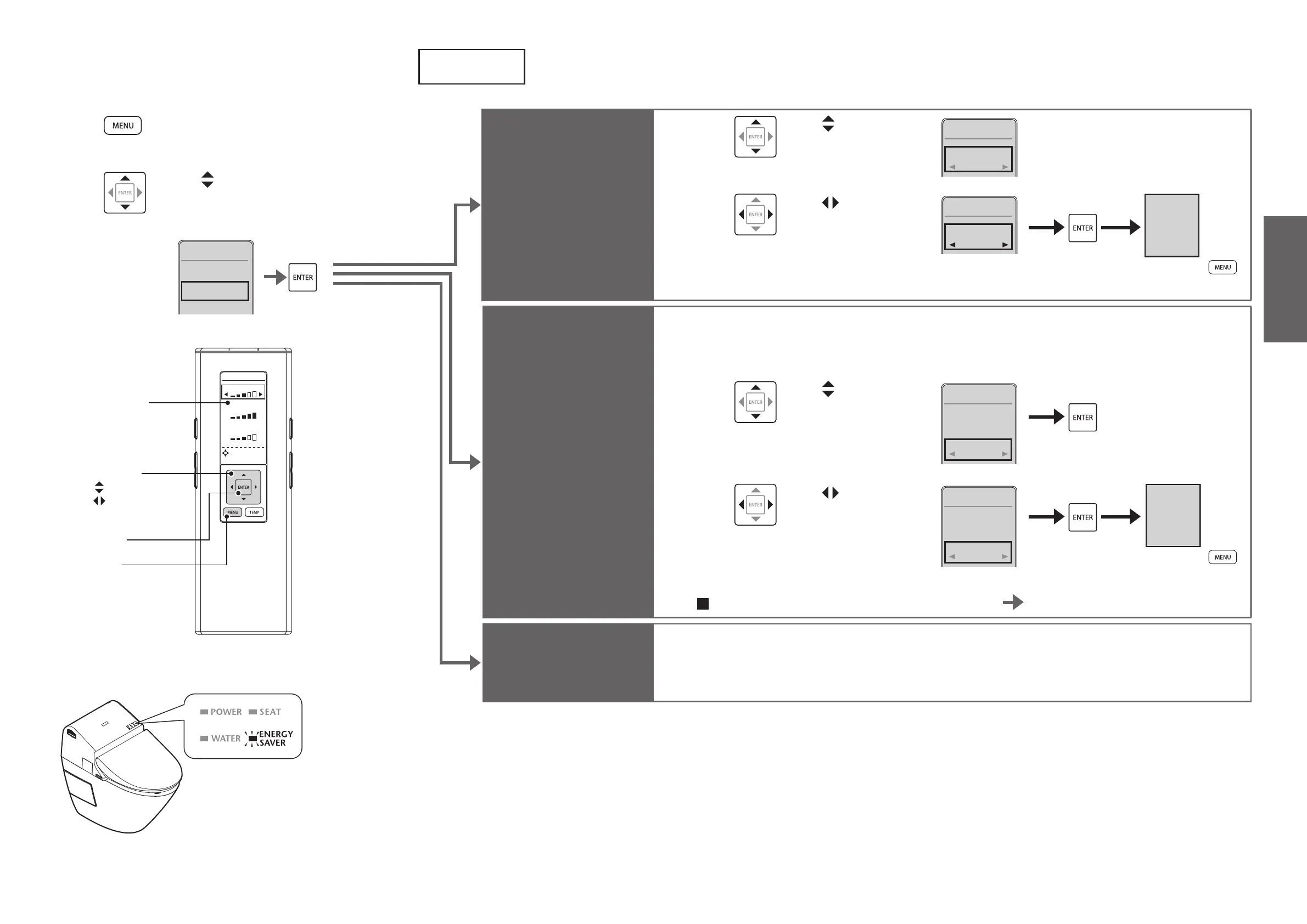
Press [MENU].
2
Use to select "ENERGY
SAVER" and then press
[ENTER].
1. CLEANING
2. ENERGY
SAVER
3. AUTO
FUNCTION
4. OTHER
SETTING
MENU2/4
Energy-Saver Features
How to Set
WATER
SEAT
DRYER
DIRECTIONAL
TEMPERAT URE
SETTING
[ENTER]
[MENU]
Select keys
: Select an item
: Select a setting
Remote control
display panel
Auto energy-
saver
3
Use to select
"AUTO ENERGY
SAVER".
1. AUTO ENERGY
SAVER
OFF
ENERGY
SAVER
1/2
4
Use to select
"ON" and then
press [ENTER].
1. AUTO ENERGY
SAVER
ON
ENERGY
SAVER
1/2
AUTO
ENERGY
SAVER
ON
(To return
)
Timer energy-
saver
Example: To save energy from 1 am to 7 am (for 6 hours)
Perform the operation at the start time for timer energy-saver (1 am).
3
Use to select
"TIMER SAVER".
1. AUTO ENERGY
SAVER
2. TIMER SAVER
ON
OFF
ENERGY
SAVER
2/2
4
Use to select
"3H", "6H", "9H"
or "OFF" and then
press [ENTER].
1. AUTO ENERGY
SAVER
2. TIMER SAVER
ON
6H
ENERGY
SAVER
2/2
TIMER SAVER
ON
6H
(To return
)
To change the energy-saver time or start time Redo from step 3.
Turning off
energy-saver
Select "OFF" in step 4 above.
When the energy-saver is set, the ENERGY
SAVER LED (green) lights up.

Related product manuals