Opening and closing
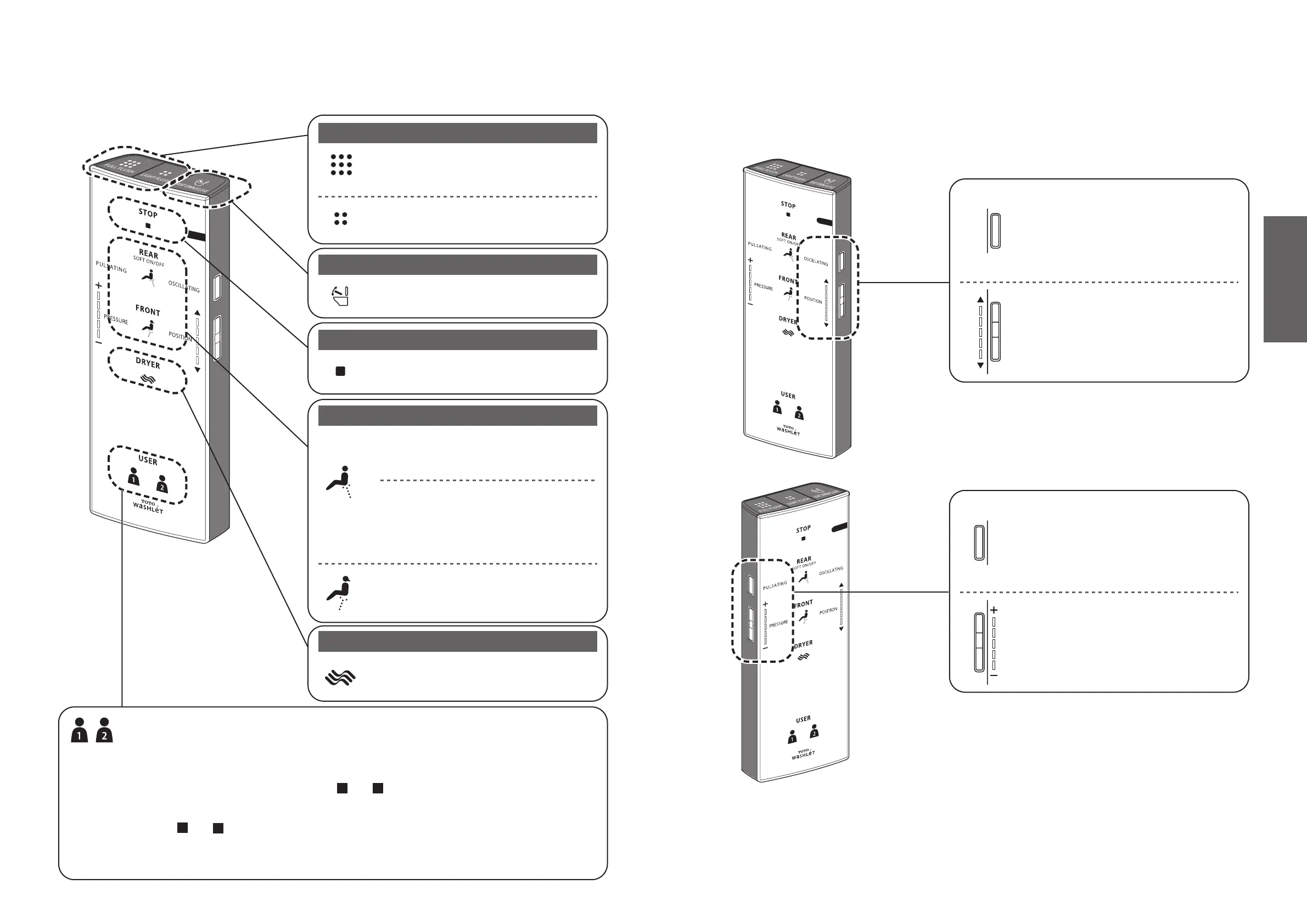
Stopping
Cleansing
Drying
[SEAT OPEN/CLOSE]
Opens and closes the toilet seat.
[STOP]
Stops the operation.
[REAR]
Cleanses your rear.
* The mode changes between [SOFT] and [REAR] each
time the button is pressed.
[SOFT]
Cleanses your rear with mild water pressure.
[DRYER]
Dries your front and/or rear.
[FRONT]
Serves as a bidet for women.
[PERSONAL SETTING LOCK 1] / [PERSONAL SETTING LOCK 2]
You can store your preferred wand position, water pressure and water temperature settings.
● To store a setting
While cleansing is in progress, set your preferred wand position, water pressure and water
temperature, and then press and hold " 1 " or " 2 " for 2 seconds or longer.
● To use
After " 1 " or " 2 " is pressed, please push the button used for cleaning.
*The wand position and water pressure LED's will light up for about 10 seconds displaying
the programed personal settings. Then the water temperature display will also show the
programmed personal setting.
[FULL FLUSH]
Perform a full flush.
[LIGHT FLUSH]
Perform a light flush.
Flush
[OSCILLATING]
The wand moves back and forth to wash
your rear thoroughly. The setting changes
between "ON" and "OFF" each time the
button is pressed. You can use this function
whenever you feel like it.
[PULSATING]
Washes with the water pressure pulsating
between soft and strong. The setting
changes between "ON" and "OFF" each
time the button is pressed. You can use this
function whenever you feel like it.
[PRESSURE]
The water pressure strength can be
adjusted for cleansing functions such as
REAR.
("+" Stronger, "-" Softer)
[POSITION]
The wand position can be adjusted to the
front or rear.
"▲" Moves to the front, "▼" Moves to the
rear
● Functions that operate when a button is pressed during "REAR", "SOFT" or "FRONT" cleansing.



 To Next Page