1
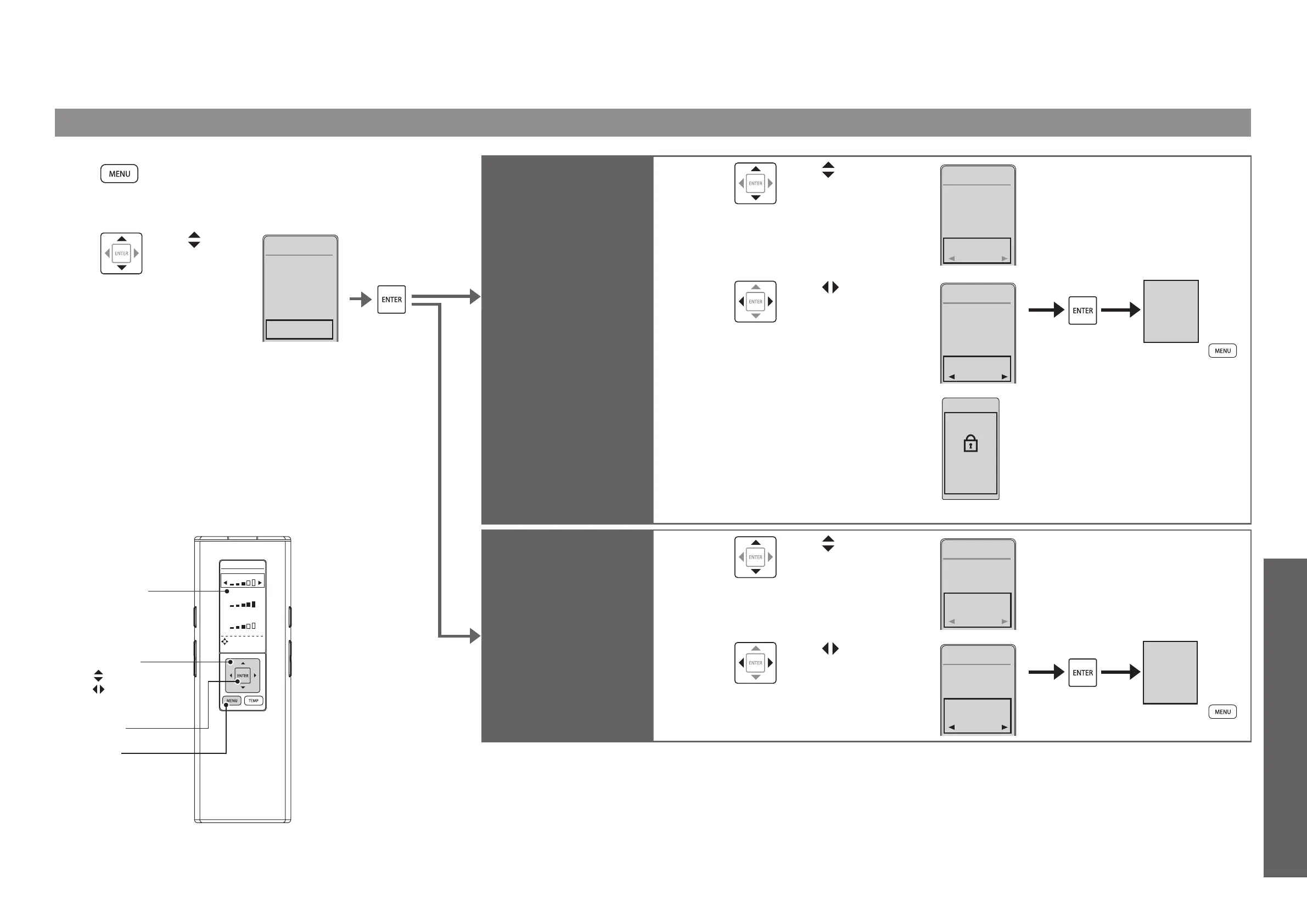
Press [MENU].
2
Use
to select
"OTHER
SETTINGS"
and then
press
[ENTER].
1. CLEANING
2. ENERGY
SAVER
3. AUTO
FUNCTIONS
4. OTHER
SETTINGS
MENU2/4
Changing Settings
OTHER SETTINGS
WATER
SEAT
DRYER
DIRECTIONAL
TEMPERAT URE
SETTING
[ENTER]
[MENU]
Select keys
: Select an item
: Select a setting
Remote control
display panel
Set whether or not to use
the setting lock
SETTING
LOCK
3
Use to select
"SETTING LOCK".
1㧚BEEP
2. ANTI-
FREEZING
OTHER
SETTINGS
3/4
OFF
ON
3. SETTING
LOCK
OFF
4
Use to select
"ON" or "OFF"
and then press
[ENTER].
1㧚BEEP
2. ANTI-
FREEZING
OTHER
SETTINGS
3/4
OFF
ON
3. SETTING
LOCK
ON
(To return
➝
)
5
Check the displayed screen.
SETTING LOCK
PRESS ENTER
FOR 2 SEC
TO RESET
Cancellation method:
Press [ENTER] for 2 seconds
or longer.
If you want to relock after cancellation,
*
reconfigure the setting.
<Display screen during setting lock>
Set whether or not to use
the personal setting lock
PERSONAL
SETTING
LOCK
3
Use to select
"PERSONAL
SETTING LOCK".
3. SETTING
LOCK
4. PERSONAL
SETTING
LOCK
OTHER
SETTINGS
4/4
ON
ON
4
Use to select
"ON" or "OFF"
and then press
[ENTER].
3. SETTING
LOCK
4. PERSONAL
SETTING
LOCK
OTHER
SETTINGS
4/4
OFF
ON
(To return
➝
)



 To Next Page