EasyManua.ls Logo

Touchstone SRV 2800 Pro - Locking TV to Flat Panel TV Mount

Touchstone SRV 2800 Pro
28 pages
Print Icon
To Next Page IconTo Next Page
To Previous Page IconTo Previous Page
Loading...
2800/3900 SRV PRO 360-Degree Swivel TV Lift
www.touchstonehomeproducts.com 800.215.1990
rev. 20201214
24
Locking TV to Flat Panel TV Mount
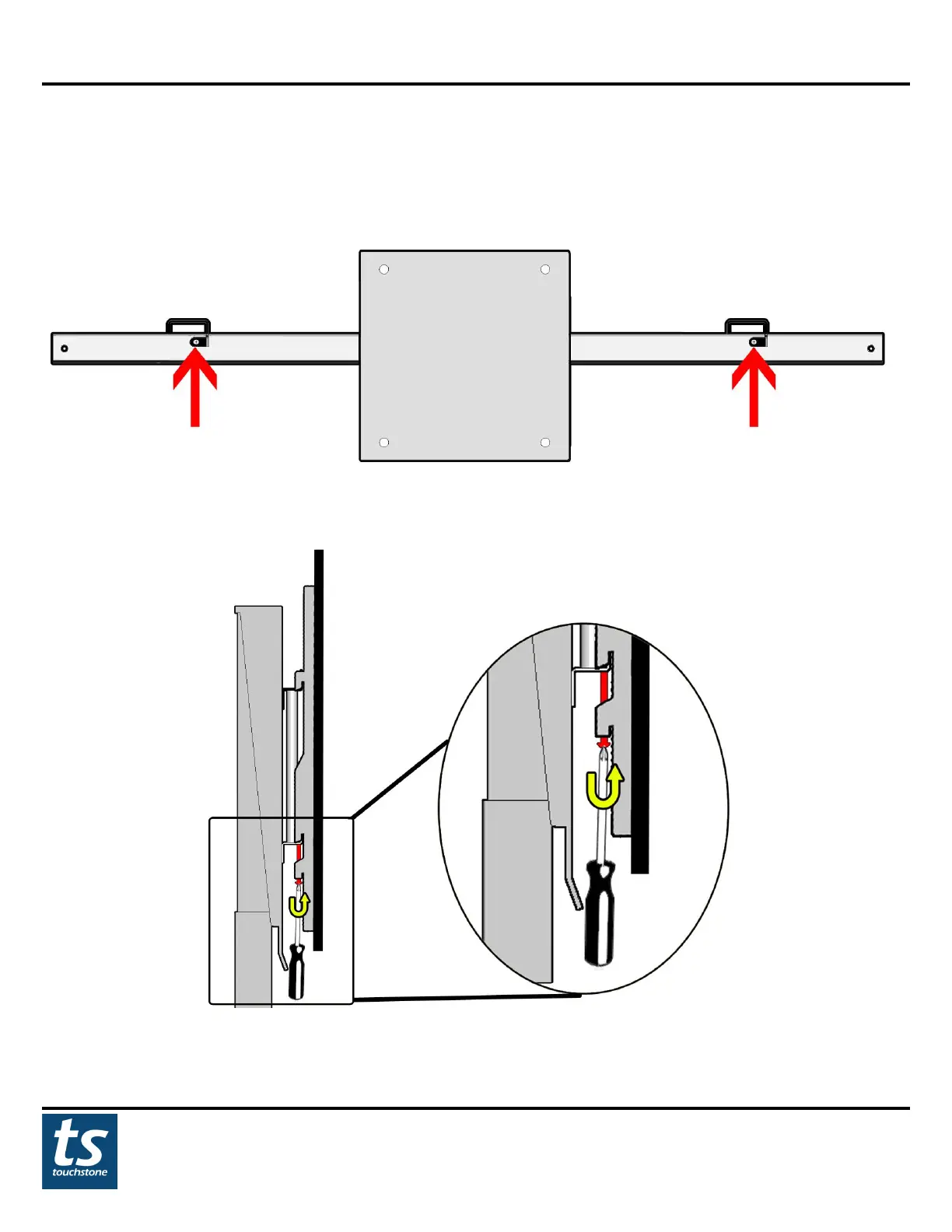
Once the TV is mounted to the lift, the TV can be locked to the flat panel TV mount so that the TV does not slide
from side to side. To lock the TV into place, tighten the 2 long screws on the bottom of each TV bracket. The
screws will tighten so that they lock against the bottom crossbracket of the flat panel TV mount.
(view of locking screws from underneath TV)
Turn both screws to lock the screw against the bottom bracket of the flat panel TV mount.

Related product manuals