9 of 12
If you successfully connected to the TouchTunes server and the
registration password you entered was correct, communications will
automatically finish and the
Attract screen will open. (If the
password was incorrect, you will be prompted to enter it again.)
Ovation is now operational.
7 Activate the Operator Menu
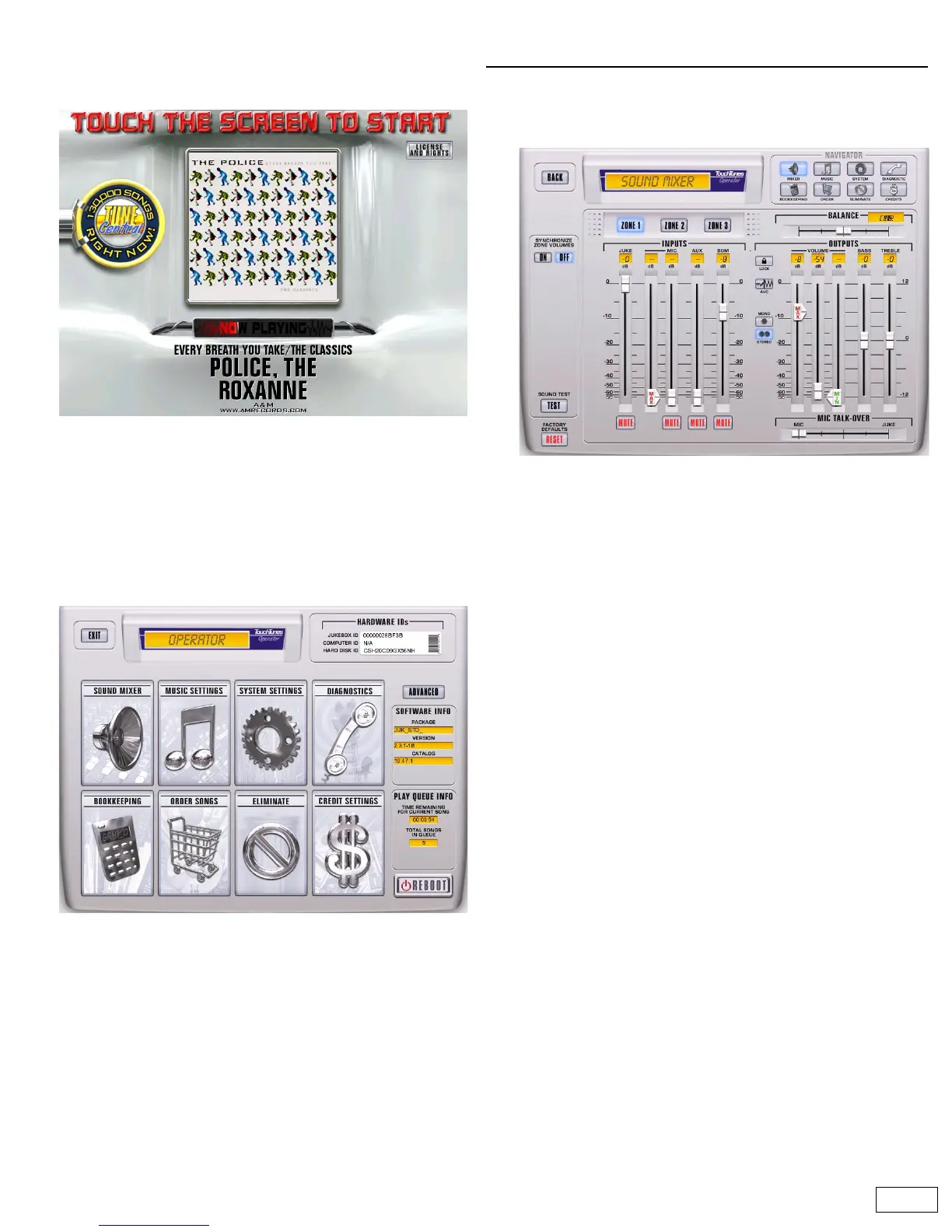
The Operator menu enables you to configure all Ovation settings. To
activate the Operator menu, press and release a manager button.
Two are available. One is located on the left side of the jukebox top
connector panel. The other is located on the control board. Refert to
the illustrations on page 5 for the exact location of each button.
The Operator menu has the following options.
Important: A safety feature automatically returns the jukebox to the
Attract screen and normal operation if you leave any operator screen
(except Telecom Diagnostics) idle for more than 1 minute.
Test and set sound levels
1 Open the Sound Mixer screen
On the Operator menu, touch SOUND MIXER. The Sound Mixer
screen opens.
2 Run the sound test
a. Under the heading SOUND TEST, touch TEST.
b. Listen to the test at all speaker positions to ensure everything
is functioning properly.
c. During the test use the OUTPUTS sliders to adjust the volume
of each zone.
• JUKE: Controls the gain applied to paid or free plays.
• MIC: Controls the gain applied to an external microphone.
• AUX: Controls the gain applied to an external line level
signal connected to the auxiliary inputs on the rear panel.
• BGM: Controls the gain applied to songs played by the
background music option.
Final output volume is controlled by the VOLUME slider.
The sound you hear during normal operation is governed by
these two rules:
a. The JUKEBOX sound source is played whenever there are
songs in the play queue. It can only be interrupted by:
• Pressing the PAUSE button on the remote control. This also
switches to the AUX sound source if one is connected.
• Pressing the TALK button on a connected microphone. This
fades down the JUKEBOX according to the setting for MIC
TALK-OVER JUKEBOX.
b. The jukebox automatically switches to the AUX source if the
jukebox is not in use and no song is currently playing, or the
jukebox was paused using the remote control.
3 When you are done
Touch BACK to return to the Operator menu.



 To Next Page