19
Chapter 5
Bandwidth Control
Use an independent bandwidth and enjoy a good Internet
experience without being affected by other users who are
sharing the same router.
For example, my roommate and I share 512Kbps Upstream
Bandwidth and 4Mbps Downstream Bandwidth via this router,
she likes to watch live show and play online games, which may
take up much bandwidth. I don’t want to be affected, so we
agree to equally distribute the bandwidth. The IP addresses
of her computer and my computer are 192.168.1.101 and
192.168.1.110.
To use the bandwidth control feature, you’d better set static
IP Address on each computer to be controlled or configure
Address reservation on the router in order to manage it easily.
About how to configure address reservation, please refer to
Reserve LAN IP Addresses.
1. Visit http://tplinkmodem.net, and log in with the password
you set for the router.
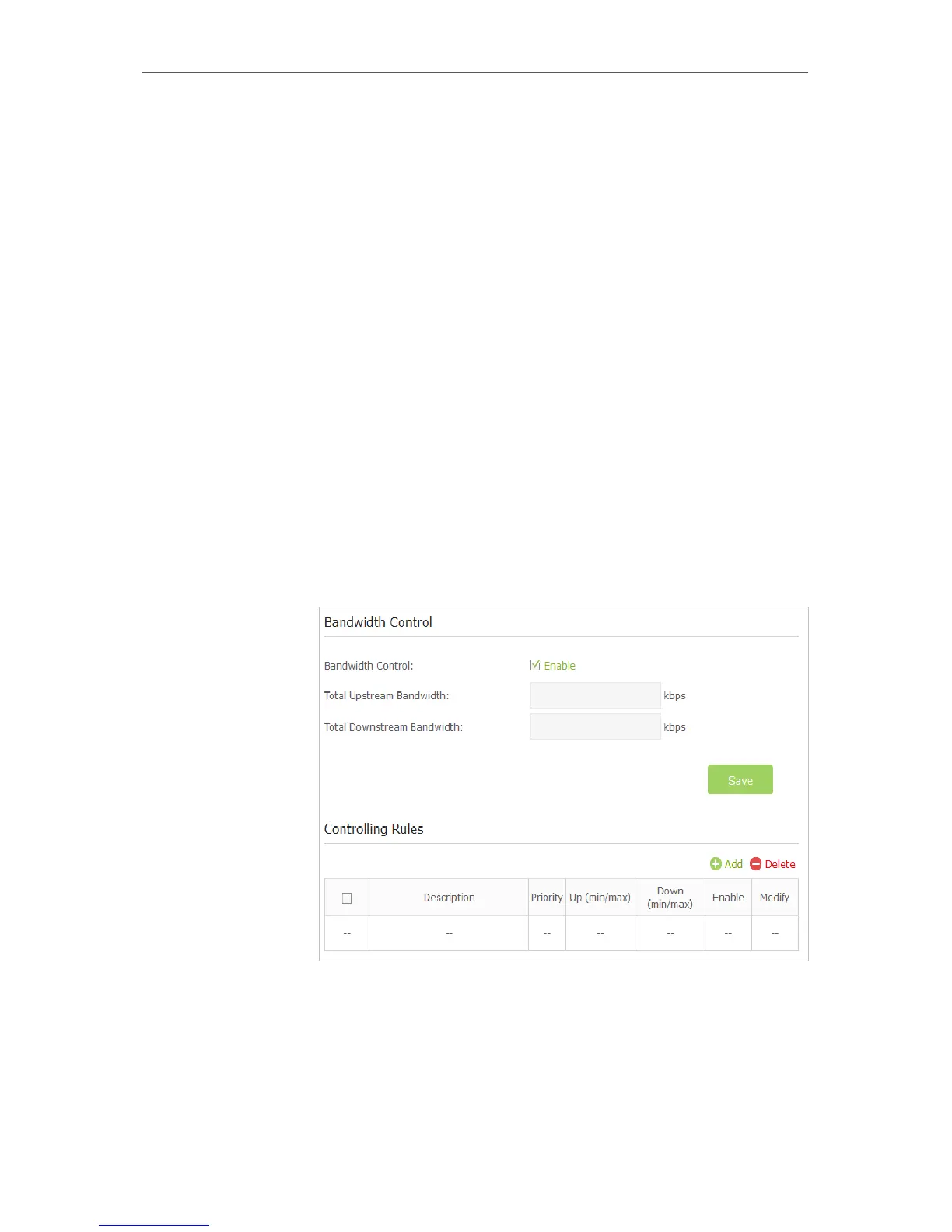
2. Go to Advanced > Bandwidth Control page.
3. Enable Bandwidth Control.
4. Enter the Total Upstream Bandwidth and the
Total Downstream Bandwidth given by your ISP.
(1Mbps=1024kbps). Click Save to save the settings.
5. Click Add to add controlling rules for each computer
respectively.
I want to:
Tips:
How can I
do that?














 To Next Page