47
Chapter 11
Specify Your Network Settings
11. 2. Data Settings
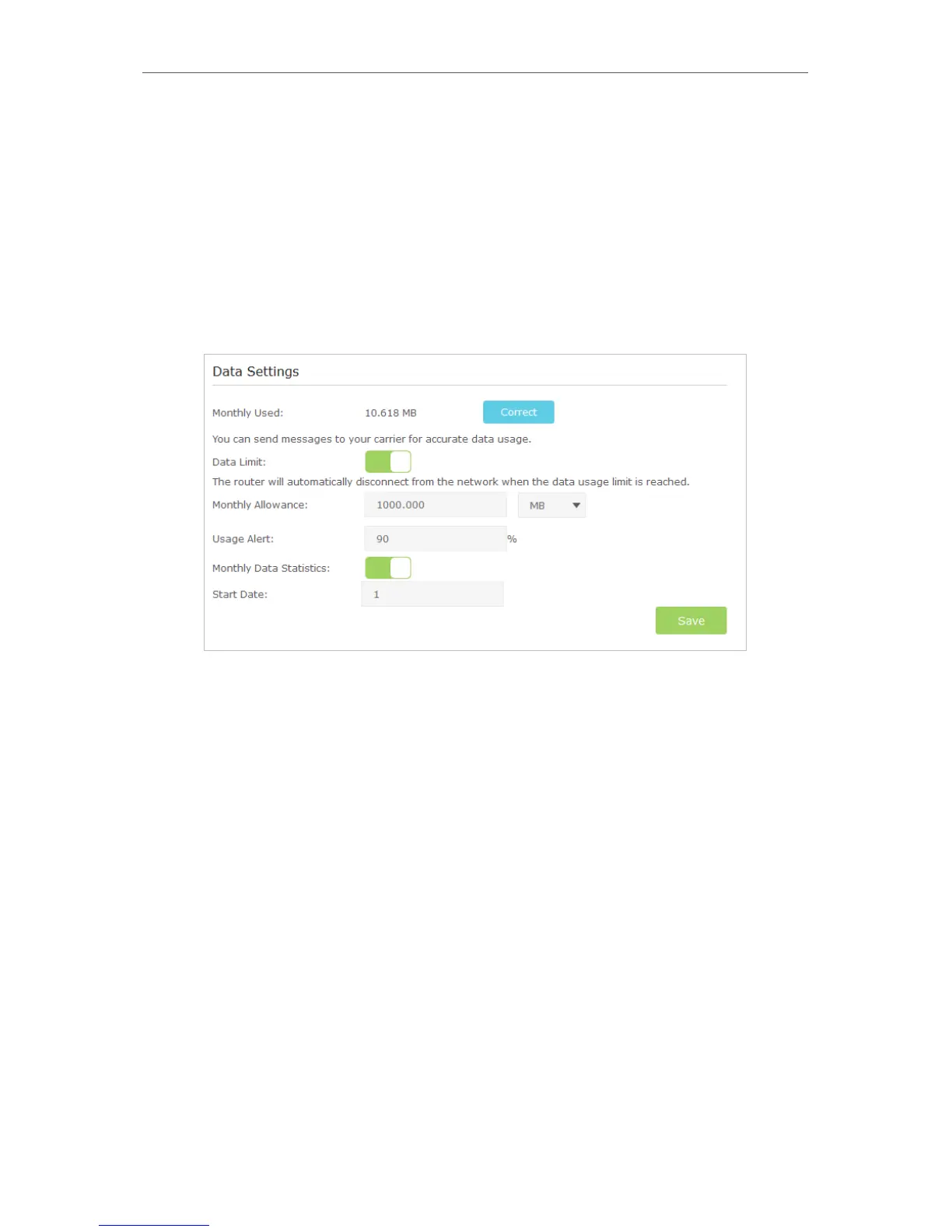
Data Settings is used to monitor the data usage of your router in real-time. You can limit
your data usage according to your monthly allowance or total allowance and you will
receive a warning if your data usage reaches the specified level.
Follow the steps below to monitor your data usage.
1. Visit http://tplinkmodem.net, and log in with the password you set for the router.
2. Go to Advanced > Network > Data Settings page.
3. Enable Data Limit to set total/monthly data allowance and usage alert to prevent
data overuse.
4. Enter the allowed amount of total/monthly data in the Total/Monthly Allowance
field. When data usage exceeds the allowed level, the router will disconnect from
the Internet and notify you on the Basic > Network Map Page.
5. Enter a percentage in the Usage Alert field to prevent data overuse. When data
usage reaches the alert level, a warning will be shown on the Basic > Network Map
Page.
6. Enable Data Statistics to reset data statistics when the next billing cycle starts.
7. Enter the start date of the billing cycle in the Start Date field.
8. Click Save to save the settings.














 To Next Page