TD-W8951ND 150Mbps Wireless N ADSL2+ Modem Router User Guide
¾ Service Provider: This field displays the service provider of DDNS.
¾ My Host Name: Enter your host name here.
¾ E-mail Address: Enter your E-mail address here.
¾ Username & Password: Type the “User Name” and “Password” for your DDNS account.
¾ Wildcard support: Select the option to use Wildcard function
4.5.6 CWMP
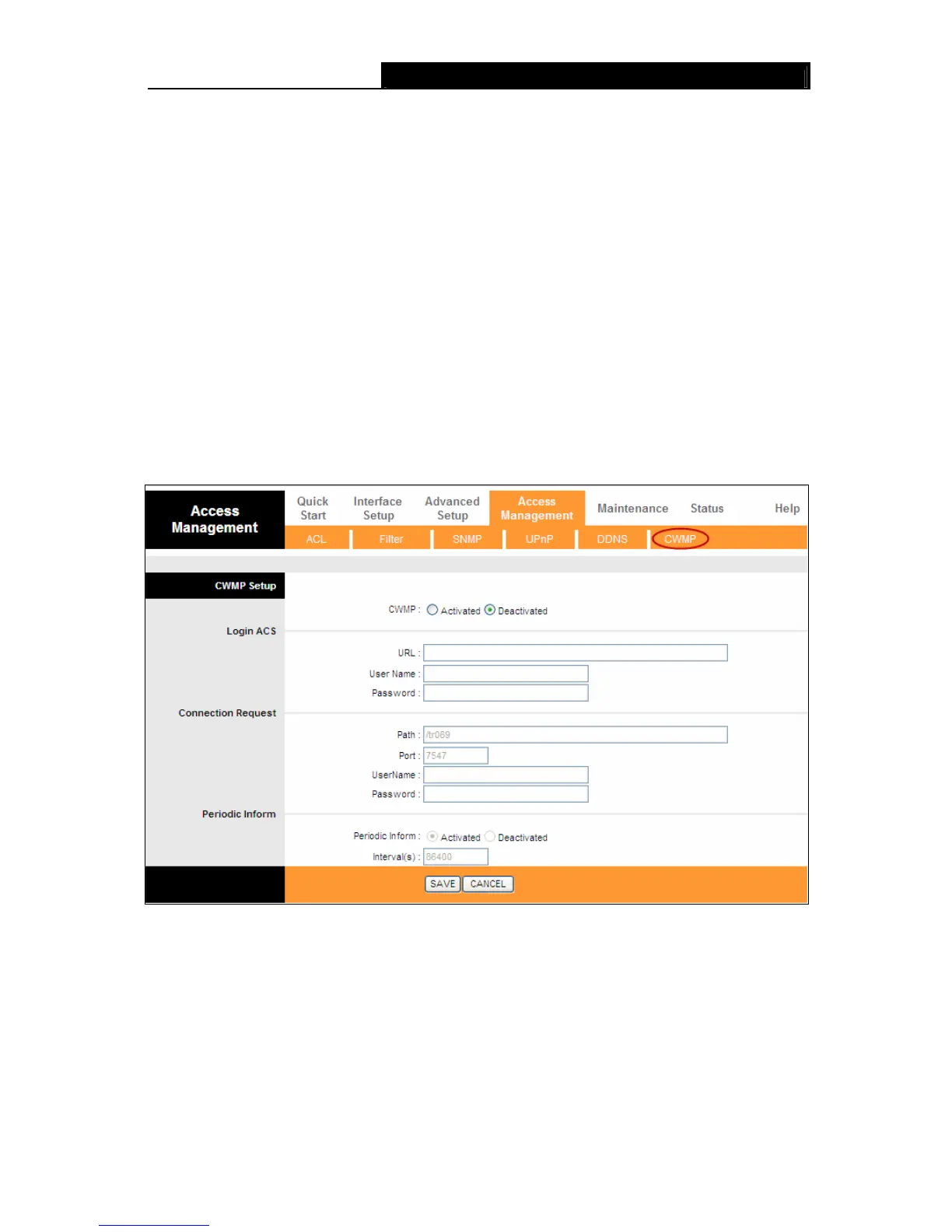
Choose “Access Management→CWMP”, you can configure the CWMP function in the screen
(shown in Figure 4-46).
The router offers CWMP feature. The function supports TR-069 protocol which collects information,
diagnoses the devices and configures the devices automatically via ACS (Auto-Configuration
Server).
Figure 4-46
¾ CWMP: Select activate the CWMP function.
¾ URL: Enter the website of ACS which is provided by your ISP.
¾ User Name/Password: Enter the User Name and password to login the ACS server.
¾ Path: Enter the path that connects to the ACS server.
¾ Port: Enter the port that connects to the ACS server.
64









 To Next Page