TD-W8961ND 300Mbps Wireless N ADSL2+ Modem Router User Guide
23
)
Note:
Each IP address entered in the fields must be in the appropriate IP form, which is four IP octets
separated by a dot (x.x.x.x), such as 192.168.1.100. The Router will not accept the IP address if it
is not in this format.
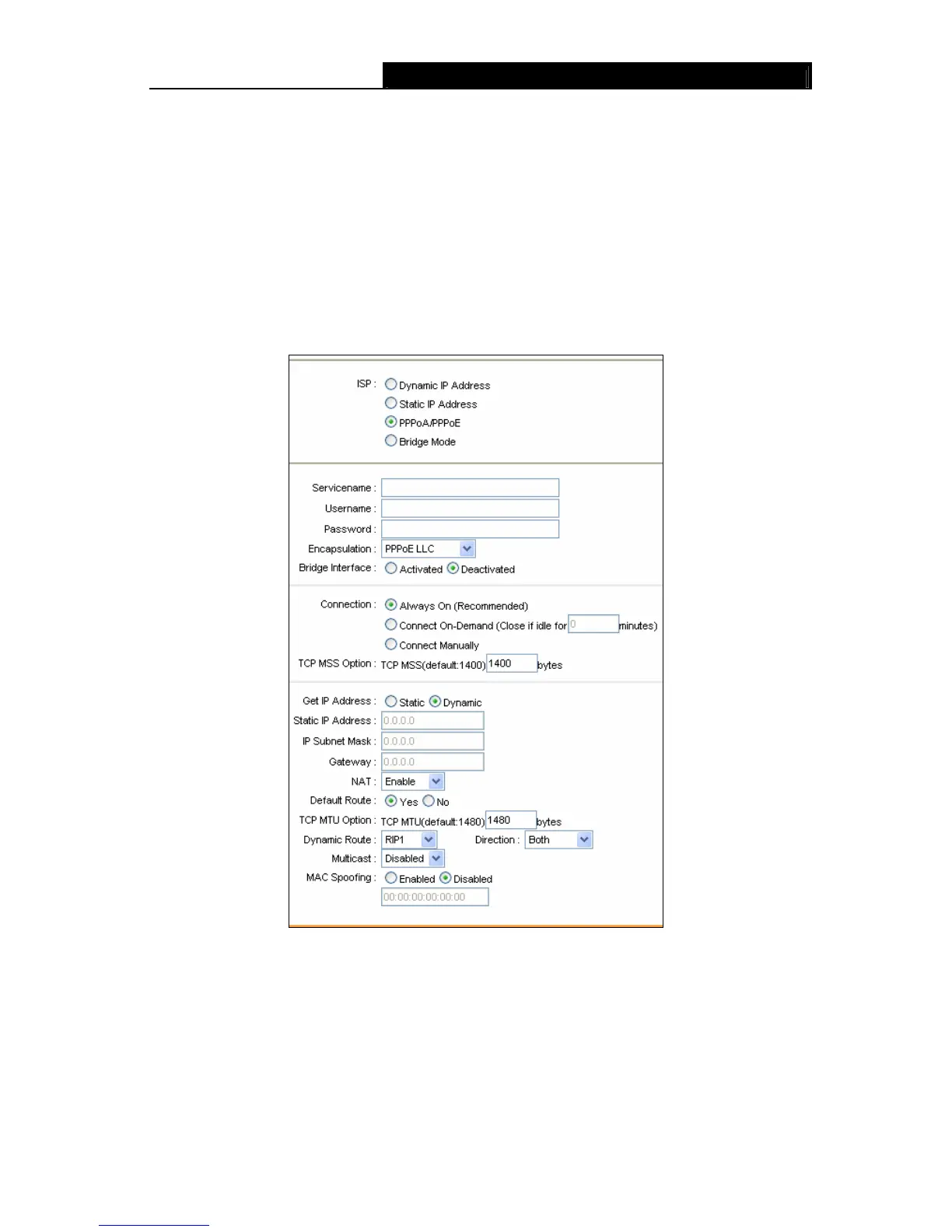
3) PPPoA/PPPoE
Select this option if your ISP requires you to use a PPPoE connection. This option is typically
used for DSL services. Select Dynamic PPPoE to obtain an IP address automatically for your
PPPoE connection. Select Static PPPoE to use a static IP address for your PPPoE connection.
Please enter the information accordingly.
Figure 4-9
¾ Servicename: Enter a name to mark current connection, or you can leave it blank.
¾ Username: Enter your username for your PPPoA/PPPoE connection.
¾ Password: Enter your password for your PPPoA/PPPoE connection.
¾ Encapsulation: For both PPPoA/PPPoE connection, you need to specify the type of
Multiplexing, either LLC or VC Mux.
¾ Bridge Interface: Activate the option, and the Router can also work in Bridge mode.











 To Next Page