TD-W8961ND 300Mbps Wireless N ADSL2+ Modem Router User Guide
45
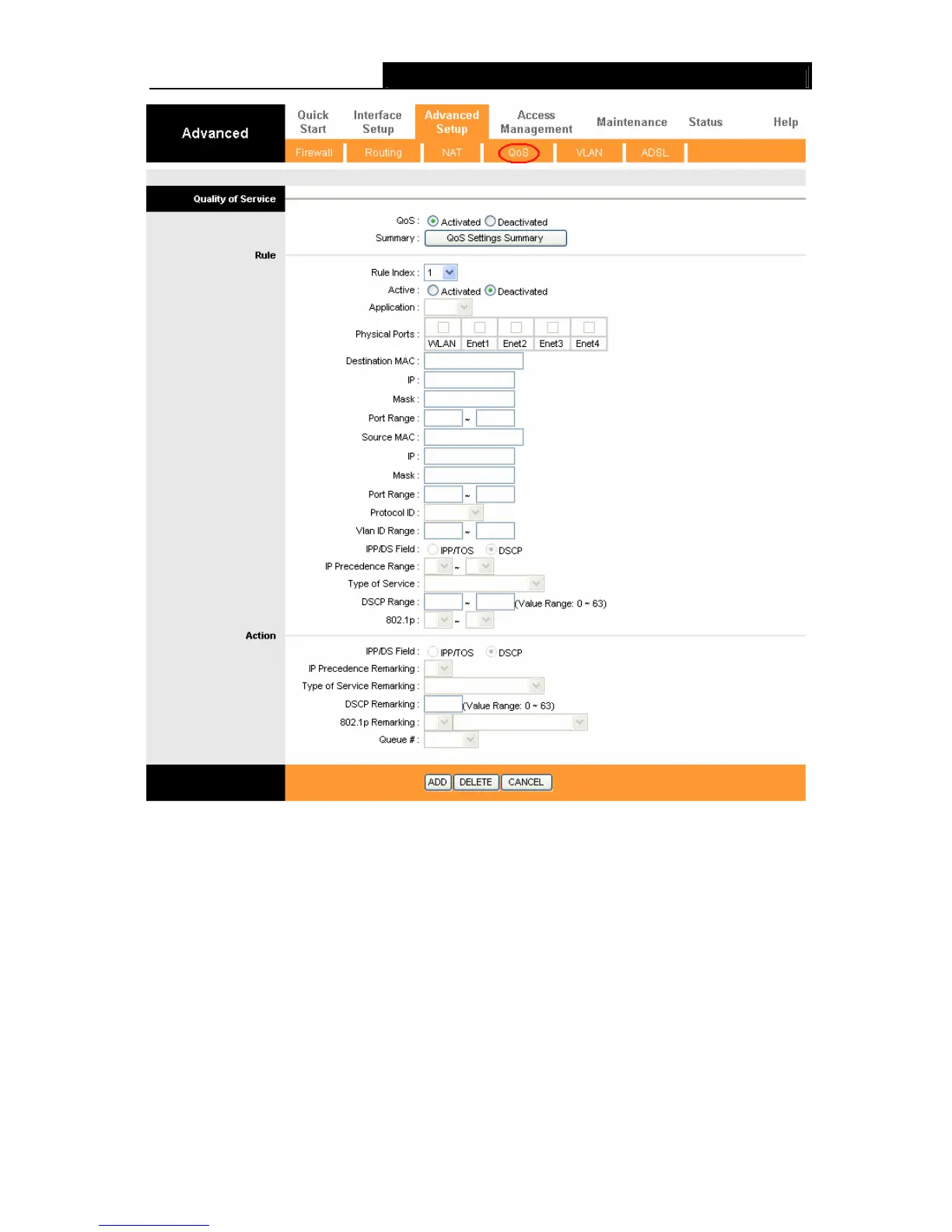
Figure 4-32
¾ QoS: Select this option to Activate/Deactivate the IP QoS on different types (IP ToS and
DiffServ).
¾ Summary: Click the button to view the configurations of QoS.
¾ Rule: Configure the rules for QoS. If the traffic complies with the rule, then the Router will
take the corresponding action to deal with it.
• Rule Index: Select the index for the rule you want to configure.
• Active: Activate the rule. The rule can take effect only when it is activated.
• Application: Select the application that the rule aimed at.
• Physical Ports: Select the port whose traffic flow are controlled by the rule.
• Destination MAC & IP & Mask & Port Range: Enter the IP information about the
Destination host for the rule.











 To Next Page