57
Connecting the TV set and the surround loudspeakers to the decoder:
Connect the components as shown in wiring diagram 1.
This is the procedure:
• Connect the REAR RIGHT, REAR LEFT and CENTER
surround loudspeakers - if present - to the appropriate
output terminals on the decoder.
• If you have an active subwoofer, connect its input to
SUB OUT.
• Connect the TV socket on the decoder to your TV set
using an S-video / video cable and adaptor.
• Finally connect the mains lead and switch the system
on.
• To use the decoder your television must be correctly
configured. The essential settings include the following:
Select the picture norm matching the source
devices connected to the TV.
Some source devices can supply a range of different
picture norms, and some TV sets can only process one
norm; If problems arise in this respect, it will sometimes
be necessary to select the standard Video norm for all
the machines in the system, as this is generally
supported by all devices.
• When you have entered the correct settings in your TV
set, the next step is to check the connection between
TV set and decoder. This is done by calling up the
'Device Setup' on the decoder:
Press the
button during surround mode
operations.
• The menu should now appear on the screen. If it does,
close it by pressing the
button again briefly.
• If the menu does not appear, or if the picture is
monochrome or unstable, read the 'Trouble-shooting'
section in these operating instructions.
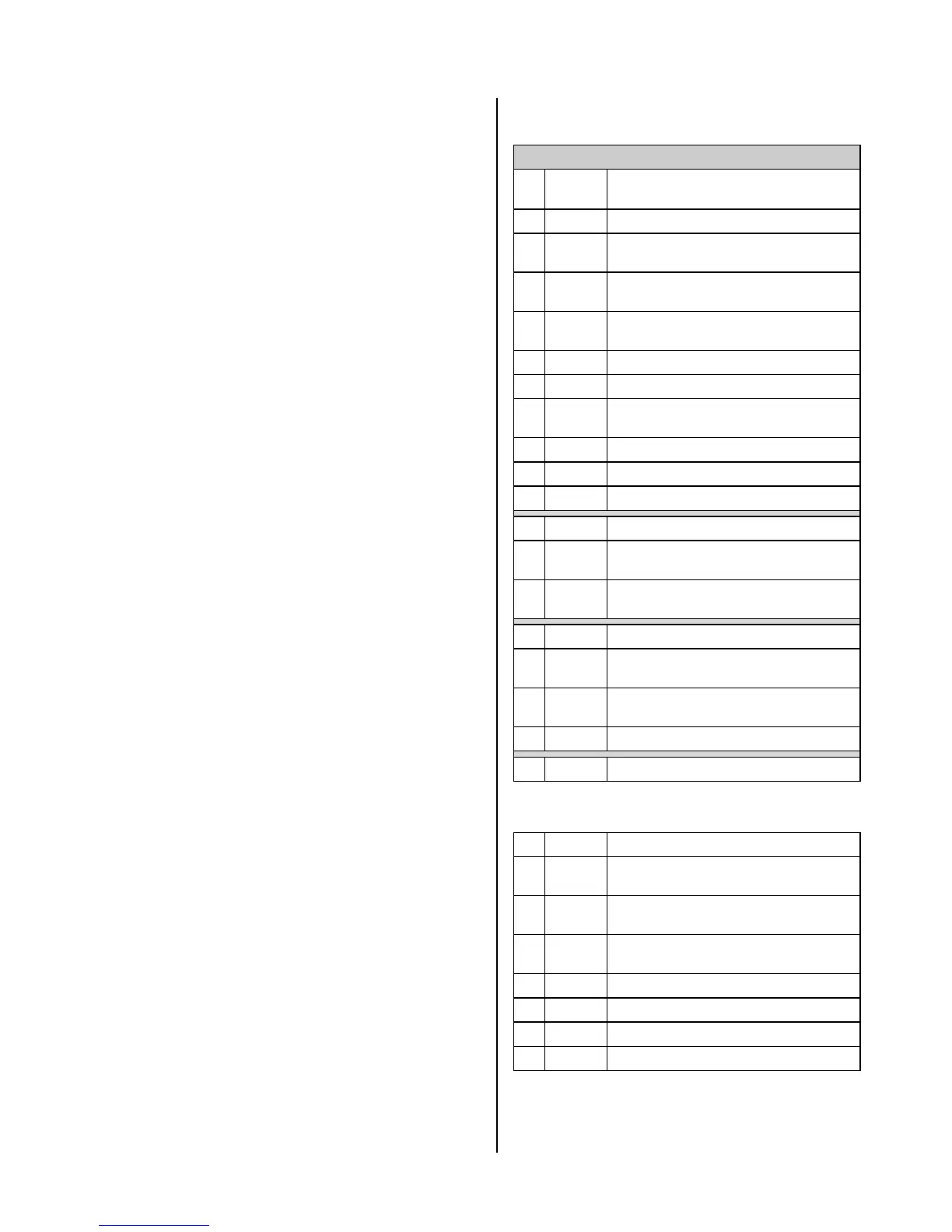
If you have a TV 720, TV 820 or TV 920 television,
please set it up as follows:
Configuring the TV 720, TV 820 or TV 920
No. F1
button
Select / activate
Menu point
1
Call up TV menu
2
red
Equipm. configuration
3
yellow
Device connections
4
blue
Euro 1
5
Laser Disk (DVD)
6
Store
7
red
Signal type selection
8
Constant AV mode 'YC in'
9
Store
10
Back in menu
11
Back in menu
12
white
Station settings
13
blue
TV station table
14
Select programme position 0
15
white
Signal
16
yellow
Euro 1 Laser Disk
17
Store
18
Quit menu
Programming the function button
for picture
format switching (4:3 / 16:9):
1
Call up menu
2
red
Device configuration
3
blue
Function button
4
Select function button
5
Select 'Picture Format' function
6
Store
7
Return to menu
8
Quit menu



 To Next Page