58
Digital SAT receiver (set-top box)
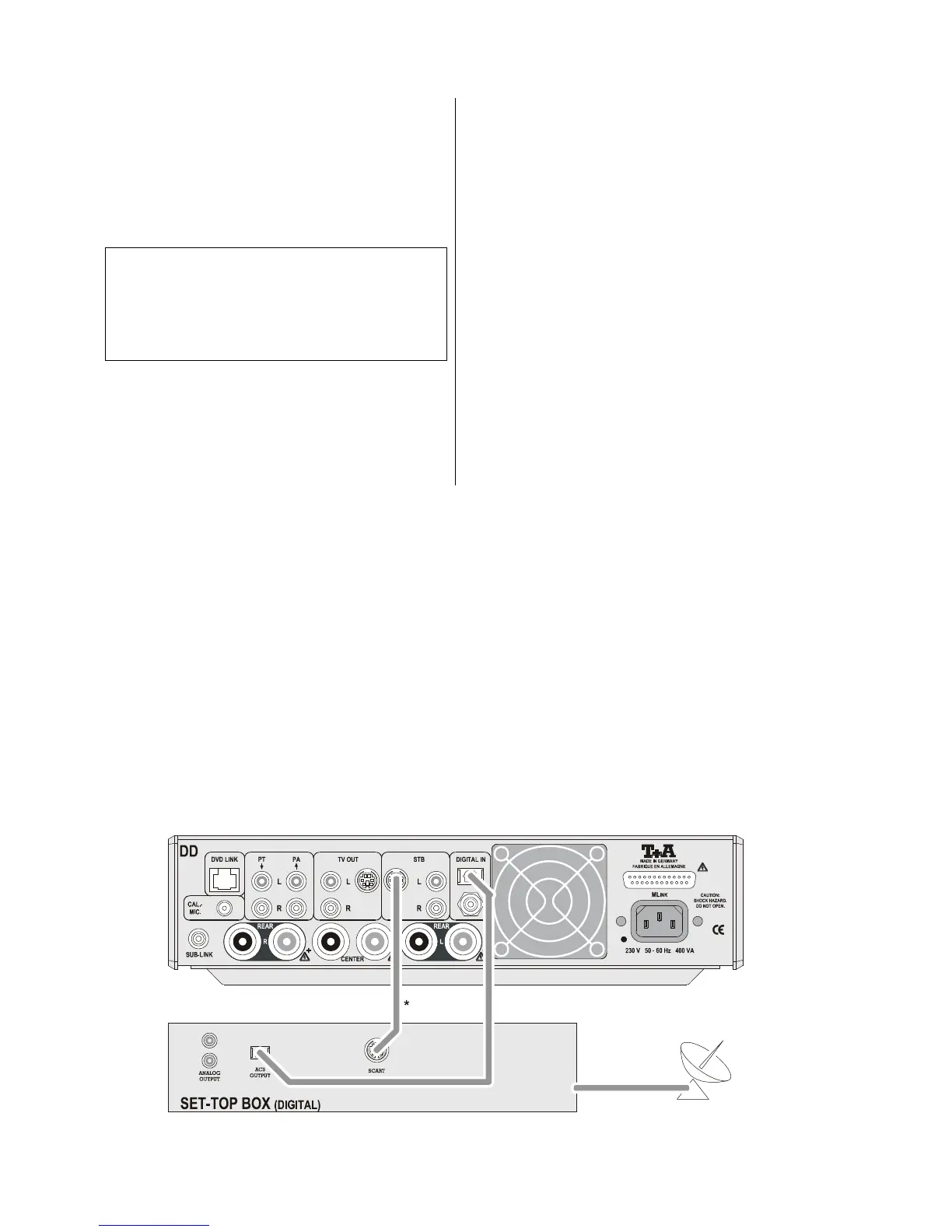
Complete the wiring of the components as shown in
wiring diagram 1 as follows:
• If the set-top box features an optical Dolby Digital
sound output, connect this to the optical digital input
(DIGITAL INPUT) of the decoder using a light-pipe
(optical) cable.
Select the 'Inputs Menu', and set the input 'Dig. opt. '
under STB IN.
Note:
If the set-top box features a co-axial digital output,
connect this to the co-axial digital input
(DIGITAL INPUT) of the decoder using a co-ax lead.
Select the 'Inputs Menu', and set the input
'Dig. co-ax.' under STB IN.
• Connect the S-video socket on the set-top box to the
STB socket on the decoder using an S-video lead.
• If the set-top box has no S-video output, a Scart / S-
video adaptor must be used. Please ask your specialist
dealer for advice on this.
Wiring diagram 1
A set-top box (digital sound and picture source) connected to the DD 820 M.



 To Next Page