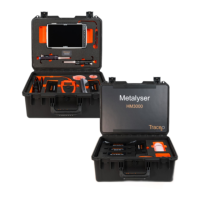
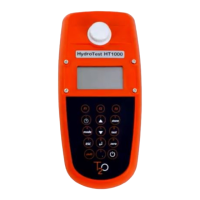
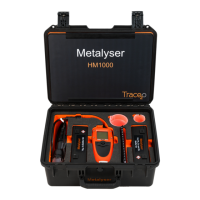
The Metalyser® Portable HM1000 is a rugged field kit designed for the rapid analysis of very low heavy metal concentrations in natural water courses, such as lakes and rivers. It utilizes a voltammetric technique to detect heavy metal ions in solution, providing results to less than 10ppb quickly. The instrument is portable, battery-powered, and suitable for on-site field screening analysis. It is sealed against water ingress and housed in a waterproof case, making it robust and virtually maintenance-free.
Function Description:
The HM1000 tests for a range of 9 heavy metals. Its operating procedure involves two main steps: plating (conditioning) and analysis. The plating step forms a thin plate on the surface of the Working Electrode, which is crucial for reliable results. A secondary conditioning step is also included to prime the electrode and increase sensitivity. The instrument offers two main analysis methods: Standard Addition and in-field calibration. Standard Addition is the recommended method, where a known amount of standard is added to the sample to determine the initial concentration. In-field calibration establishes a calibration curve before analyzing multiple samples rapidly. A Blank Subtraction method is available for creating a new baseline if contaminants are suspected in the buffer.
Important Technical Specifications:
- Handheld Unit Environment:
- Water Ingress: IP67
- Operating Temperature: -20°C to +70°C
- Storage Temperature: -20°C to +70°C
- Connections:
- 1 x waterproof Mini USB port
- 1 x 12 Way Multipole Connector
- Display: 128 x 128 pixel monochrome backlit LCD
- Power Supply: 4.5 – 5V DC, 700mAh
- Battery: 3.3V Li-ion 2200mAh rechargeable
- Detection Limits (Lower Limit / Upper Limit in ppb):**
- Arsenic (III): 5 / 500
- Total Arsenic (As (III+V)): 10 / 500
- Copper (Cu): 5 / 500
- Mercury (Hg): 5 / 500
- Cadmium (Cd): 3 / 500
- Lead (Pb): 5 / 500
- Zinc (Zn): 5 / 500
- Upper limit fixed at 500ppb; dilution needed for higher values. Lower limits achievable with 60 seconds deposition; increased accuracy with 120 seconds deposition.
- Variability: ± 5% at 20ppb with Metaware software, ± 7.5% with handheld.
- Accuracy: Dependent on element measured, sample matrix, and type.
Usage Features:
- User Interface: Controlled via on-screen menus and a 4-way navigation joystick (Up, Down, Left, Right, and OK). A Cancel button returns to the previous menu.
- LCD Screen: Displays current date, time, battery, and connection status. Backlit for poor lighting conditions.
- Charging: The built-in battery can be charged via USB using supplied car or mains chargers, or a PC/laptop. Fast charge (500mA, approx. 7 hours) and trickle charge (100mA) options are available.
- Sonde: Contains pre-assembled electrodes (WE1, WE2, R, C) and a stirrer. Electrodes are letter-referenced for correct positioning. The sonde head is designed for submersion up to 1 meter in water.
- Sample Analysis Beaker (SAB): Has a fixed volume, ensuring a constant sample volume when removed from water.
- Pipette: Used for adding standard additions, set to 280µl by default (equivalent to 20ppb). The volume can be adjusted.
- Deposition Times: Default 60 seconds for most elements (down to 5ppb), 10ppb for arsenic. Shorter times (30 seconds) for higher concentrations (50-500ppb), longer times (120 seconds) for lower concentrations (<10ppb) to increase accuracy.
- Language Selection: English, French, and Spanish pre-installed.
- Auto Switch Off: Optional ten-minute auto shutdown feature to extend battery life.
Maintenance Features:
- Electrodes:
- Counter Electrode: Requires minimal maintenance, mainly visual inspection for damage.
- Reference Electrode: Contains a liquid-filled tube that can be replenished with the supplied Reference Electrode Fill Solution. The tip should be kept wet, and a few drops of deionised water should be added to the cap before storage.
- Working Electrode: Surface should be regularly polished using the supplied glass platen, polishing cloth, and slurry to remove contaminants and ensure a mirror-like finish. Protective rubber cap should be replaced during storage. Conditioning steps are required after polishing.
- Stirrer: Needs to be checked for proper rotation. If stuck, a few drops of Stirrer Oil (only the supplied oil) can be applied to the shaft.
- Buffers: Store in a dark, cool, dry environment. Powder buffers have a shelf life of 3 years, liquid buffers 1 year.
- Standards: Store in a dark, cool place, shelf life of 12 months. Discard if contaminated.
- Plating Solutions: Store in a dark, cool place, shelf life of 1 year. Discard and replace if efficacy deteriorates.
- Post-Analysis Cleaning: Sonde head and electrodes should be thoroughly washed with deionised water or sample water after each analysis to minimize carry-over, especially after arsenic analysis.
- Troubleshooting: The manual provides a detailed troubleshooting guide for common issues like "Peak not visible," "Results lower/increasing," and "Sample >L.O.D."
- Self-Diagnosis: The instrument provides on-screen indicators for battery status (fast charge, trickle charge, fault/overheat, full, ¾, ½, ¼, empty), USB connection, and stirrer operation. It also displays error messages like ">L.O.D," "<L.O.D," "Addition error," and "Calibration error" to assist in diagnosing problems.


 To Next Page
 General