B
96
Repair and Service Manual
FUEL SYSTEM
Read all of SAFETY and this section before attempting any procedure. Pay particular attention to Notices, Cautions, Warnings and Dangers.
699322
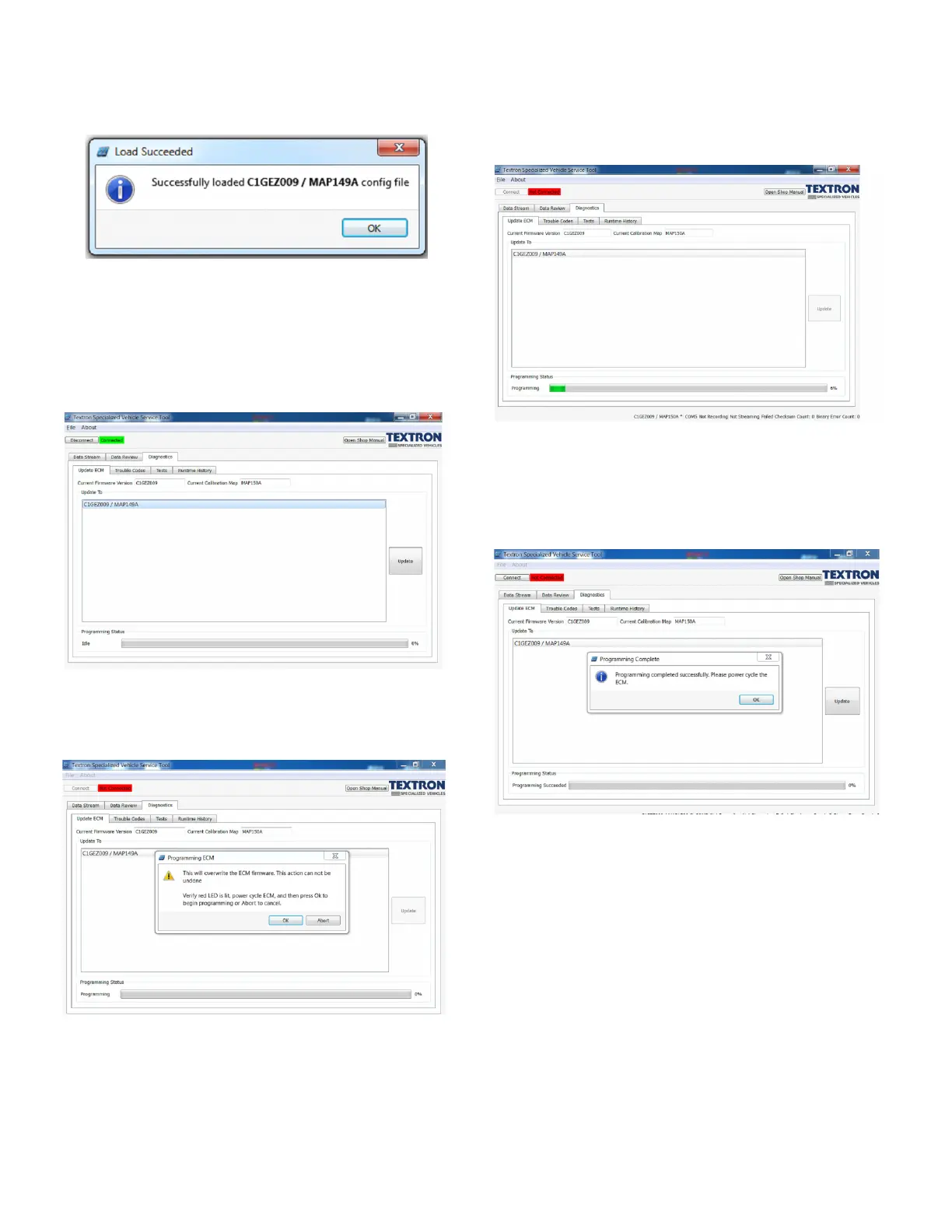
3. Click “OK” to load the map.
Fig. 14 Completion of ECM Map Loading
4. Stop streaming (Data Stream tab).
5. Navigate to the “Update ECM” tab, used to update
the ECM Software. Update procedure as follows:
a. Select the desired file and then click the “Update”
button.
Fig. 15 IRIS Tool Update ECM Tab
b. Verify the red LED is on to indicate that the ECM
is in program mode. Cycle the key power, and
then press “OK”.
Fig. 16 Programing ECM Window
c. The Status Bar at the bottom of the IRIS tool
“Update ECM” tab window will start showing pro-
gramming progress. The yellow LED on the USB
Communication module will pulse during pro-
gramming.
Fig. 17 IRIS Update ECM Window
d. A message will pop up indicating the program-
ming is finished. You will need to cycle the key
power again and then click “OK” in the pop up
window.
Fig. 18 Successful Program Update Window
Troubleshooting
If there is an error encountered, such as lost communica-
tion or a time-out:
• Click “OK” and click the “Connect” button in the IRIS
window.
• If it will not reconnect after multiple attempts, turn off
the key, remove the USB cable, turn on the key, and
reinsert the USB cable to the laptop, and click the
“Connect” button in the IRIS window.
• If it still will not reconnect, the ECU is corrupted. The
throttle body assembly must be removed and
replaced with a new functioning unit.



 To Next Page