B
FUEL SYSTEM
Read all of SAFETY and this section before attempting any procedure. Pay particular attention to Notices, Cautions, Warnings and Dangers.
97
Repair and Service Manual
699322
Fault Check
The Walbro EFI system uses Diagnostic Trouble Codes
to report issues. Both active and stored faults are
reported by the ECM.
• Active Faults – These are faults that have been trig-
gered since the key was last switched to the “ON”
position.
• Stored Faults – These are faults that are no longer
active. These faults have not been triggered since
the key was last switched to the “ON” position. They
were active at one time but were stored when the key
was turned to the “OFF” position sometime in the
past.
A more detailed description and basic troubleshooting
can be found by clicking on the faults when they appear
on the Diagnostics->Trouble Codes tab in the software.
These faults can be read from the MIL typically located
under the vehicle’s seat. A series of flashes indicates
each fault code. A description of how to read codes from
the MIL is found in the vehicle owner’s manual and ser-
vice manual. Note that the MIL will not operate when the
diagnostic dongle is connected to the vehicle. In this
case, the faults are instead passed to the diagnostic soft-
ware.
Follow the below procedure to view active and stored
vehicle faults in the software:
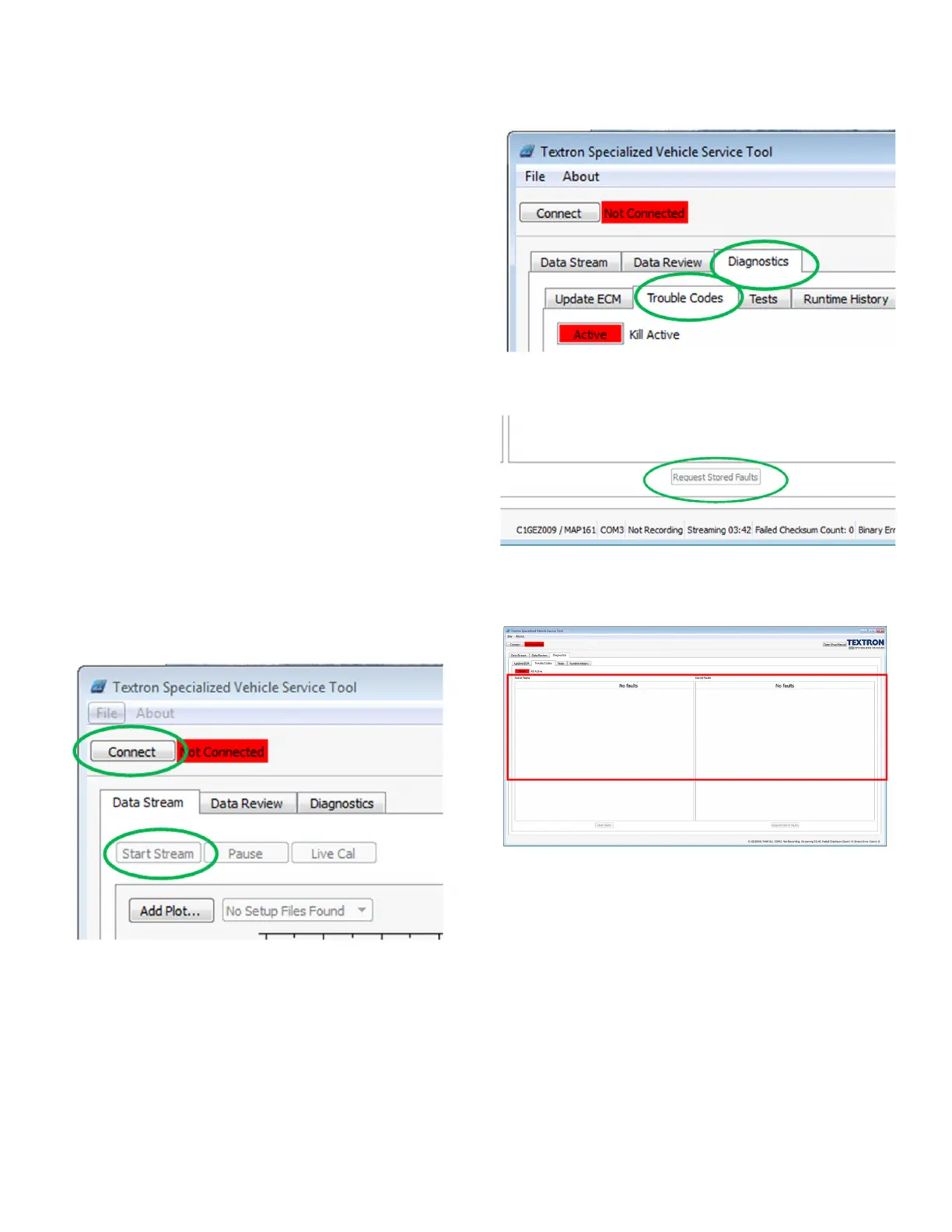
1. Turn the vehicle key to the “ON” position.
2. Press Start Stream.
Fig. 19 Connect and Start Stream Buttons
3. Navigate to the Diagnostics Tab.
4. Navigate to the Trouble Codes sub-tab
.
Fig. 20 Trouble Codes Tab
5. Press “Request Stored Faults” at bottom.
Fig. 21 Requested Stored Faults Button
6. Now the software displays the Active Faults and
Stored Faults in the area shown.
Fig. 22 Fault Codes Display Area
7. Current ECM hours are found on the Diagnostics tab
and Runtime History sub-tab in a field called Engine
Hours in the top left (see Figure 19). Hours are
reported on initial software connection. If the vehicle
is run any significant amount while connected, the
software should be disconnected and reconnected to
refresh the hour count. This hour reading should cor-
relate closely with the reading of a vehicle’s hour
meter, if installed, since both record pedal-down


 To Next Page