12
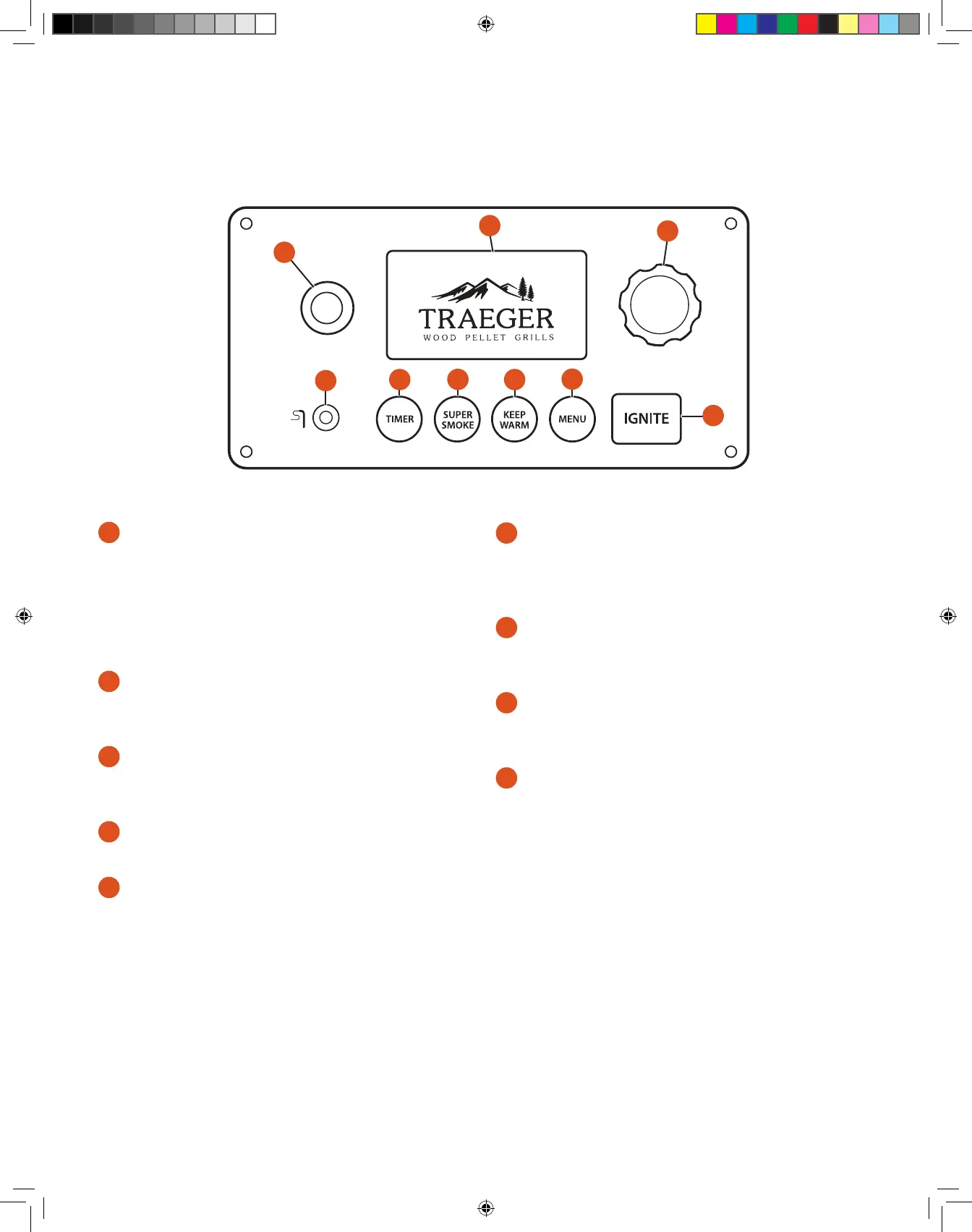
YOUR WiFIRE® DIGITAL CONTROLLER Your Traeger® Grill is equipped with a state-of-the-art Traeger Controller with WiFIRE® Technology
that is Wi-Fi-capable. Before you begin using the grill, familiarize yourself with the dierent features of the control panel.
Once the main power
button (located on the back of the pellet hopper) is ON (I), use the Standby button to turn on and o the grill.
1
STANDBY BUTTON
Use this button to turn on and o (standby mode) the electronic
controller once the grill’s main power switch (located on the back
of the grill) has been turned ON (I). Press and hold for 3 seconds
to initiate the shut-down cycle when you are finished using your
grill. Always run your grill through the full 15-minute shut-down
cycle when you are finished using your grill.
2
STATUS DISPLAY
Shows current temperature, status of cook program, cook time
remaining, etc.
3
SELECTION DIAL
Rotate dial to move up and down through the displayed menu.
Press the center of the dial to make a selection.
4
MEAT PROBE JACK
Plug the meat probe into the jack for probe cooking.
5
TIMER
The timer is for your convenience only; it does not aect
grill operation. For example, if you need to baste your meat
in 15 minutes, set the timer for 15 minutes. A tone will sound
when the time is up.
NOTE: Temperature fluctuations are normal for Traeger® Grills. Any significant fluctuation could be the result of wind, air temperature, improper
use, or lack of grill maintenance.
GETTING TO KNOW YOUR GRILL CONTINUED
1
9
2
3
8
7
6
5
4
6
SUPER SMOKE
Select SUPER SMOKE at any time during grilling when cook
temperature is between 165°–225°F (74°–107°C) to increase
the amount of smoke released for additional smoky flavor.
7
KEEP WARM
This feature maintains the grill temperature at 165°F (74°C) to
keep food warm.
8
MENU
From MENU, you can set up the meat probe and connect your grill
to your Wi-Fi network using the Traeger app.
9
IGNITE
Press IGNITE to start the grill.
T09627_Redland_OM_EN.indd 12T09627_Redland_OM_EN.indd 12 9/16/22 10:58 AM9/16/22 10:58 AM





 To Next Page