26
ADDITIONAL CONTROL FUNCTIONS
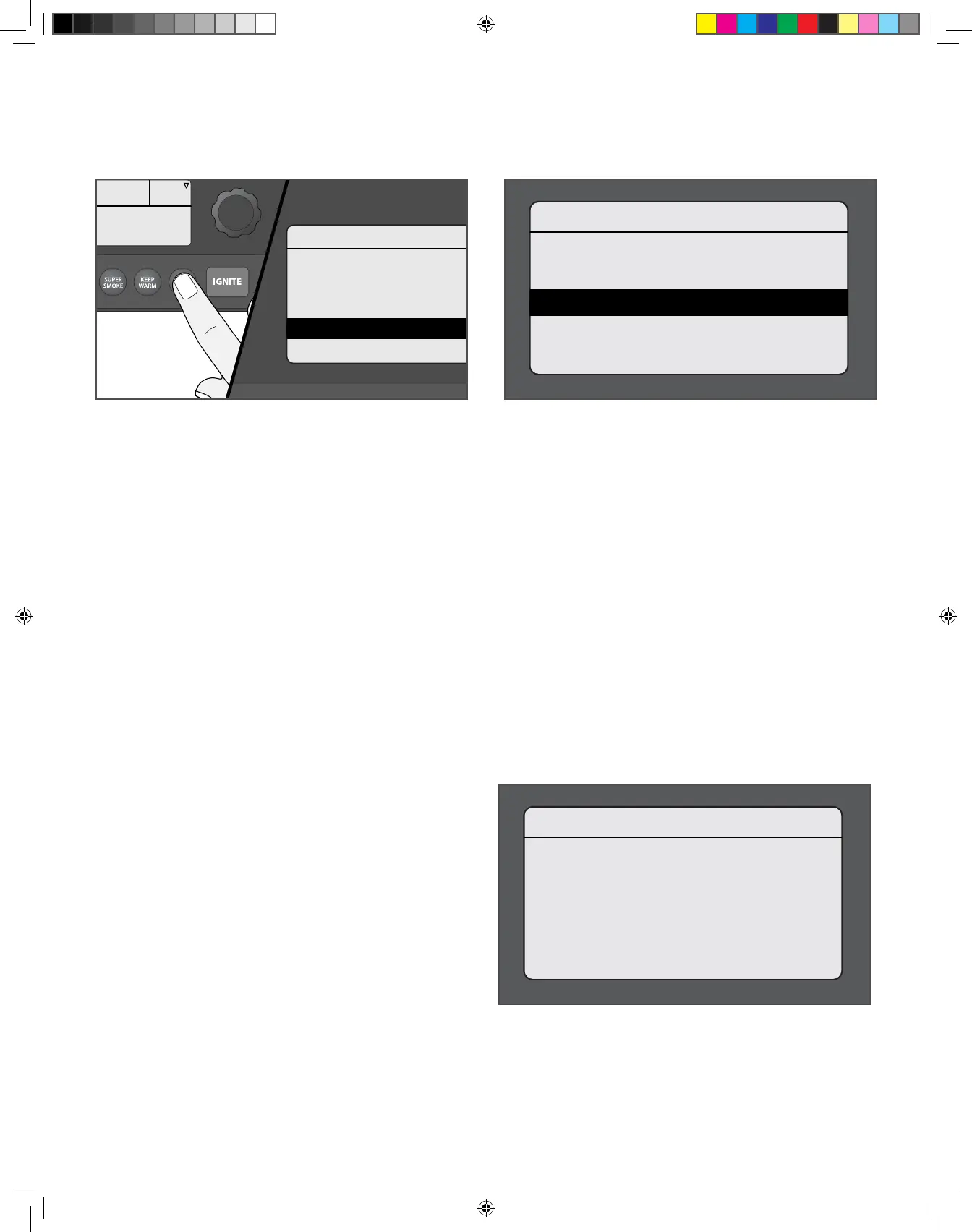
TO ACCESS THE SETTINGS MENU:
Turn grill on. Once the home screen is displayed, press MENU. The main menu will display several options. Turn the dial to highlight “Settings”.
Press the center of the dial to select.
To change a setting, turn the dial to select the desired setting. Press the center of the dial to confirm. Select Back to return to the Settings menu.
SETTINGS Use the Settings menu to adjust display settings, clear notifications, access important product and contact information, and more.
TRAEGER WiFIRE
>Auger
>Pellet Sensor
>Wi-Fi Information
>Settings
>Back
Press Dial To Set Temp
165
°F
SETTINGS
>Speaker
>Contrast
>Probe Calibration
>Clear Notications
>Temperature Units
ABOUT GRILL
Traeger WiFire Grill
SW VER: 00.01.a2
CONFIG VER: 99.000
UUID: 648CBE
>Back
SPEAKER
Turns the grill control speaker on or o. The selected setting will be
indicated with a *.
CONTRAST
Rotate the dial to adjust the display contrast from 1 (high) to 5 (low).
Default setting is 3. Press the center of the dial to confirm and return
to the Settings menu.
PROBE CALIBRATION
There are two options under this setting:
1. Calibrate Probe: Provides instructions on calibrating using an
ice water bath. “Place probe in ice water for 1 minute before
calibrating.” is displayed.
2. Probe Oset: Rotate the dial to adjust the probe temperature
oset in 1° increments, from -15°F to +15°F/-8°C to +8°C. The
default setting is 0. Press the center of the dial to confirm and
return to the Settings menu.
CLEAR NOTIFICATIONS
Use this function to clear error messages and notifications.
NOTE: Since an error will put the grill into Cool Down mode, the
display will still show "Cooling Down" when you exit the Clear
Notifications and Settings menus.
TEMPERATURE UNITS
Turn the dial to choose between degrees Fahrenheit (°F) and Celsius
(°C). Press the center of the dial to confirm. The selected setting will
be indicated with a *.
CUSTOMER SERVICE
Displays the Traeger® WiFIRE® dedicated customer service number.
LEARN MORE
Displays link information for the Traeger app and website.
ABOUT GRILL
Provides important information about your grill, including model
number and sofware version.
BACK
Return to the main menu.
T09627_Redland_OM_EN.indd 26T09627_Redland_OM_EN.indd 26 9/16/22 10:59 AM9/16/22 10:59 AM



 To Next Page