25
054
°F
355
Set Probe Alarm?
>YES
>NO
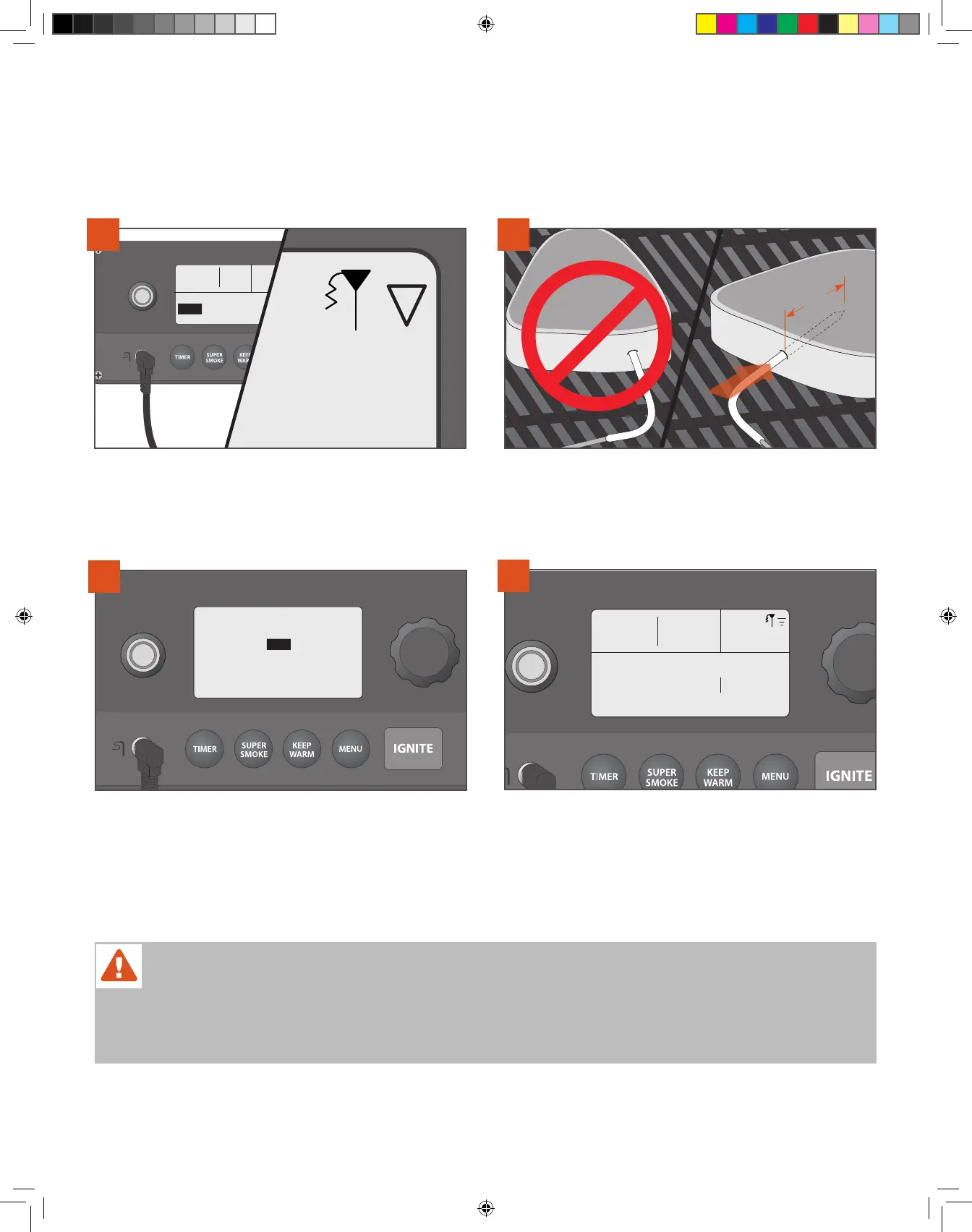
Plug the probe into the probe jack located on the WiFIRE® Controller.
The controller will recognize the probe and the probe icon will light in
the controller screen’s upper-right corner. The display will ask if you
want to set an alarm. Select YES.
1
Insert the probe tip into the thickest part of the meat—not in the fatty
portion or touching bone. The probe needs to be in the meat at least
2" (5.1 cm). This probe may not be suitable if you can’t insert the
probe into the thickest part of the meat and 2" (5.1 cm) into the meat.
2
PROBE
Set Probe Alarm:
145
Rotate the dial to the desired food temperature. Press the dial center
to select/confirm.
NOTE: To calibrate the probe, see “Additional Control Functions” on
page 26.
3
Probe: 72˚ F 145˚
Igniting
054
°F
350
Once the probe alarm is set, the home screen will display the grill
temperature, goal probe temperature, and grill status. A tone will
sound when your meat reaches the set alarm temperature. If using
the Traeger app, you can monitor the probe temperature, you can
adjust the probe temperature, and you will receive a push notification
on your connected smart device when the desired temperature is
reached.
4
IF THE GRILL IS TURNED ON:
WARNING!
• MEAT PROBE IS EXTREMELY HOT DURING AND AFTER COOKING; USE CAUTION WHEN REMOVING.
• IMPROPER PLACEMENT OF THE MEAT PROBE OR IMPROPER MEAT PROBE CALIBRATION COULD RESULT IN RAW OR UNDERCOOKED
MEATS, POULTRY, SEAFOOD, SHELLFISH, OR EGGS, WHICH MAY INCREASE YOUR RISK OF FOODBORNE ILLNESS.
T09627_Redland_OM_EN.indd 25T09627_Redland_OM_EN.indd 25 9/16/22 10:59 AM9/16/22 10:59 AM



 To Next Page