24
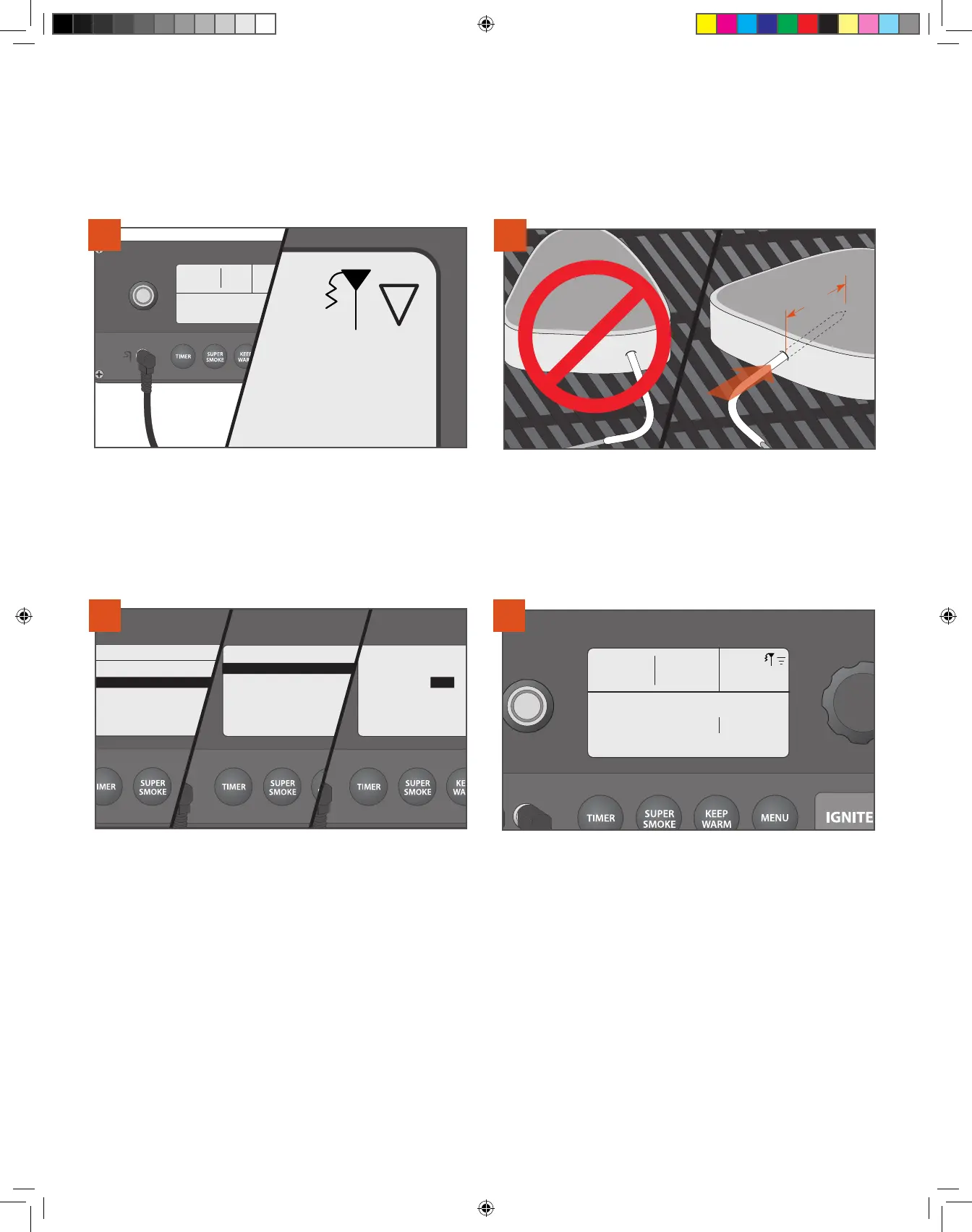
COOKING WITH THE MEAT PROBE Use these methods when your recipe specifies a goal temperature for your food.
CHOOSING A COOK METHOD CONTINUED
057
°F
355
PROBE : COLD
Igniting . .
Plug the probe into the probe jack located on the WiFIRE® Controller.
See “Using Your Grill” to turn on the grill. Once the grill is on, the
controller will recognize the probe and the probe icon will light
in the controller screen’s upper-right corner.
1
Insert the probe tip into the thickest part of the meat—not in the fatty
portion or touching bone. The probe needs to be in the meat at least
2" (5.1 cm). This probe may not be suitable if you can’t insert the
probe into the thickest part of the meat and 2" (5.1 cm) into the meat.
2
TRAEGER WiFIRE
>Cook Cycle
>Probe:
>Auger
>Pellet Sensor
>Wi- Information
Press MENU; then scroll and select PROBE. You will be prompted
to set a probe alarm for the internal goal temperature. Select SET
ALARM. Then, at the probe menu, use the selection dial to choose
the temperature goal for your meat.
NOTE: To calibrate the probe, see “Additional Control Functions” on
page 26.
Once the probe alarm is set, the home screen will display the grill
temperature, goal probe temperature, and grill status. A tone will
sound when your meat reaches the set alarm temperature. If using
the Traeger® WiFIRE® app, you will receive a push notification on your
connected smart device, along with a display of your grill’s status
throughout the cooking process. Afer removing your cook from
the grill, always use a meat thermometer to confirm that you have
actually achieved the target internal meat temperature.
Probe: 72˚ F 145˚
Igniting
054
°F
350
4
3
IF THE GRILL IS TURNED OFF:
T09627_Redland_OM_EN.indd 24T09627_Redland_OM_EN.indd 24 9/16/22 10:59 AM9/16/22 10:59 AM



 To Next Page