20
TRAEGER WiFIRE
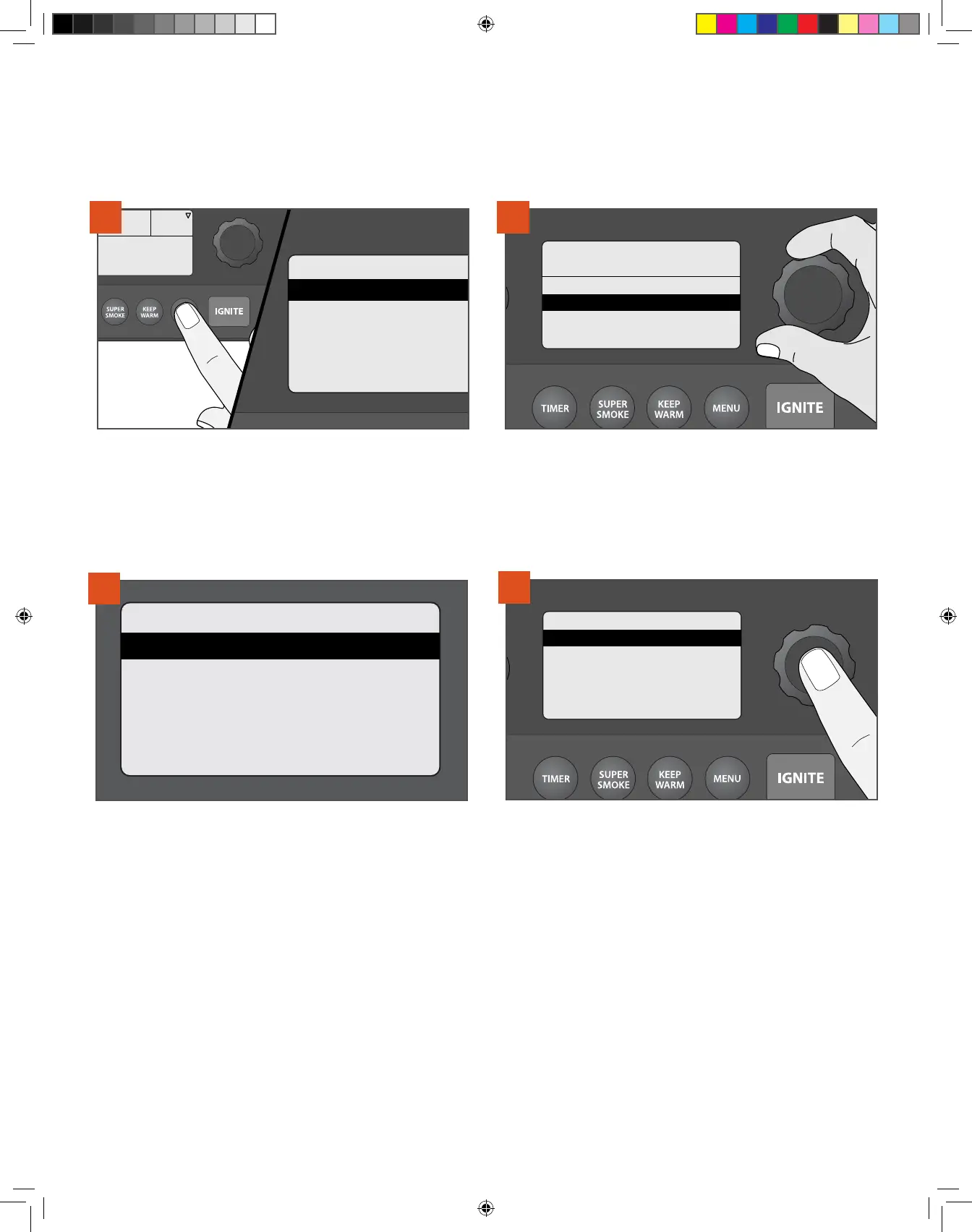
>Cook Cycle
>Probe
>Auger
>Pellet Sensor
>Wi-Fi Information
Press Dial To Set Temp
165
°F
1
Find the home screen and press MENU. The MENU will now display
several options. Select Cook Cycle.
VISIT TRAEGER APP
FOR MORE RECIPES
>Chicken Challenge
>Beginner’s Brisket
>NEW
>NEW
2
From the Cook Cycle screen, use the selection dial to choose the
recipe you want. Press the center of the dial to select.
NOTE: Use your Traeger app to find thousands of recipes to
download directly to your grill. You must sync your grill to your
home's Internet before you can begin.
Beginner’s Brisket
STEP 1
165°F | TIME: 03:30
STEP 2
225°F | PROBE: 190°F
>RUN NOW
3
Once a custom cook cycle is selected, the included steps will display.
Then, select one of four options: RUN NOW, EDIT, DELETE, or BACK to
return to the previous menu.
TIP: If you’re in the middle of programming a cook cycle and change
your mind, press MENU repeatedly until you return to the main menu,
and start over.
USING A PRESET CUSTOM COOK CYCLE
Your Traeger® Grill comes pre-programmed with two of our most popular custom cook
cycles: Beginner’s Brisket and Chicken Challenge.
CHOOSING A COOK METHOD CONTINUED
Beginner’s Brisket
>RUN NOW
>EDIT
>DELETE
>BACK
4
If you want to run the custom cook cycle exactly as-is, select RUN
NOW.
NOTE: To edit or add steps, follow the instructions in “Creating a
Custom Cook Cycle” on page 22.
T09627_Redland_OM_EN.indd 20T09627_Redland_OM_EN.indd 20 9/16/22 10:59 AM9/16/22 10:59 AM



 To Next Page