18 BAS-SVX10F-EN
Installation and Configuration: Display Sensor
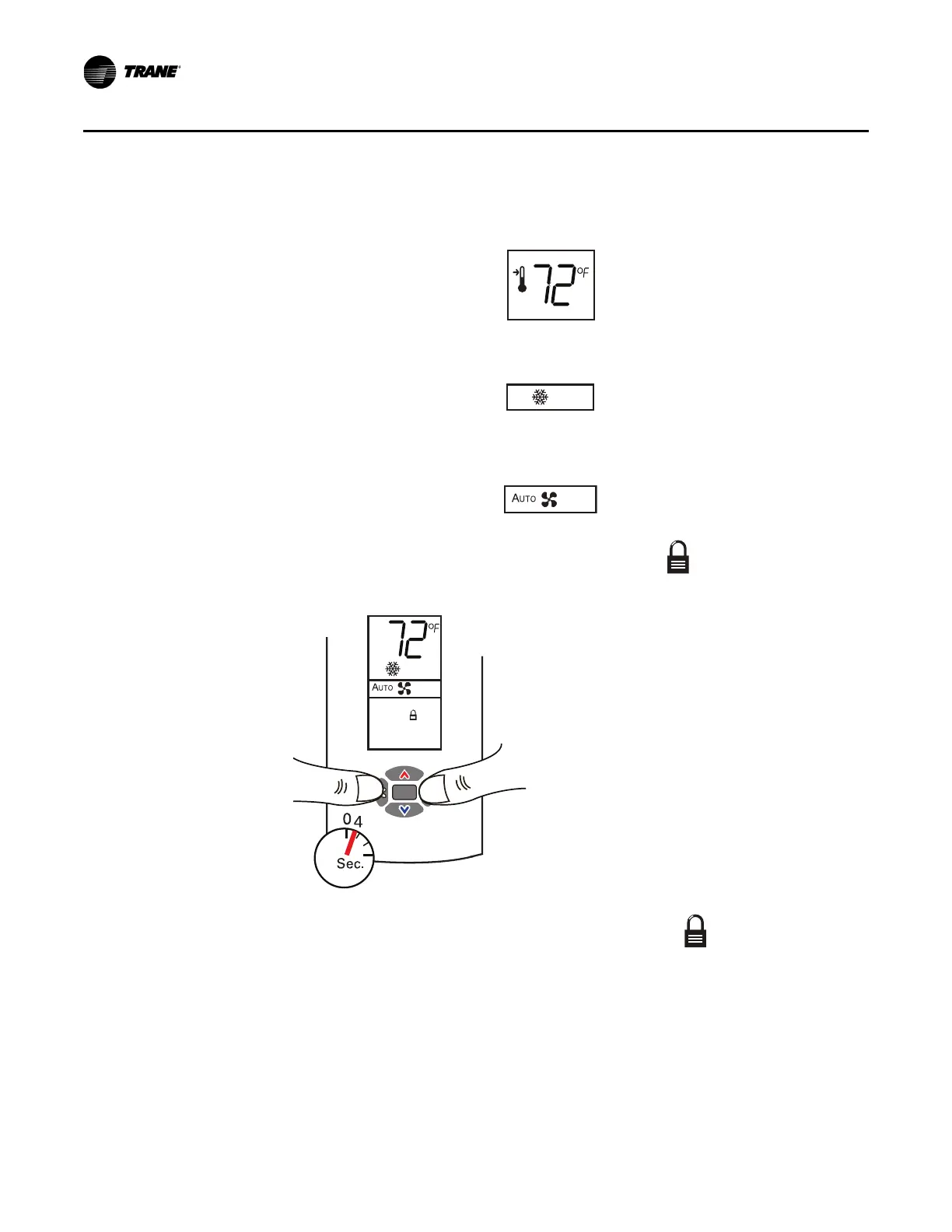
1. Verify that the sensor is in operating mode and at the home screen.
2. Choose a setting to lock or unlock:
• Sel
ect the setpoint by pressing the up or down arrow.
• Select the system menu by pressing the center button. Use the left or right arrow to choose
the setting.
• From the system menu press the down arrow to select the fan menu. Use the left or right
arrow to choose the setting.
3. Press the left and right arrows for 4 seconds. The lock symbol will appear on the display
to indicate that the setting
has been locked.
Note: If you try to access a feature that is locked, the locked symbol appears on the display.
If you press a keypad button to try change a locked setting, the locked symbol flashes.
Replacing the Cover
To replace the cover:
1. Hook the cover over the top of the back plate. A
pply light pressure to the bottom of the cover
until it snaps in place.


 To Next Page