ARTC-SVX013A-EN
39
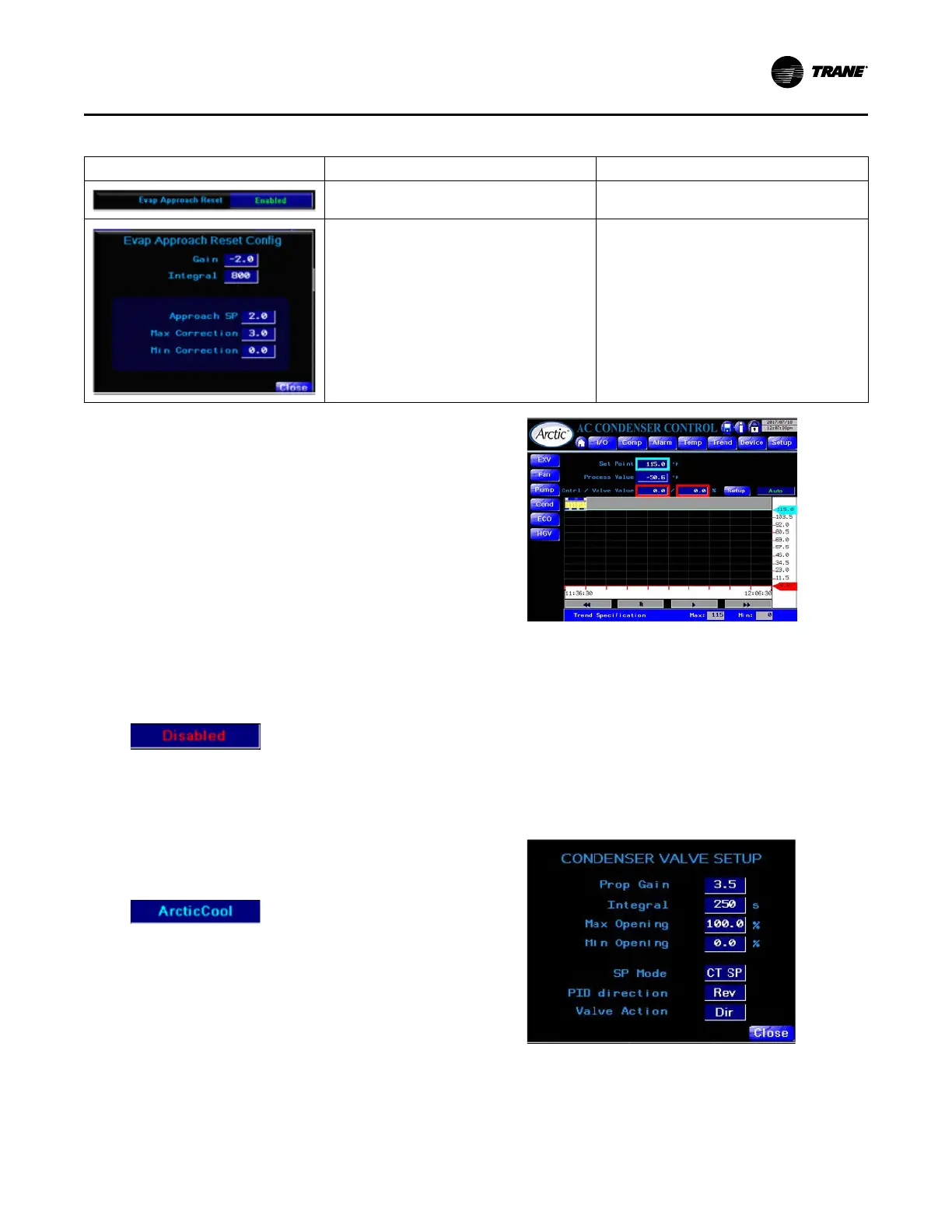
Table 12. EXV control options (continued)
Screen Controls Access
SubCool Reset Function.
Enable and disable from the HMI configuration
screen.
Evaporator Approach Reset. For sub cooling
algorithm only Function: set PI parameters.
Pick point from EXV control screen, available when
using sub-cooling algorithm.
Condenser Control
The control system can control external devices and any
devices that are local to the chiller. Two of the features are:
• Condenser Valve Control
• Condenser Fan Control
Condenser Valve Control
The condenser valve can be a device attached to the chiller
or just as simple as a device connected to the BMS. The
controller provides a signal reference that is PID driven to
control the condenser inlet temperature to a defined
setpoint value. The chiller control system provides two
options as selected from the HMI configuration page.
HMI Condenser Control:
• Disabled – This option indicates no controllable
condenser valve exists.
• ArcticCool Control – This option requires ArcticCool
T3C Companion controller. The T3C Companion works
with the ArcticCool Main controller; they share
information including inputs and outputs. The
companion cannot work as a stand-alone controller
because it does not have the inputs and outputs to
sustain the functionalities built in. It is designed as a
companion relying on the main controller.
Condenser Valve Control main page:
• Condenser Valve Control
– Displays trend and current values for Setpoint,
Process Value and Control value.
– Setpoint is Tech level adjustable if corresponding
option selected on Setup screen. See below.
– Valve Control Mode: Auto/Manual/Off.
– To access other settings, click Setup.
– Trend has y-axis zoom capability.
– Access: Main Menu > Devices Menu > Cond.
• Condenser Valve Setup
– P-Gain and I PID constants.
– Maximum and Minimum valve opening settings.
– SP Mode. CT SP – condenser valve shares the
same SP as a cooling tower; SP – condenser valve
Operating Procedures


 To Next Page