EasyManua.ls Logo

Trane TCONT850 - User Manual

Trane TCONT850
24 pages
Print Icon
To Next Page IconTo Next Page
Loading...
18-HD73D1-9E-EN
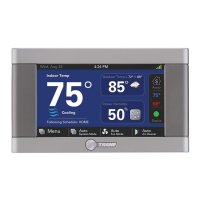
TCONT850 Installation Guide
ComfortLink™ II XL 850
Communicating Connected Control
ALL phases of this installation must comply with NATIONAL, STATE AND LOCAL CODES
IMPORTANT — This Document is customer property and is to remain with this unit.
These instructions do not cover all variations in systems or provide for every possible contingency to be met in connection with
the installation. Should further information be desired or should particular problems arise which are not covered sufficiently
for the purchaser’s purposes, the matter should be referred to your installing dealer or local distributor.

Questions and Answers

  • D
    David WadeAug 19, 2025
    What to do if my Trane TCONT850 displays an alert code?
    • A
      ashley53Aug 19, 2025
      If your Trane Control Unit is displaying an alert code, navigate to the Diagnostic screen on the 850 Control. There, you'll find a problem description and possible cause to help you understand the alert.
  • J
    john30Aug 21, 2025
    What to do if Trane TCONT850 Control Unit display will not come on?
    • L
      Lisa MitchellAug 22, 2025
      If the display on your Trane Control Unit won't come on, it could be due to a loss of 24VAC between R & B at the Control. Check the wiring between R & B to see if R & D, or B & D have been reversed. Also, check the transformer for 24VAC output and look for broken or shorted thermostat wire.
  • P
    pmendozaAug 25, 2025
    What to do if Trane Control Unit screen does not respond to touch?
    • D
      David CantuAug 25, 2025
      If the screen on your Trane Control Unit isn't responding properly to a button press, it could be that the screen is out of calibration. Remove the Control from the sub base and reset it, then follow the calibration instructions when the Control reboots. It could also indicate an internal Control fault; in that case, remove the Control from the sub base and reset it.
  • M
    marymccormickAug 26, 2025
    Why is my Trane Control Unit heating not turning on?
    • L
      Linda TranAug 26, 2025
      Your Trane Control Unit heating may not be coming on because the system mode is not set to Heat/Auto, or the setpoint is set too low. Set the mode to heat and raise the setpoint above the room temperature. It's also possible that the minimum off time delay is being enforced, so wait for 5 minutes and recheck the heating equipment. The heating system may require service.
  • D
    David ClayAug 28, 2025
    Why is my Trane TCONT850 cooling not turning on?
    • K
      Katherine BanksAug 28, 2025
      Your Trane Control Unit cooling might not be activating because the system mode isn't set to Cool/Auto, or the setpoint is too high. Set the mode to cool and lower the setpoint below the room temperature. Another reason could be the minimum off time delay, so wait 5 minutes before rechecking. The cooling system may require service.
  • M
    millsjosephAug 30, 2025
    How to stop my Trane TCONT850 Control Unit fan from running constantly?
    • L
      Lucas ClarkAug 30, 2025
      If the fan on your Trane Control Unit is running all the time, check the Control settings to see if the fan is set to On, Circulate, or Clean mode. Additionally, there could be a failure in the indoor unit.
  • J
    jessica43Sep 1, 2025
    What to do if my Trane Control Unit displays heating or cooling but there is no air?
    • T
      Todd GoodwinSep 1, 2025
      If your Trane Control Unit indicates heating or cooling, but no warm or cool air is coming from the registers, wait a minute for blower delays and recheck registers. It's possible that the equipment is not working properly.
  • D
    Daniel GarciaSep 3, 2025
    Why does my Trane TCONT850 Control Unit overshoot the temperature?
    • P
      Philip PhelpsSep 3, 2025
      If the room temperature overshoots when the Heat/Cool setting is changed by more than 2° on your Trane Control Unit, it could be due to oversized heating/cooling equipment under the current conditions, meaning the control cannot respond fast enough to prevent overshooting. Another possibility is an improper location of the Control. Relocate the Control (or use a remote sensor) if it is in a “dead” spot with poor or no air circulation. Compare heat load calculation to equipment chosen.
  • N
    Nicole VaughnSep 5, 2025
    Why is my Trane TCONT850 heat pump not turning on?
    • N
      nruizSep 5, 2025
      If your Trane Control Unit heat pump isn't turning on and only the furnace or electric heat strips are running, the outdoor temperature might be below the compressor lockout temperature setting. Adjust the compressor lockout temperature setting if desired. Also, check/repair the outdoor sensor or wiring. The outdoor unit may not be reporting (Err.126.00), so check the communication status of the outdoor unit.
  • T
    Tracey JohnsSep 7, 2025
    Why is the indoor temperature display on my Trane TCONT850 incorrect?
    • T
      Thomas WilsonSep 7, 2025
      The indoor temperature display on your Trane Control Unit might be incorrect because the Control requires one hour to acclimate to the environment. Allow one hour before proceeding with troubleshooting process. Another reason could be that the indoor temperature display needs calibration; calibrate the temperature sensor from the Control menu. Also, heat from the touch screen might be trapped within the thermostat body. Move the thermostat away from any competing air stream or use a remote temperature sensor.

Summary

Safety

Installation

Location

Guidelines for selecting the optimal placement for the thermostat unit.

Network Connections

Details on connecting the thermostat to the internet via wired or wireless.

Mounting

Step-by-step instructions for physically mounting the thermostat.

Wiring

Instructions for connecting the control wires to the sub-base.

Field Wiring Connection Diagrams

Visual guides illustrating wiring configurations for various system types.

System Setup

Installer Setup Screens

Overview of screens for configuring equipment and settings.

Group 1 Standard Settings

Configuration options for outdoor/indoor unit types and stages.

Group 2 Equipment Settings

Settings related to compressor and indoor heat cycles per hour.

Group 3 Sensor Settings

Configuration for indoor and outdoor temperature/humidity sensors.

Group 7 Lockout Settings

Settings to restrict system operation based on outdoor temperature.

Basic Operation

PI Control

Explains the Proportional-Integral control scheme for comfort and efficiency.

System Mode

Explains the available system operating modes like Heat, Cool, Auto, Off, Emergency Heat.

Advanced Operation

Diagnostic Tools

Test Modes

Tools for testing individual system components like blower, compressor, and heat.

Diagnostics

Accessing and interpreting system alerts and status.

System Report

Provides a consolidated view of real-time system operational data.

Alerts

Details on viewing and understanding current and historical system alerts.

Troubleshooting

Trane TCONT850 Specifications

General IconGeneral
BrandTrane
ModelTCONT850
CategoryControl Unit
LanguageEnglish

Related product manuals