IQ4E/.. Installation Instructions - Mounting TG201338 Issue 4, 19-Jan-2016. Applies to v3.33. 7
Installation Instructions - Mounting IQ4E/..
12
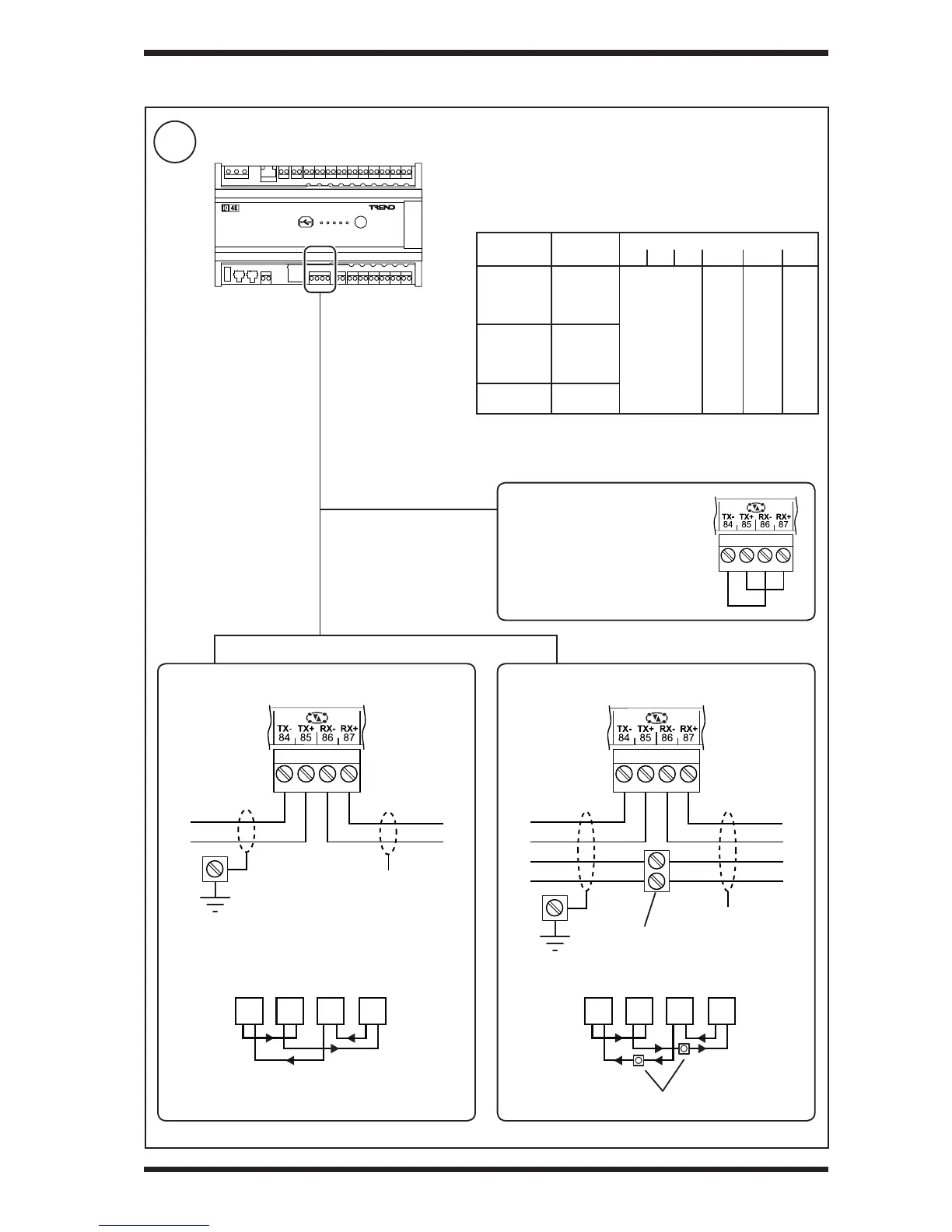
Connect Trend Current Loop Network (/LAN variants only, if required)
3 INSTALLATION (continued)
TR
TR
TRTR
panel/enclosure
ground
additional terminals
T
R
R
X
T
additional terminals
If the current loop is enabled
(default), the LAN communications
will not operate without an intact
network. If a network is not tted a
loop back must be tted as shown.
Not connected
2 wire system 4 wire system
TR
TR
TRTR
panel/enclosure
ground
T
R
R
X
T
Terminal size: 0.14 to 2.5 mm
2
(22 to 12 AWG).
Terminal screw torque: 0.45 to 0.62 Nm (4 to 5.5 lb.in).
Maximum cable length depends on cable type and baud rate:
Cable Type
Baud Rate
1k2 4k8 9k6 19k2 38k4 76k8
Trend
TP/2/2/22/
HF/200
Belden 8723
Shielded
twisted pair
2 pairs (4
conductors)
1000 m
(1090 yds)
700 m
(765
yds)
350 m
(380
yds)
175 m
(191
yds)
Trend
TP/1/1/22/
HF/200
Belden 8761
Shielded
twisted pair
1 pair (2
conductors)
Belden 9182
Belden 9207
Twinaxial (2
conductors)
Note: Adjacent devices may specify different maximum cable
lengths and baud rates. The shortest cable length (for the chosen
baud rate) applies when connecting to the IQ4E current loop.


 To Next Page