4 IQ4E/.. Installation Instructions - Mounting TG201338 Issue 4, 19-Jan-2016. Applies to v3.33.
IQ4E/.. Installation Instructions - Mounting
6
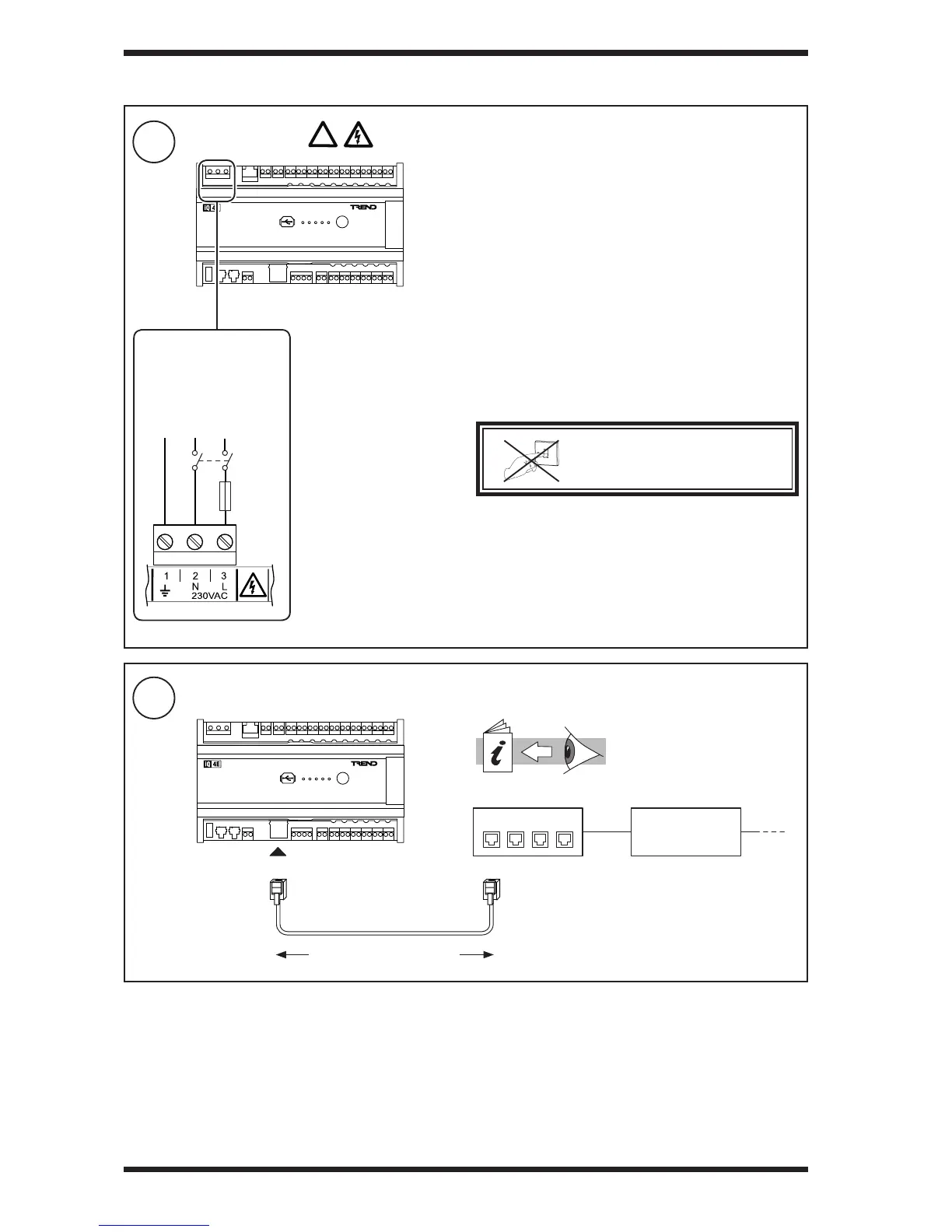
Connect Power
7
Connect Ethernet (if required)
3 INSTALLATION (continued)
Trend Ethernet Products
Engineering Guide (TE200369)
Terminal size: 0.14 to 2.5 mm
2
(22 to 12 AWG).
Terminal screw torque: 0.45 to 0.62 Nm (4 to 5.5 lb.in).
Power supply cable must have maximum operating
temperature of 80°C or greater.
This equipment must be earthed (grounded).
/230 230 Vac ±10% 50/60 Hz at up to 70 VA
The 230 V supply must include a dedicated 5 A fuse complying
with IEC60269 (BS1362) and a suitably rated switch in close
proximity and be clearly marked as the disconnecting device
for the unit. A 5 A circuit breaker with high breaking capacity
may be used as an alternative.
Do not position the equipment so that the disconnecting
device is difcult to operate.
O
I
DO NOT SWITCH ON POWER
/230
ensure
correct
polarity
E N L
5A
Standard Ethernet cable
(Cat 5e twisted pair)
RJ45RJ45
Hub / Switch
Router
maximum 100 m (109 yds)


 To Next Page