Fiber Ethernet Adapter
User’s Guide 13
檔名: pcifxp.doc
原作者: Carrie Chen
列印時間: 1/31/2003 3:06 PM
About Hardware’s Configuration
Step 1: Choose “View Current Configuration” from the Main Menu and press
<ENTER> to view the adapter’s current configuration.
Step 2: If you want to change the current configuration, choose “Set Up New
Configuration” from the Main Menu and press <ENTER> to proceed.
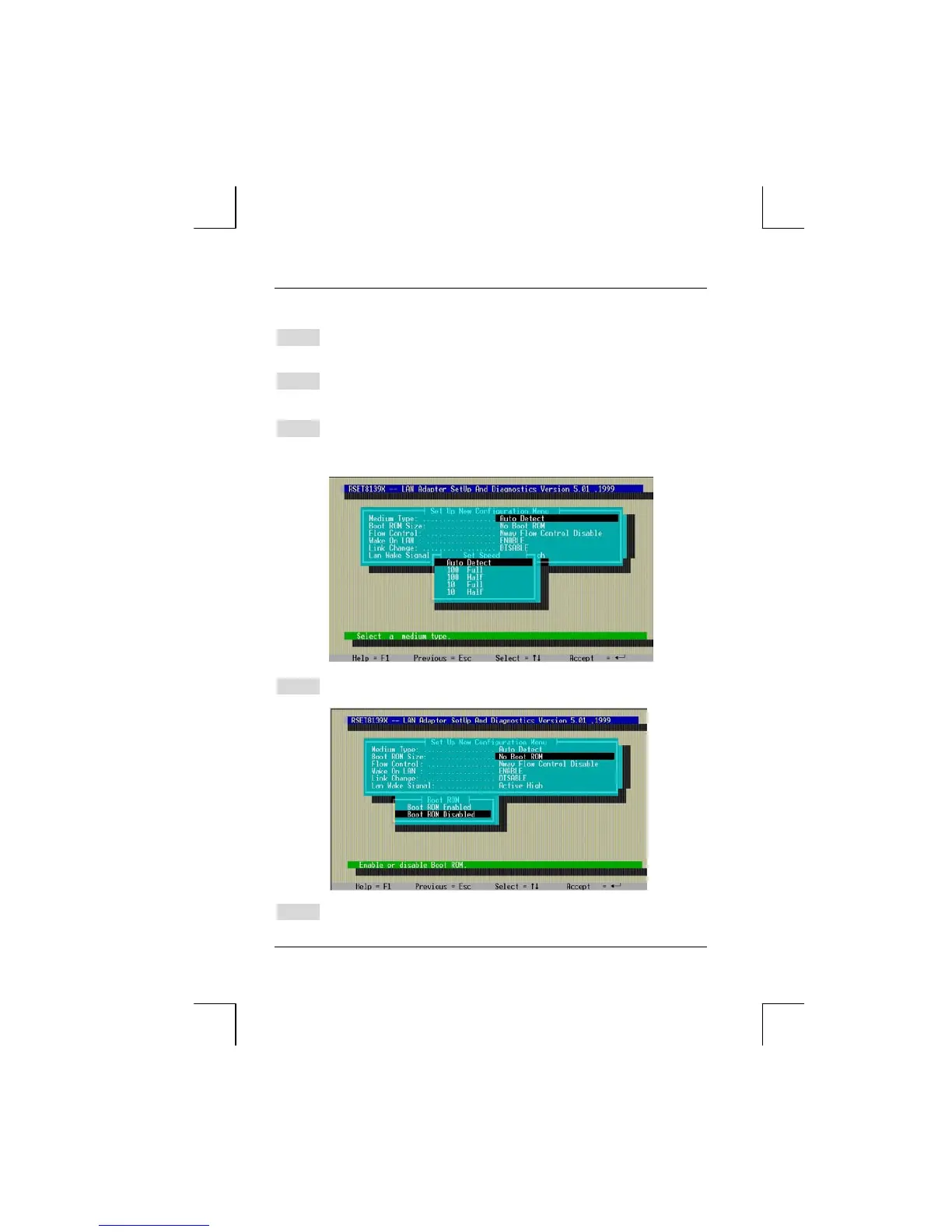
Step 3: Choose “Media Type” and press <ENTER>. For the Fiber Adapter, you
can only select [Auto Detect], [100 Full] or [100 Half] from the “Media
Type” selection. The adapter will not function when selecting [10 Full] or
[10 Half].
Step 4: Choose “Boot ROM Size” and press <ENTER>. Select [Boot Enabled]
or [Boot ROM Disabled]. Note: We do not provide Boot ROM.
Step 5: Same steps for “Flow Control”, “Wake On LAN”, “Link Change” and
“LAN Wake Signal”: Choose, select, <ENTER>, and <ESC> to exit.



 To Next Page