Fiber Ethernet Adapter
User’s Guide 9
檔名: pcifxp.doc
原作者: Carrie Chen
列印時間: 1/31/2003 3:06 PM
Connecting Remote Wake-Up Cable
This is an optional function. Proceed with the installation only
when your PC supports this Remote Wake-Up and you wish to
make use of this function. Please check your Motherboard User’s
Guide for more information.
Step 1: Make sure the power to the PC is off.
Follow Step 1~3 in previous section.
Step 2: Check if the Fiber Adapter is properly installed in a PCI slot.
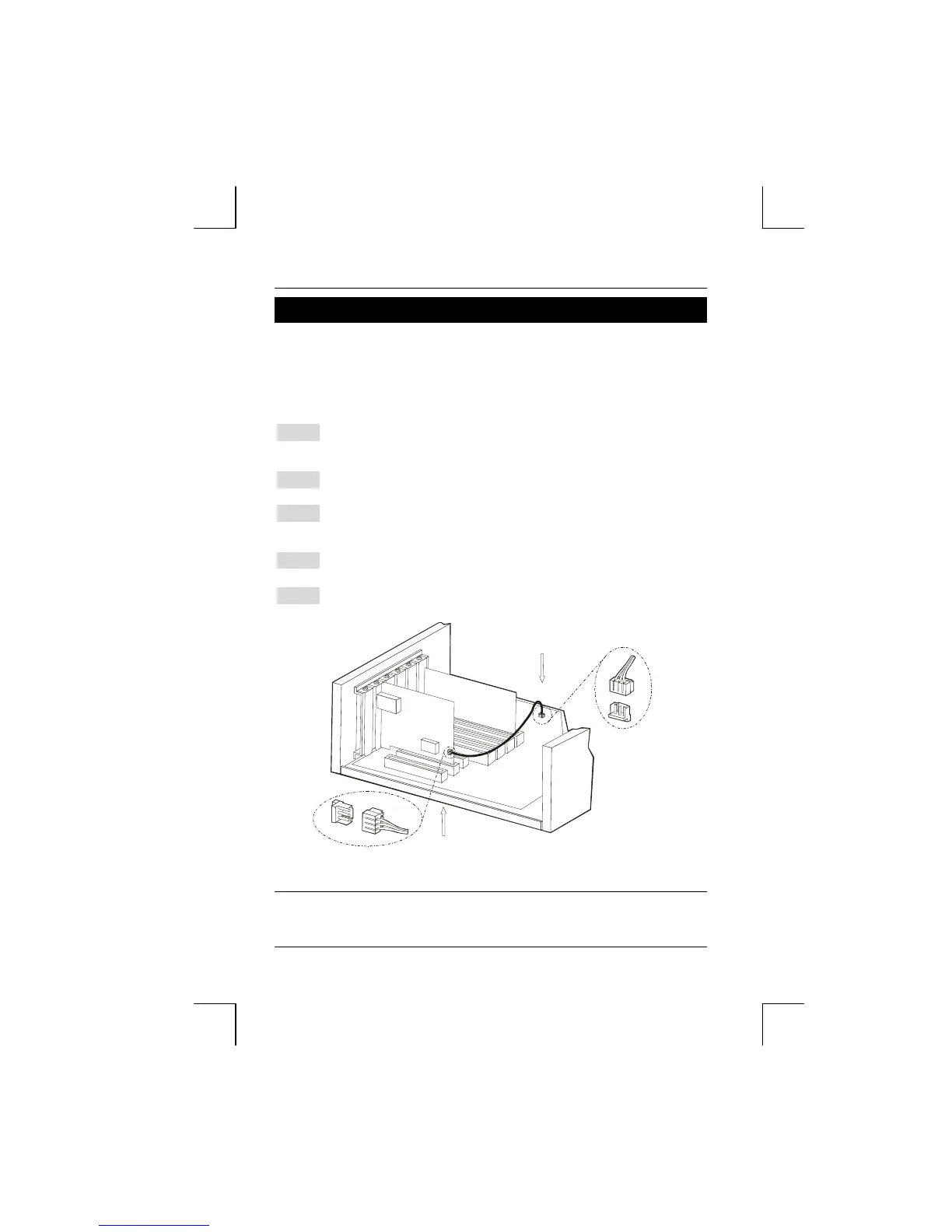
Step 3: Prepare a Remote Wake-Up cable. Connect the cable from Fiber
Adapter to motherboard connector. Refer to Figure 3 below for details.
Step 4: Replace the PC cover then.
Step 5: Proceed to “Connecting to Your Network” Section.
Connect Remote Wake-Up cable from Fiber Adapter
to motherboard connec tor
Pl u g i n Re m o t e Wa ke -Up c a b l e
to connec tor on Fiber Adapter
Figure 3: Connecting Wake-Up cable








 To Next Page