Need help?
Do you have a question about the TRENDnet TEW-736RE and is the answer not in the manual?
Lists all items included in the product package.
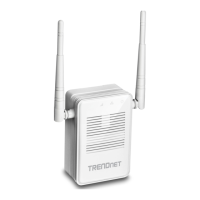
Highlights key features and capabilities of the range extender.
Describes physical components and LED status indicators on the device.
Defines wireless networks and explains the need for extenders.
Outlines the methods for configuring the range extender.
Guides users through setting up the device using WPS.
Provides step-by-step instructions for configuring the device via a wizard.
Explains how to connect devices to the network created by the extender.
Details how to access the device's management interface after initial setup.
Instructions for changing login password and device name.
Provides steps for updating the device's firmware.
Instructions for manually setting or changing the device's IP address.
How to connect the extender to a different wireless network.
How to back up and restore device configurations.
Steps to restart the range extender.
How to restore the device to its original factory settings.
How to check the current operational status and system information.
Addresses WPS support, configuration, and accessing the management page.
Explains duplicate SSIDs and troubleshooting internet connectivity.
Guides on finding the device's IP address on different operating systems.
Explains setting up automatic IP configuration (DHCP).
Instructions to locate the MAC address on Windows and macOS.
Steps for connecting to a wireless network using Windows built-in tools.
FCC compliance information and interference guidelines.
European compliance statements and standards.
Details various EMC, wireless, and human exposure standards.
 General
| Category | Extender |
|---|---|
| Wireless Standards | IEEE 802.11n, IEEE 802.11g, IEEE 802.11b |
| Frequency Band | 2.4GHz |
| Maximum Wireless Speed | 300Mbps |
| Wired Standard | IEEE 802.3, IEEE 802.3u |
| Antennas | 2 x external antennas |
| Button | Reset button, WPS button |
| Ports | 1 x 10/100 Mbps Ethernet Port |
| Security | WEP, WPA, WPA2 |
| Weight | 91 g (3.2 oz) |
| Power Adapter | 5V/1A |


 To Next Page