EasyManua.ls Logo

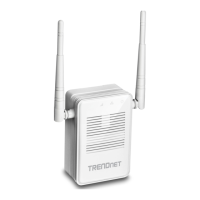
TRENDnet TEW-822DRE - User Manual

TRENDnet TEW-822DRE
59 pages
Print Icon
To Next Page IconTo Next Page
Loading...

Table of Contents

Other manuals for TRENDnet TEW-822DRE

Question and Answer IconNeed help?

Do you have a question about the TRENDnet TEW-822DRE and is the answer not in the manual?

Summary

Product Overview

Features

Detailed list of product capabilities and design features.

Network Setup and Connection

Range Extender Setup (WPS)

Step-by-step instructions for setting up using the WPS button.

Web Browser Configuration

Guide on setting up the device via its web interface.

Access Point Setup Mode

Instructions for configuring the device in Access Point mode.

Web Management Access

Accessing the Management Page

Information on default login credentials and access methods.

System Settings

Wizard and Network Settings

Accessing the setup wizard and configuring IP address.

Wireless Network Configuration

Range Extender Mode Setup

Scanning networks and selecting a router for range extension.

Wireless Security Settings

Choosing security protocols like WEP, WPA/WPA2.

WPS Connection

Using WPS for easy client connection.

Status Monitoring and Diagnostics

Access Control and Network Features

Tools and Utilities

Firmware Update

Procedure for updating the device's firmware.

Technical Specifications

Troubleshooting

Access and Connectivity Issues

Solutions for problems accessing the unit or network.

Factory Reset Procedure

Steps to restore the device to factory defaults.

Appendix: Static IP Address Setup

Limited Warranty

Summary

Product Overview

Features

Detailed list of product capabilities and design features.

Network Setup and Connection

Range Extender Setup (WPS)

Step-by-step instructions for setting up using the WPS button.

Web Browser Configuration

Guide on setting up the device via its web interface.

Access Point Setup Mode

Instructions for configuring the device in Access Point mode.

Web Management Access

Accessing the Management Page

Information on default login credentials and access methods.

System Settings

Wizard and Network Settings

Accessing the setup wizard and configuring IP address.

Wireless Network Configuration

Range Extender Mode Setup

Scanning networks and selecting a router for range extension.

Wireless Security Settings

Choosing security protocols like WEP, WPA/WPA2.

WPS Connection

Using WPS for easy client connection.

Status Monitoring and Diagnostics

Access Control and Network Features

Tools and Utilities

Firmware Update

Procedure for updating the device's firmware.

Technical Specifications

Troubleshooting

Access and Connectivity Issues

Solutions for problems accessing the unit or network.

Factory Reset Procedure

Steps to restore the device to factory defaults.

Appendix: Static IP Address Setup

Limited Warranty

TRENDnet TEW-822DRE Specifications

General IconGeneral
Frequency Bands2.4 GHz, 5 GHz
Antennas2 x external antennas
WPS SupportYes
Wireless StandardsIEEE 802.11n, IEEE 802.11g, IEEE 802.11b
Wireless SecurityWPA, WPA2
Ports1 x 10/100 Mbps Ethernet
ButtonReset, WPS
LED IndicatorsPower, WPS

Related product manuals