Need help?
Do you have a question about the TRENDnet TEW-737HRE and is the answer not in the manual?
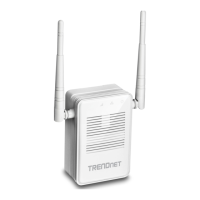
Details product features like high power wireless, compact design, and easy setup for extended network coverage.
Lists the items included with the TEW-737HRE, such as the device, quick installation guide, and CD-ROM.
Identifies and describes the physical ports, buttons (Reset, WPS), and LED indicators on the TEW-737HRE.
Step-by-step instructions for connecting the TEW-737HRE to a router using the WPS button.
Instructions for setting up the TEW-737HRE through a web browser interface, including network connection and login.
Managing login language, Wi-Fi network settings, and viewing connected wireless clients.
Guide on how to download and install firmware updates for the TEW-737HRE.
Managing configuration settings, system reboot, and viewing device status details.
Step-by-step guide to configure a static IP on Windows for device compatibility.
Step-by-step guide to configure a static IP on macOS for device compatibility.
Details FCC rules, interference statements, and radiation exposure limits for the device.
Outlines European Union conformity, CE marking, and RoHS compliance for the TEW-737HRE.
 Output Power
| 802.11b output power | 20 dBm |
|---|---|
| 802.11g output power | 18 dBm |
| 802.11n output power | 20 dBm |
 Power
Power| voltage | 100 - 240 V AC |
|---|---|
| power consumption | 6 Watts (Max) |
| operating temperature | 0 - 40°C (32 – 104°F) |
 Weight and Dimensions
| dimensions | 67 x 56 x 45 mm (2.6 x 2.2 x 1.8 in.) |
|---|---|
| weight | 120 g (4.2 oz) |
| operating humidity | Max. 95% non-condensing |


 To Next Page