6.1.2.6 Ethernet Port Detected
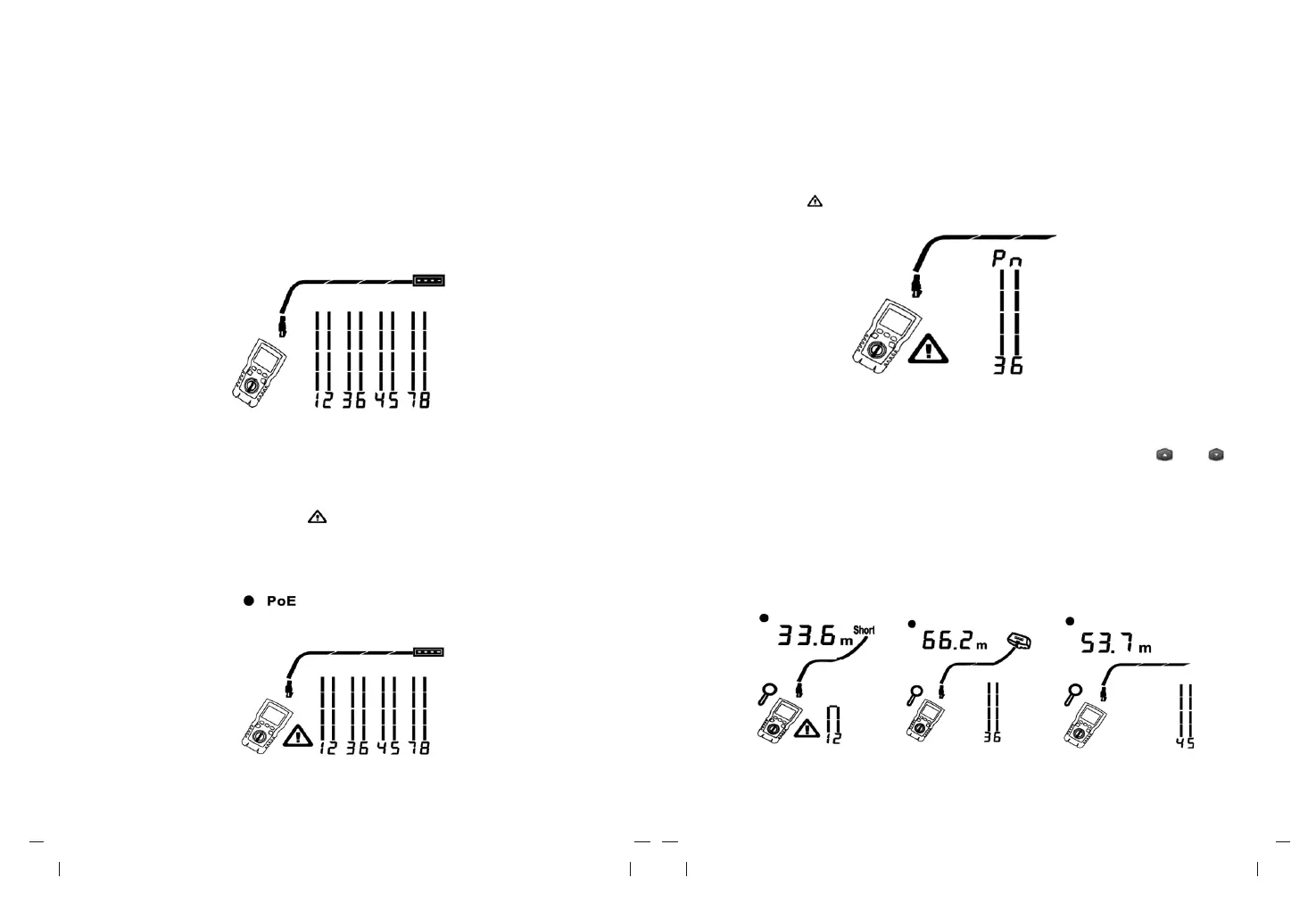
Figure 6.7 shows that the tester detects Ethernet port.
The tester cannot measure the length if the port does not produce reflections. Length
may fluctuate or be obviously too high if the port’ s impedance fluctuates or varies from
the cable’s impedance. When in doubt, disconnect the cable from the port to get an
accurate length measurement.
6.1.2.8 Voltage Detection
Figure 6.9 shows that the tester detects cable voltage.
If the measured cable is live and its voltage is greater than or equal to 10V, the tester
will show “ ” and “Pn” (P: positive; n: negative).
Figure 6.9 Cable Voltage Detection
Figure 6.7 Ethernet Port Detected
6.1.2.7 POE Switch Detected
Figure 6.8 shows the tester detecting the POE switch.
In testing mode, the tester could identify if the device connected by measured cable is POE
switch or not, and displays “POE” and “ ”.
In testing mode, the tester cannot identify IEEE 802.3af, IEEE 802.3at and IEEE 802.3bt.
To know about the power supply standards of POE switch, please perform a test on the
switch under POE mode. (See “POE Mode”)
Figure 6.8 POE Switch Detected
6.1.2.9 View Details for a Wire Pair
Figure 6.10 shows that the tester displays details for each wire pair. Use “ ”and “ ”
to move through the screens. In this mode, the tester continuously tests only the wire
pair you are viewing.
A: Short on pair 1, 2 at 33.6m. Note: On the results detail screens, shorts are shown only
when they are between wires in a pair. When there is a short, the far-end adapter and
the mapping of the unshorted wires are not shown.
B: Pair 3, 6 is 66.2m long and is terminated with wire map adapter.
C: Open on pair 4, 6 at 53.7m. The open could be on one or both wires.
A B C
Figure 6.10 Details for a Wire Pair



 To Next Page