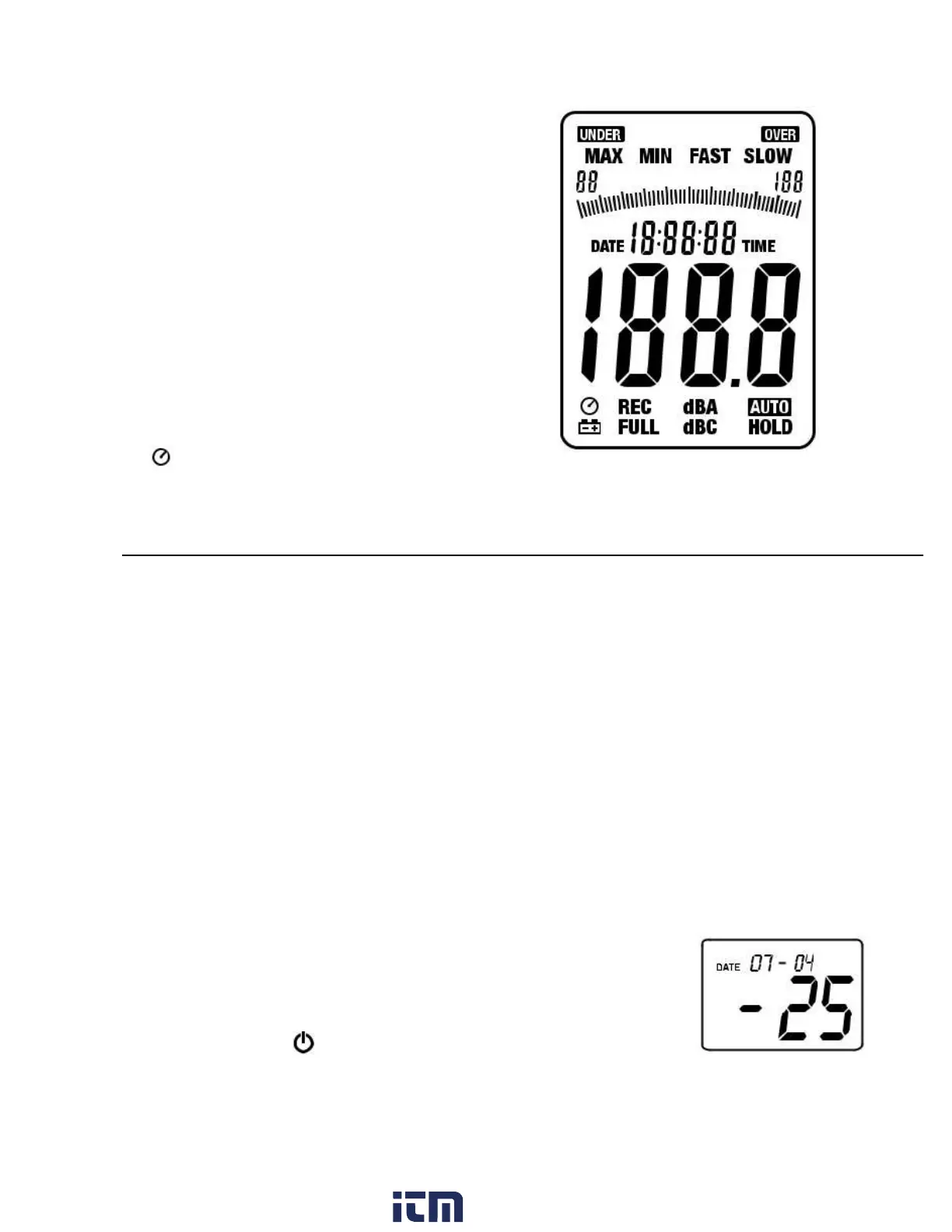
DISPLAY
Symbol
Function
MAX
Maximum hold
MIN
Minimum hold
OVER
Over range
UNDER
Under range
FAST
Fast response
SLOW
Slow response
dBA
A-Weighting
dBC
C-Weighting
REC
Recording data
AUTO
Auto range selection
FULL
Memory full
HOLD
Data hold
Auto Power Off enabled
Low battery indicate
Initial Setup
Battery Installation/AC Adaptor
The meter can be powered by one 9V battery or by an AC power adaptor.
Before inserting or replacing the battery and before connecting the AC
adaptor, be sure to turn off the meter.
Time and Date Setup
The SETUP mode is used to set the time, date and default measurement
range. Once set, the meter will retain the settings in non-volatile memory.
Resetting should not be required.
NOTE: Press the HOLD button at any time during this procedure to save
the set data and to return to normal operation
1. Make sure the meter is OFF to start
2. Press and hold the SETUP button and then
press the power
button. Release the SETUP button to enter the setup mode.
w ww. . com
information@itm.com1.800.561.8187


 To Next Page