11
Appendix
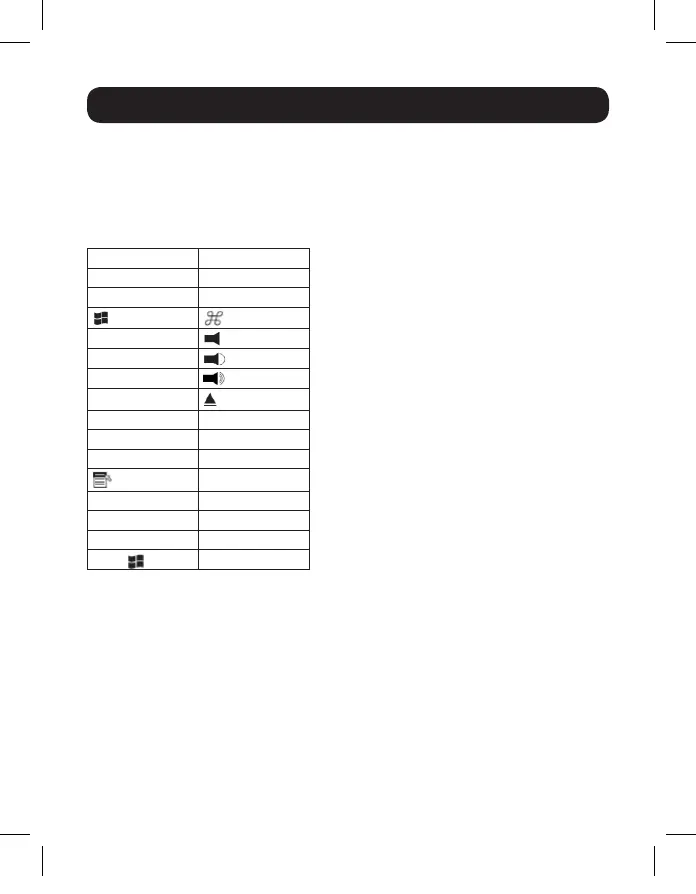
Mac Keyboard Emulation
A PC compatible (101/104 key) keyboard can emulate the functions of the
Mac keyboard using the PC keystrokes in the table below.
Note: When more than one key is required on the PC Keyboard to emulate the Mac
keyboard, press and release the first key, and then press and release the second key.
PC Keyboard Mac Keyboard
[Shift] Shift
[Ctrl] Ctrl
[Ctrl], [1]
[Ctrl], [2]
[Ctrl], [3]
[Ctrl], [4]
[Alt] Alt
[Print Screen] F13
[Scroll Lock] F14
=
[Enter] Return
[Backspace] Delete
[Insert] Help
[Ctrl],
F15
17-10-486-933633.indb 11 11/17/2017 2:44:38 PM






 To Next Page