12
Appendix
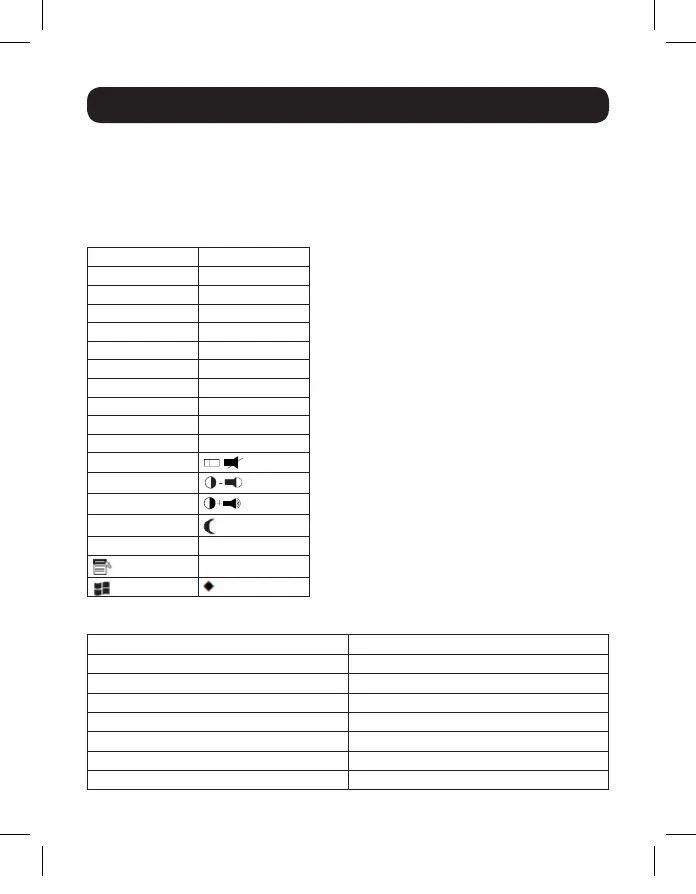
Sun Keyboard Emulation
A PC compatible (101/104 key) keyboard can emulate the functions of the
Sun keyboard using the PC keystrokes in the table below.
Note: When more than one key is required on the PC Keyboard to emulate the Sun
keyboard, press and release the first key, and then press and release the second key.
PC Keyboard Sun Keyboard
[Ctrl], [T] Stop
[Ctrl], [F2] Again
[Ctrl], [F3] Props
[Ctrl], [F4] Undo
[Ctrl], [F5] Front
[Ctrl], [F6] Copy
[Ctrl], [F7] Open
[Ctrl], [F8] Paste
[Ctrl], [F9] Find
[Ctrl], [F10] Cut
[Ctrl], [1]
[Ctrl], [2]
[Ctrl], [3]
[Ctrl], [4]
[Ctrl], [H] [Help]
[Compose]
Factory Default Settings
Setting Default
Hotkey Invocation Key [Scroll Lock] [Scroll Lock]
Auto Scan Interval 5 seconds
Keyboard Operating Platform PC Compatible
Mouse Emulation Enabled
Keyboard Emulation Enabled
Mouse Port Switching Disabled
Power on Detection Enabled
17-10-486-933633.indb 12 11/17/2017 2:44:38 PM






 To Next Page